C:\1980S\PAGEMAKE.TXT
1985
PageMaker: Moving the Proof Back onto the Desk
Aldus joined page layout, Macintosh graphics, and laser printing into a workflow small publishers could control.
The troublesome thing about a finished page is that somebody always wants to change it. A headline becomes longer. An illustration moves. The editor removes a paragraph, then adds a different paragraph of nearly the same length, which is somehow just long enough to upset the entire arrangement.
In a publishing workflow built around separate typesetting and physical page assembly, revisions could require a new round of preparation and proofing. PageMaker brought the arrangement of text and pictures onto the computer screen, close to the person responsible for the page. Editing the layout became a series of decisions that could be tried and inspected.
It didn’t make every user a designer. It made design decisions available at the desk. That was enough to change what a small organization could reasonably attempt to publish.
A publisher’s problem becomes a software product
Paul Brainerd’s background included newspapers and Atex, a company supplying publishing systems. After Kodak acquired Atex and closed its Seattle operation, Brainerd and colleagues formed Aldus in 1984. PageMaker 1.0 shipped for the Macintosh in July 1985.1
That account needs more than one name. Brainerd brought publishing experience, product direction, and business work; engineers built the application. His oral history describes functional specifications, prototypes, and collaboration rather than a finished program springing unaided from a founder’s revelation.
The product depended on complementary inventions. The Macintosh supplied a graphical environment and mouse interaction. Apple’s LaserWriter supplied high-quality desktop printing. Adobe’s PostScript supplied a way to describe the page for the printer. PageMaker supplied the composition workflow connecting them.2
The combination mattered more than any component considered alone. A printer that can render beautiful pages needs usable pages to render. A layout program that produces attractive screen arrangements needs dependable output. A graphical computer needs applications that justify spending time in its graphical world.
Brainerd’s team also reconsidered its intended customers. Conversations with smaller newspapers revealed purchasing cycles that a young company couldn’t comfortably wait through. The target broadened toward offices, schools, churches, and small publishers. Desktop publishing became a description of a reachable market as well as a technical workflow.3
A page is a place
A word processor begins primarily with a sequence of text. Page layout begins with the physical page as a space to be arranged. Text and pictures occupy positions and dimensions. Their relationships become visible before printing.
The difference is practical. A newsletter may need a headline spanning two columns, a photograph with a caption, and an announcement box beside the main article. Treating these elements as things on a page makes their alignment and proportions available to direct manipulation. The operator can judge the arrangement as an arrangement.
The screen is nevertheless an approximation. A small display can’t show an entire printed page at its original physical size while also leaving generous room for controls. Moving between a page overview and a closer view is therefore part of the work. An overview reveals balance; a close view reveals details.
This is a useful division of attention. A page can be well balanced and contain a misspelled headline. It can be impeccably proofread and visually chaotic. Software that permits both scales of inspection helps the user perform two different kinds of review.
The interaction also gives the operator faster feedback. Moving a picture and seeing the new relationship with a headline supports experimentation. A change becomes something to inspect rather than merely imagine. The danger is that inexpensive experiments are very easy to keep making after a page was already satisfactory.
Building a newsletter with a ruler
Consider an invented one-page newsletter on U.S. letter paper, 8.5 inches wide and 11 inches tall. Give it half-inch margins on both sides. The available horizontal measure is
If we use two equal columns separated by a quarter-inch gutter, each column is
The gutter is the space between columns. It helps the reader distinguish one line’s continuation from the beginning of the neighboring column. An apparently modest gap performs a substantial act of traffic control.
Place a headline across the full 7.5-inch measure, then reserve an area below it for the main story. Put a small illustration in the second column with a caption immediately beneath. The job now involves both content and geometry: enough width for the headline, enough height for the story, and a clear relationship between picture and caption.
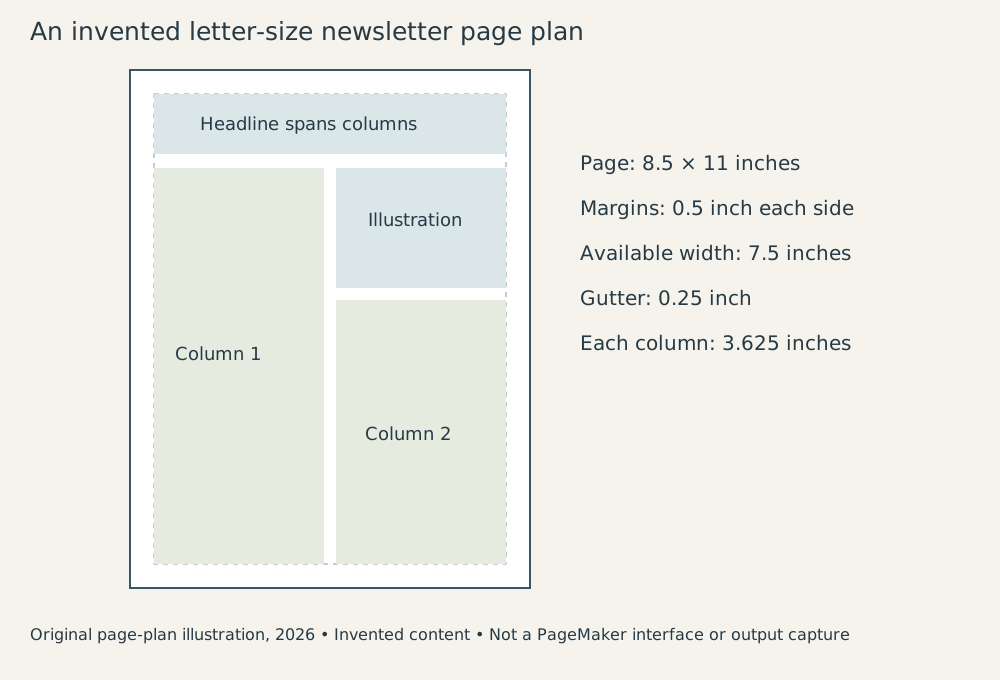
Original explanatory illustration, 2026. This is an invented page plan, not PageMaker’s historical interface or output.
Suppose the body type is 10 points with 12-point leading. Leading is the distance from one line’s baseline to the next. There are 72 points per inch, so a seven-inch text area has 504 points of height. Dividing by 12 gives 42 baseline intervals.
That isn’t a promise of exactly 42 printable lines. The first and last baseline positions, paragraph spacing, headings, and the program’s layout rules affect the actual fit. The calculation is a planning estimate. It tells us the scale of the available area before we discover that the editor’s “small addition” needs another inch.
A physical measure is more dependable than estimating from character count alone. Proportional type gives different characters different widths. A line of narrow letters occupies less space than a line of wide ones. Word lengths and line breaks introduce more variation. “About 500 words” is useful for assigning a story; it isn’t a page geometry specification.
Revisions propagate through the arrangement
Now widen the picture by half an inch. Its footprint takes more of the second column. Text that fitted before may need to move elsewhere. The caption may become two lines instead of three because its measure has widened, partially compensating for the picture’s change.
This is why page layout is a system of relationships. Each element’s size affects the remaining area and the reader’s route through the page. A convenient direct-manipulation interface makes changing an element easy. The operator still needs to inspect the consequences.
Next change the headline from “Summer Workshop” to “Summer Workshop Registration Opens Monday.” The added words may require a smaller type size, another line, or more horizontal space. Each option changes the visual hierarchy. The headline’s job is to identify and attract attention to the story; cramming it into the old space may weaken that job.
There isn’t one universally correct answer. The useful software lets the publisher compare options at a cost low enough to permit judgment. That turns layout into a visible negotiation among content, hierarchy, and physical limits.
Revising text raises a second concern: keeping the authoritative wording clear. A publication assembled from material created in multiple programs needs a workflow for corrections. If somebody fixes the source story after the layout operator has corrected the placed version, two plausible copies can diverge. The page may look settled while its document management is quietly staging a dispute.
A sensible teaching workflow assigns responsibility: prepare the copy, place it, proof the arranged page, record corrections, and approve the final output. That sequence is an editorial recommendation, not a claim that PageMaker 1.0 supplied modern review or version-control facilities.
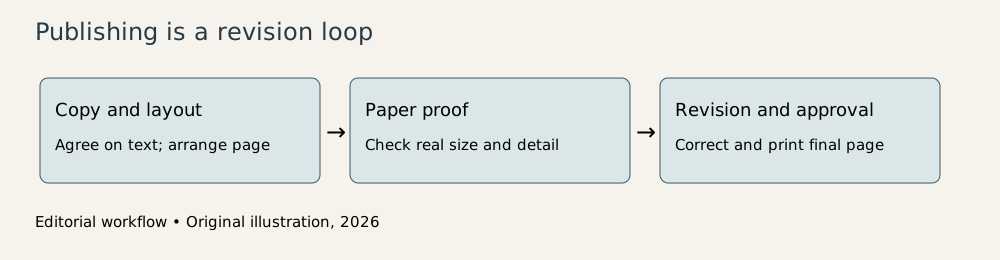
Original explanatory diagram, 2026. The workflow describes publishing responsibilities rather than built-in collaboration features.
The printer closes the loop
PageMaker’s screen layout became especially valuable when the LaserWriter could produce a credible paper proof. The proofing cycle became accessible to the same organization that was making the decisions. A designer could inspect the physical page, correct it, and print again without sending every revision through an outside typesetting process.2
Paper still matters in this workflow. Screen zoom changes apparent scale. A headline that looks imposing when magnified can be disappointingly small on the printed sheet. Fine rules, spacing, and image quality also deserve inspection at the actual output size.
The new equipment didn’t make printing free. Hardware, supplies, and time still cost money, and professional production could still require additional processes. Desktop publishing changed the economics of preparing and proofing many documents; it didn’t remove every distinction between an office newsletter and a demanding commercial print job.
It also redistributed responsibility. Typography and page design previously mediated by specialists became decisions made by a broader population. Some publications benefited from the author’s proximity to the content. Others discovered that access to several typefaces is not a request to use all of them on one page.
That is a familiar tradeoff in personal computing. Making a capability available expands useful work and expands the range of work done without expertise. The appropriate response is to teach the expertise more clearly. Restricting the toolbar won’t substitute for understanding hierarchy, spacing, and consistency.
The revision is the real achievement
PageMaker’s significance is often illustrated by a polished page. I think the more revealing demonstration is a changed page: a photograph moved, a headline adjusted, and a new proof made while the publisher still remembers why the change was requested.
The program brought a costly feedback loop nearer to the decision-maker. It helped small publishers treat composition as something they could operate and revise directly. That was a change in organizational capability as much as a change in graphics.
The lasting idea is simple enough to fit on the desk: make the thing, inspect it at the scale that matters, and revise it while the decision is still yours. PageMaker didn’t supply taste. It supplied a remarkably useful place to exercise it.
Footnotes
-
Oral History of Paul Brainerd, Computer History Museum, 2006, pp. 6–8: Atex closure, company formation, engineering collaboration, and July 1985 shipment. Retrospective recollections are treated as such. ↩
-
Computer History Museum, Desktop Publishing, Macintosh, PageMaker, and LaserWriter context; Adobe’s 1985 PostScript Language Tutorial and Cookbook, chapter 12, LaserWriter output environment. ↩ ↩2
-
Brainerd oral history, pp. 10–11, customer research and market choice. The combined historical paraphrase from this interview is kept compact; page-planning examples are original. ↩