C:\1980S\GNUEMACS.TXT
1985
GNU Emacs: The Editor You Can Reprogram
GNU Emacs made editing commands, documentation, and user extensions parts of the same programmable environment.
Sooner or later, an editor’s designer guesses wrong about your work. Perhaps you need a particular indentation rule, a way to insert a recurring header, or a command that moves through the awkward files your organization insists are a perfectly reasonable format. The editor offers its existing commands. You offer a sigh.
GNU Emacs made a different arrangement. Its commands were programs, and users could write more of them in the language already used to implement much of the editor. The seam between using the application and changing the application was unusually accessible. It also gave the phrase “I’ll just adjust my editor” a worrying amount of scope.
The interesting achievement wasn’t an enormous checklist. It was a coherent way of making a tool adapt to work that its original author hadn’t anticipated.
An old name, a new implementation
Emacs belonged to a tradition before GNU Emacs existed. The original EMACS emerged in the 1970s as editing macros built on TECO at MIT. Richard Stallman’s 1981 paper described its combination of interactive editing, customization, and documentation. GNU Emacs therefore wasn’t the invention of the extensible editor, and 1985 wasn’t Emacs’s birthday in the broad sense.1
Stallman began the GNU implementation in 1984. The project’s maintained history records March 20, 1985 as the announcement of its initial public release, version 13, following earlier versions numbered 1.0 through 1.12. That curious sequence is a useful warning against treating version numbers as a reliable geological record. The history also cautions that early dates sometimes refer to an announcement and sometimes to when a version was made.2

Richard Stallman, photographed by chrys in 2005. Later portrait, not a photograph of the 1985 release. Source and existing crop/color corrections; CC BY 2.0. No additional alterations.
.jpg)
GNU itself had been announced in September 1983 as an effort to build a freely shareable Unix compatible system. An editor was a practical component of that effort: people developing an operating system need something in which to write it. It was also software people could use immediately on existing systems. A complete replacement operating system could take years; a working editor could already justify copying a tape.3
By the middle of the decade, GNU Emacs was a substantial environment. Contemporary release notes discuss C indentation, shell interaction, mail, outline editing, and modes for nroff and TeX. These are period capabilities, not modern extensions smuggled into an old terminal window.4
A buffer is a place to work
To understand Emacs, start with a distinction that can initially feel like unnecessary vocabulary. A file lives on storage. A buffer holds text inside the running editor. A window displays part of a buffer.
Those are three different responsibilities. A buffer can visit a file, accumulating changes until the user saves them. It can also contain help, a list of files, or the output of another program. Two windows can display different parts of the same buffer. Closing a window needn’t destroy its text.
That separation is useful because editing isn’t always the act of changing a document destined for disk. Reading compiler errors and following them back to source lines is another kind of text interaction. So is browsing documentation. Once these activities share the same basic container, familiar movement and selection operations become available in more places.5
Emacs calls the current insertion position point. A mark can designate another position, allowing the region between them to become the subject of a command. These names are ordinary once learned, though the initial lesson does require accepting that the editor has chosen to give the cursor a philosophical promotion.
The important engineering decision is that commands can operate on this editor state directly. They don’t need to impersonate a person hammering the keyboard. They can insert text, inspect positions, choose buffers, and call other commands.
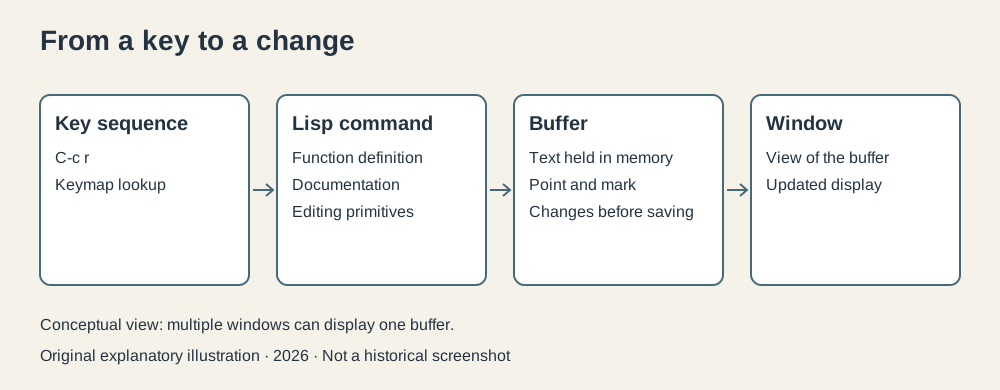
Original explanatory diagram, created for this series in 2026. It summarizes the command and buffer relationship; it is not a historical screenshot.
A command small enough to understand
Consider a recurring heading in a plain text research file. We want a command that inserts a heading and leaves point ready for the next entry. Here is an original teaching example using long established Emacs Lisp forms:
(defun insert-research-heading ()
  "Insert a heading for the next research entry."
  (interactive)
  (insert "Research notes\n--------------\n"))
defun defines a function and gives it a name. The empty parentheses after the name indicate that it takes no arguments. The string is its documentation. interactive makes the function available as an editor command, rather than only as something another Lisp function can call. Finally, insert puts the supplied text at point.
The parentheses look conspicuous, but they expose the structure quite plainly: define this function, supply its documentation, make it interactive, and perform this operation. The example isn’t pretending to be an extension distributed in 1985; it demonstrates the extension model of the period.
Once evaluated in the running editor, such a command can be invoked by name through M-x. A key binding can make it more convenient:
(global-set-key "\C-cr" 'insert-research-heading)The key sequence is Control-c followed by r. The quoted symbol names the function to call. Contemporary Emacs release notes reserve Control-c followed by ordinary letters for users, providing a place for personal bindings that standard major modes should leave alone.4
The clever part is the resulting relationship. Documentation isn’t an external promise about the command; it is attached to the function the editor actually knows. A binding points to that function. Calling it changes the buffer through the editor’s own primitives. Changing the definition can change what the same binding does without rebuilding the whole program.
This is more expressive than recording a sequence of keystrokes, useful as keyboard macros are. A function can branch, inspect text, repeat an operation, or ask for input. The routine becomes software rather than a fragile reenactment of yesterday’s cursor movements.
Modes supply local judgment
A universal editing command cannot make sensible decisions about every kind of text. A paragraph in a letter and a block of C code both occupy a buffer, but pressing an indentation key should usually mean different things.
A major mode supplies a buffer’s main editing conventions. It can define local bindings, indentation behavior, and other settings appropriate to the material. A minor mode adds a more limited behavior that can coexist with the major mode. The period release notes show this architecture being refined in practice, including improvements to C indentation and changes to shell and outline commands.4
Suppose one buffer contains research prose and another contains C. A global preference might specify a general wrapping column. The prose mode can use that value when filling paragraphs; the C mode can apply its own indentation rules. Buffer local settings prevent one document’s preferences from spilling into every other document.
This is a modest sounding detail with large consequences. Customization becomes contextual. You can teach the editor how to handle a file type rather than repeatedly correcting it after each operation. And an extension writer can compose with an existing editing environment rather than manufacture a new interface from scratch.
There are limits. A mode has to implement good behavior, and two extensions can still disagree about a binding or a variable. The architecture provides places to put decisions; it doesn’t guarantee that everyone puts a wise decision there.
Self documentation was a working feature
An extensible tool needs a way to reveal what it has become. Printed instructions describe the original distribution. Your running editor may contain altered bindings, newly defined commands, and local settings. A manual sitting beside the terminal can’t automatically know about these changes.
Emacs’s help facilities connect questions about keys and functions to the editor’s current definitions. The idea had been articulated in Stallman’s earlier EMACS paper and was carried into GNU Emacs’s documented interaction model.15
That changes how a user learns. If a key performs something surprising, the useful question is which command it invokes and what that command does. If a named operation exists but is inconvenient to reach, a binding can connect it to an easier sequence. The interface is inspectable because it is represented as data and functions inside the application.
I find this more interesting than the familiar joke about Emacs containing everything. A large environment is tolerable only if people can locate the part they need. Extensibility without inspection would simply create a much larger mystery.
Freedom and the cost of ownership
Technical extensibility and legal permission reinforced each other. GNU’s stated goal included allowing users to share and modify software, and its distribution arrangements made source available. Early GNU software used program specific copying terms before the general GNU GPL appeared in 1989; describing the first 1985 Emacs release as if it shipped under today’s GPL would flatten that history.36
Access to source wasn’t necessary for every Lisp customization. It mattered when the change required the C implementation, when a port needed adjustment, or when someone wanted to distribute a modified version. The user wasn’t confined to whatever extension hooks a vendor happened to permit.
But ownership has a bill. A personal configuration can become elaborate enough that its author must maintain it, diagnose interactions, and remember why a setting once seemed essential. Flexibility moves some decisions from the product designer to the user. That can be liberating; it can also turn an afternoon’s editing into an investigation of one’s own past judgment.
A smaller editor with fixed behavior remains a sensible choice. GNU Emacs’s historical importance lies in showing how far a different bargain could go. Its Lisp environment gave individual changes a practical route into daily work, while GNU’s distribution model let those changes travel beyond the person who made them.
A tool that can meet you halfway
Modern readers should resist decorating the 1980s editor with today’s package collections, graphical interface, or later facilities such as Org mode. Early GNU Emacs was already interesting on its own terms: a programmable editing environment used on contemporary Unix systems, with commands, help, and text organized around a shared set of abstractions.
Its durable contribution is a specific expectation. When a tool repeatedly makes the wrong assumption about your work, you should have some way to express the better assumption. GNU Emacs put that possibility inside the editor and made it useful enough to be worth learning.
Whether you want to exercise it every day is a separate matter. Some people want an editor. Some people want an editor and a small domestic software ecosystem. Emacs made the second preference unusually well catered for.
Footnotes
-
Richard M. Stallman, EMACS: The Extensible, Customizable Self-Documenting Display Editor, MIT AI Memo 519a, March 26, 1981. This describes the earlier EMACS, not GNU Emacs. ↩ ↩2
-
GNU Emacs maintainers,
etc/HISTORY, especially the explanatory note and 1985 entries. ↩ -
GNU Project, Initial Announcement, September 27, 1983, and Overview of the GNU System. ↩ ↩2
-
GNU Emacs,
NEWS.1-17, contemporary changes through March 1986. ↩ ↩2 ↩3 -
Richard Stallman, GNU Emacs manual source, version 18.59 repository tag, sections on buffers, windows, help, and customization. This retained manual includes later version 19 notices; those features are excluded here. ↩ ↩2
-
Free Software Foundation, GNU GPL version 1, February 1989; the 1983 GNU announcement establishes the earlier sharing and modification goals. ↩