C:\1980S\WINDOWS1.TXT
1985
Windows 1.0: Building a Graphical Contract Above DOS
The first Windows offered a shared interface and programming environment within the constraints of the DOS personal computer.
If every application invents its own way to draw text, handle a mouse, and print a document, the computer becomes a collection of separate negotiations. The user learns each program’s habits. The developer learns each device’s habits. Neither arrangement is particularly economical.
Windows 1.0 offered a shared graphical environment above MS-DOS. Applications written for it could use common facilities for windows, input, and graphics. Users could work with several activities in a visible arrangement rather than treating the computer as one command prompt followed by one application.
The first release was modest compared with the system its name eventually came to represent. That’s precisely why it deserves a close look. It shows the problem Microsoft was trying to solve before the solution acquired enough furniture to fill an entire operating system.
Two dates, and a long interval
Microsoft announced Windows in November 1983. The first version shipped on November 20, 1985. The interval matters: an announcement about the intended environment isn’t evidence that customers could purchase the finished software that day.1
The first public release is often discussed as Windows 1.0, while surviving U.S. distribution media commonly carry the 1.01 version designation. A historical example should identify the actual release represented. The PCjs preservation environment provides a runnable reconstruction of Windows 1.01 and associated documentation; this article uses its archived materials to check interface details, without claiming to have tested an original PC.2
Windows operated in relationship with DOS. It provided a graphical environment and services, while DOS remained part of the machine’s software foundation. Calling it equivalent to the later Windows NT architecture would lose the central engineering constraints of the first product.
The user-facing environment included small applications such as Notepad, Paint, Calculator, and Clock. These supplied immediately understandable tasks and examples of the common interface. The more consequential ambition was to give other applications a reason to adopt the same graphical facilities.3
That platform proposition required developers as well as users. A useful collection of included accessories could demonstrate the environment; substantial work applications could make it a destination. The distinction is important whenever a product’s future depends on software that somebody else has yet to write.
A window isn’t just a rectangle
The visible interface of the first Windows favored tiled application windows. They occupied arranged regions rather than the freely overlapping top-level application windows associated with later releases. Dialogs and other special interface elements make “no overlap anywhere” too absolute a description.4
Tiling has an intelligible benefit. Each visible application keeps an area of its own, so another application’s top-level window doesn’t simply cover it. The screen presents its current division of space directly. The cost is that opening more visible activities gives each one less room.
Consider a hypothetical display with 640 by 350 pixel positions. Dividing its height evenly among two regions yields 175 pixels per region before accounting for controls, borders, and any other reserved areas. Three regions would have roughly 116 pixels each. This is teaching arithmetic about space, not a measurement of Windows’ actual placement algorithm.
The interaction has to help users manage that scarcity. Minimizing an activity or changing the visible arrangement recovers working area. A document may need more room than a clock; equal rectangles don’t imply equal utility.
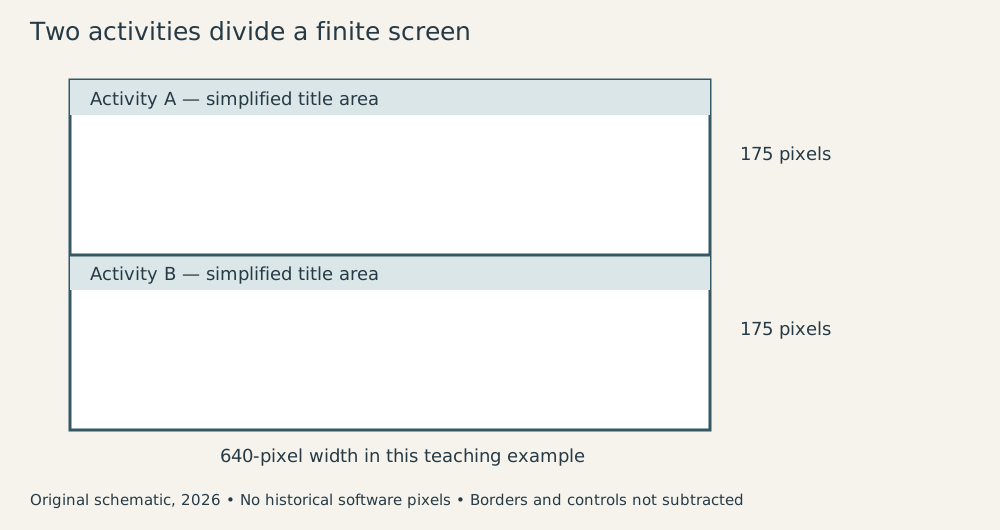
Original schematic, 2026; invented application contents and simplified geometry. It is not a Windows screenshot.
I find the constraint more revealing than the visual difference from later desktops. A window system has to decide how programs compete for attention and screen area. The first Windows made one particular choice under particular hardware and interface constraints. Familiarity with another choice doesn’t make the original choice meaningless.
The application waits for something to happen
A graphical application usually can’t assume that the next thing the user does will be the next line in a fixed conversation. The user may click a menu, resize a working area, press a key, or switch to another activity. The application needs a structure that accepts those events and responds appropriately.
The Windows programming model organized interaction through messages and window procedures. A program retrieved and dispatched messages; a procedure associated with a window handled the relevant operations. Drawing was requested when the application’s window needed repainting.5
Here is deliberately simplified pseudocode, offered as a teaching model rather than an exact Windows 1.0 C program:
create the application's window
while the program continues:
    wait for the next message
    if it requests termination:
        leave the loop
    dispatch it to its window procedure

window procedure:
    if asked to repaint:
        draw the current document
    if a key supplies new text:
        update the document
        request a repaint of the affected area
    otherwise:
        use the system's default handling
The document is application state. The visible pixels are a representation of it. Keeping those roles separate allows the application to reconstruct its view after changes in the display arrangement. The screen is a place to show the document, not the safest place to store it.
That structure is different from a program that asks a question, reads one answer, and continues down a fixed path. The graphical program spends much of its life responding to events. Its correctness depends on maintaining sensible state across many possible event sequences.
Imagine a tiny note-taking program. A keystroke changes the text buffer. A repaint draws the buffer’s current contents. Closing the window may require asking what should happen to unsaved text. The window procedure connects the visible activity to the underlying document, while the shared environment supplies the route for those messages.
The result is a common programming contract. The application doesn’t have to invent every convention for interacting with the mouse or redraw the whole idea of a menu from first principles. It does have to obey the environment’s expectations.
Sharing the processor requires cooperation
The first Windows environment used cooperative scheduling for its Windows applications. Programs had to return control appropriately so other work could proceed. A program that kept computing without yielding could make the environment unresponsive. Having several activities on screen doesn’t mean the system can forcibly manage them in the manner of a modern preemptive operating system.5
An original timing example makes the implication concrete. Suppose our note application has a long calculation that takes three seconds. If it performs the whole calculation inside an input-handling routine without returning control, the user may experience those three seconds as an inert interface.
Splitting the calculation into smaller units can create opportunities to service interaction between units. That doesn’t make the total arithmetic disappear. It changes how its execution shares time with the environment.
The distinction between throughput and responsiveness is useful. Finishing a task quickly overall matters, but so does acknowledging input promptly. A machine that completes a calculation in three seconds while responding to the user can feel very different from one that spends the same three seconds apparently refusing to discuss it.
Memory and device support also constrain what an environment can offer. DOS PCs varied in graphics hardware and peripheral configuration. A shared graphics interface could reduce the amount of hardware-specific work applications performed, but the environment still needed suitable drivers and available resources.
Existing DOS applications posed another compatibility problem. They weren’t necessarily written to cooperate with the graphical environment’s assumptions. Supporting them therefore couldn’t mean magically converting every application into a native Windows program with the same interaction model.
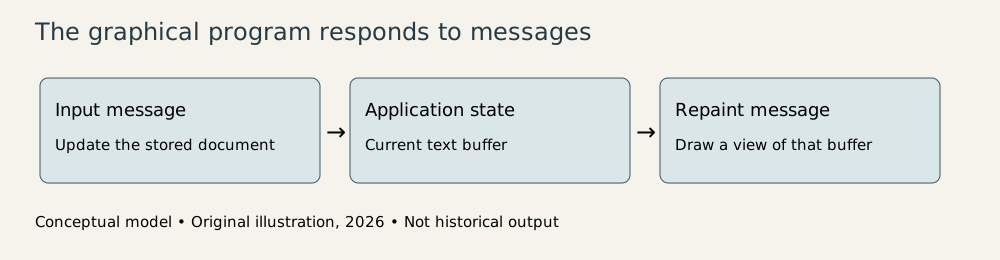
Original explanatory diagram, 2026. The note application and three-second calculation are invented teaching examples.
The difficult business of becoming the default
A common environment is most valuable when many programs use it. Its earliest version therefore faces an awkward cycle: users want applications before committing to the environment, and application developers want users before committing to its programming interface.
Windows 1.0’s included programs made the concept demonstrable. The larger strategic question was whether developers would build enough valuable software around its interfaces. Historical importance and immediate product attractiveness need not be identical. A later successful platform can begin with a version whose usefulness is limited by its available applications and hardware context.
It is equally misleading to treat the first version as inevitable preparation for everything Microsoft eventually shipped. The program deserves assessment as a 1985 product: a graphical layer for DOS machines, a particular screen arrangement, and a particular application model. Later successes don’t retrofit later features into its disks.
The contribution I find most consequential is the contract between application and environment. Input arrives through a defined mechanism. Drawing uses shared facilities. Windows can coordinate programs because those programs agree to participate in the arrangement.
The visible desktop is the public face of that agreement. Underneath it lies a more demanding idea: independent applications behaving well enough to share a machine and a user’s attention. Windows 1.0 made that idea concrete on the DOS PC, with limitations plainly visible. The limitations explain why the work had to continue; the contract explains why continuing it was worthwhile.
Footnotes
-
Microsoft, The History of Microsoft—1985, November 20 shipment; Microsoft announcement-history page, November 1983 announcement distinguished from release. ↩
-
PCjs: Microsoft Windows 1.01, preserved media and documentation. Modern emulator environment is not original hardware. ↩
-
Microsoft Windows 1.01 documentation, preserved by PCjs, included application names and user interface materials. ↩
-
Computer History Museum: Windows 1.0 software box, tiled interface and limited DOS-program multitasking; surviving interface material at PCjs qualifies this as the top-level application arrangement. ↩
-
Charles Petzold, the original Windows “Hello World” program, reproduced scans from Microsoft’s 1985 Programming Guide; Petzold, Programming Windows, 1990 edition, chapter 1, explains the continuing message and nonpreemptive scheduling model. Later desktop features in that edition are excluded here. SDK 1.01 distribution listing establishes preserved sample files and dates. ↩ ↩2