C:\1980S\MACPAINT.TXT
1984
MacPaint: A Bitmap Canvas on the Desktop
How Bill Atkinson and Susan Kare helped turn individual black and white pixels into a responsive, approachable drawing medium.
A drawing program makes a fairly demanding promise: move your hand, and something convincing should happen immediately. You shouldn’t have to negotiate with the computer between the beginning and end of a brushstroke. A painting application that pauses to consider its position has already lost yours.
MacPaint made that promise on the original Macintosh, with 128 kilobytes of memory and a monochrome display. Released with the computer in January 1984, it offered a canvas, recognizable tools, and the invitation to try them. Bill Atkinson wrote the application and the QuickDraw graphics machinery beneath it. The published source includes Pascal application logic and performance-sensitive Motorola 68000 assembly.1
The interesting achievement is how much engineering disappeared into the experience. Choosing a brush is visible. Managing buffers, clipping drawing operations, and keeping a selection distinguishable from the picture are mercifully less visible. MacPaint’s friendliness was built from decisions about what the machine should remember and what a person should have to think about.
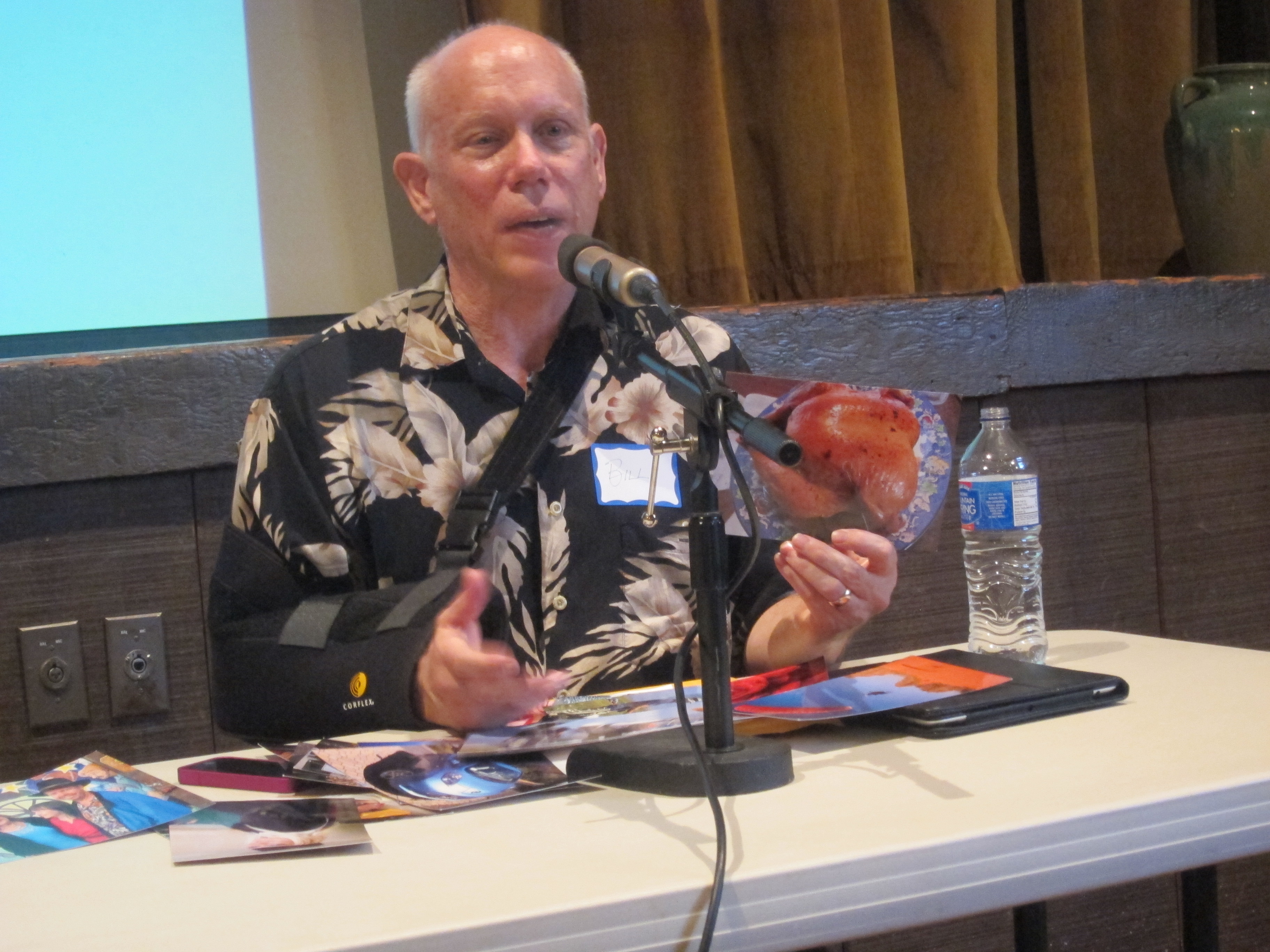
Bill Atkinson in Berkeley on August 12, 2012, decades after MacPaint’s development. Photograph by Jay Cross, source, CC BY 2.0. Downloaded without alterations.

A canvas with a very definite memory
A bitmap represents a picture as a grid of pixel values. In a one-bit image, each pixel has two possible states. Call them black and white. Eight such decisions fit into one byte.
That economy has consequences. Consider an invented 64-by-64-pixel drawing. Its raw one-bit image occupies
A second copy costs another 512 bytes. A hypothetical 512-by-512 image needs 32,768 bytes, or 32 KiB, before accounting for the program, its other data, or the displayed interface. Doubling both dimensions quadruples storage. This is general bitmap arithmetic, not a claim about MacPaint’s actual page dimensions or memory allocation.
It explains why a tiny-looking design choice can consume a large fraction of a small computer. A more generous canvas also means more data to copy, examine, and preserve. Memory capacity and drawing speed are related through the amount of picture the program must handle.
A bitmap also has a particular kind of honesty. Draw a circle, and the stored result is a collection of changed pixels. Unless the program maintains additional structure, it doesn’t retain a circle object with a center and radius. Later editing must work on the marks that exist. Asking to enlarge them cannot recover a curve the file no longer describes.
This makes a paint program different from the geometry model discussed in the AutoCAD article. Both can produce an outline. Their files remember different things about it. That difference matters when you want to revise the picture rather than merely admire it.
The artist at the programmer’s elbow
MacPaint grew from Atkinson’s earlier Lisa drawing work. In early 1983 he concentrated on the Macintosh application, initially called MacSketch. The visible arrangement put drawing tools beside the working area and patterns below it. The program was substantially finished in October 1983, before the January launch.1
The programmer wasn’t its only designer. In a 2010 museum interview, Atkinson credited Susan Kare as a co-designer. She used the developing application as an artist, while he watched where she struggled and considered how the software could accommodate what she wanted to do.2
I find that arrangement more revealing than another list of clever tools. A programmer testing a drawing application knows which behavior is supposed to work. An artist arrives with an intention. The distance between those two is where useful interface changes tend to happen.
There is also an important distinction between recognizable and self-explanatory. A paintbrush icon can suggest a purpose; it cannot specify every detail of selection, pattern application, or dragging. The interface still needs consistent behavior and feedback. Giving an obscure operation a charming little picture is sometimes just obscurity with excellent packaging.
Why a moving outline mattered
If a picture can contain any arrangement of black and white pixels, how do you draw a selection boundary that cannot be mistaken for part of the picture?
A static black rectangle can disappear against black artwork. Reversing the underlying pixels helps, but a busy image can still make the result confusing. Movement supplies another signal. The picture stays still while the boundary changes.
MacPaint’s animated selection outline became known as marching ants. Hertzfeld’s development account describes a shifting pattern used to keep a selection visible, alongside the eightfold magnification of Fat Bits and the paint bucket’s seed fill.3
The conceptual distinction is useful even without recreating the original effect. Selection belongs to the editing interface. The selected artwork belongs to the document. A program must communicate both while keeping them separate. If it permanently paints the selection indicator into the stored image, the act of selecting has damaged the thing selected.
The same reasoning applies to a cursor, temporary alignment guide, or preview of a shape you’re still dragging. These marks describe what you might do next. They need a different lifetime from marks you have committed to the picture.
A paint bucket is a connectivity question
The bucket tool looks wonderfully untechnical: click inside an outline, and its interior fills. Underneath, the program must determine which pixels belong to that interior. MacPaint used seed filling; Atkinson tried several approaches to meet its memory and speed limits.3
Here is a teaching model. It explains connectivity without claiming to reproduce his implementation. Let # represent a black boundary and . a white pixel:
########
#......#
#..##..#
#......#
########
Choose a white seed inside the border. Visit its neighbors above, below, left, and right. Continue through white neighbors, tracking the positions already visited. The reachable white area contains sixteen pixels. The two internal black pixels remain black, and the outer boundary stops the search.
Now remove one pixel from that outer boundary. If it opens a path to white pixels outside, the same rule reaches those too. The computer hasn’t misunderstood the word inside. The drawing no longer encloses an inside under the rule we gave it. One missing dot can be a very expensive door.
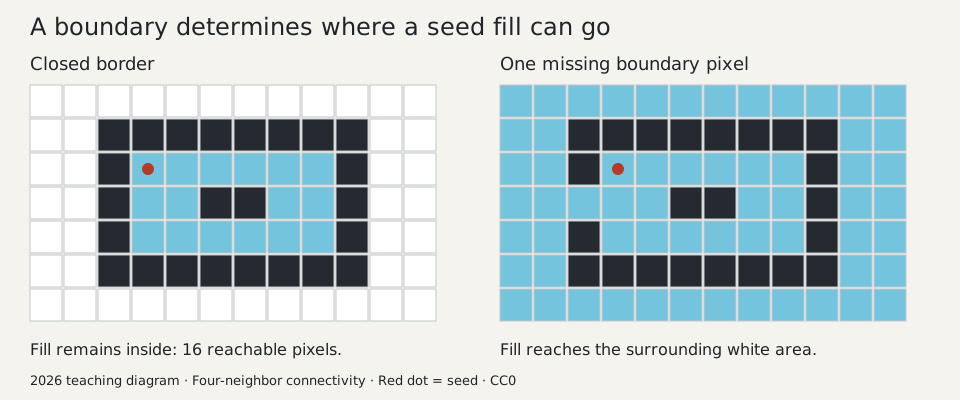
Original explanatory diagram, created for this series in 2026 and released under CC0. It depicts a general four-neighbor fill model, not a MacPaint screenshot. Blue indicates pixels reachable from the marked seed; the open boundary lets the fill escape.
Replacing the reachable area with a pattern introduces another distinction. The search determines membership. The pattern determines the final appearance. For an invented checkerboard, we might make a visited pixel black when is even and white otherwise, with and its integer coordinates. That yields a regular pattern anchored to coordinates rather than to the order in which pixels were visited.
The separation prevents the exploration itself from getting confused. Some replacement pixels remain white. A careless algorithm that relies only on changed color to recognize visited positions could revisit them indefinitely. A teaching implementation can keep a separate visited set. A constrained historical implementation needs a more economical strategy.
Likewise, recursively visiting a pixel’s neighbors is easy to explain but can consume many stack frames. An explicit work list avoids deep function calls while still requiring storage. Processing horizontal spans can reduce that overhead. These are general algorithm choices; the historical source confirms the seed-fill problem without making this model a transcript of MacPaint’s code.
Smooth movement costs extra copies
Suppose you’re dragging a selection. The display needs the picture with the selection at the current position. At the next position, the old preview must disappear and a new one must appear.
One tempting approach erases the old image directly on screen and draws the new image there. If the display shows the intermediate state, the user sees flicker. The computer has done the right operations in an unhelpfully public order.
MacPaint composed drawing in offscreen memory before transferring the result to the visible display. Hertzfeld describes two buffers for the current and previous document-window states, supporting both smooth manipulation and undo.3
Here is a general way to think about that arrangement. Preserve the stable image from before a drag. For each new mouse position, use that saved state as the basis for a preview, add the moved selection, and display the completed composition. You’re presenting a sequence of finished frames rather than a sequence of intermediate repairs.
Undo also becomes understandable: restore the preserved state. That provides a previous version, not an unlimited archive of every action. Atkinson’s 2004 interview connects the buffers to the limited undo model and explains why the original drawing window couldn’t simply be expanded without breaking the memory budget.4
There is a tradeoff worth keeping in view. Copies take space, but avoiding them can make the interface harder to trust. Memory spent on responsiveness and recovery supports the user’s willingness to experiment. It earns its place even though it doesn’t add a new item to the tool palette.
QuickDraw kept the application inside its boundaries
QuickDraw supplied drawing operations used by MacPaint and other Macintosh applications. Its region machinery represented areas and supported combinations such as intersection. Drawing could be clipped to the area where an application was allowed to put pixels, including when other windows obscured part of it.5
For a simple teaching example, imagine a rectangular drawing area partly covered by a menu. The valid destination is the drawing rectangle minus the covered portion. A line may cross both, but only its allowed pixels should be written. Otherwise your brushstroke could paint directly through the interface used to choose the brush.
Putting that work into a graphics library gives application authors a common set of rules. Each tool can request a drawing operation without rebuilding the whole window-management problem. The visible simplicity depends on a shared boundary contract.
Limits that explain the design
Monochrome painting could be expressive without being infinitely flexible. Patterns suggested shading through arrangements of dots. Fat Bits let a user inspect and change individual pixels. Neither transformed the image into a collection of independently editable objects.
In particular, placing text in a bitmap eventually leaves marks rather than a persistent editable sentence. Atkinson experimented with recognizing those marks as characters again, then removed the recognition feature. His 2004 account treats that as a product decision: an impressive engineering trick could make the overall application less coherent.4
The preserved source also needs a date label of its own. The museum released MacPaint 1.3 source in 2010 under noncommercial terms. That is valuable historical evidence, but it shouldn’t be silently described as the exact January 1984 release, or treated as an unrestricted license to reuse Apple’s artwork.1
What I admire about MacPaint is the alignment between mechanism and invitation. Pixels are exposed when precision helps. Buffering stays hidden because its job is to make movement feel continuous. A moving boundary communicates selection without becoming part of the art. Undo buys enough safety to encourage a second attempt.
A useful creative tool gives you somewhere to begin and a tolerable way to get things wrong. On a very small Macintosh, that required careful budgeting. The friendliness was real. Someone had done the arithmetic.
Sources
Footnotes
-
Leonard J. Shustek, “MacPaint and QuickDraw Source Code”, Computer History Museum, July 18, 2010. Historical release, implementation languages, development chronology, and source version/license. ↩ ↩2 ↩3
-
Bill Atkinson and Andy Hertzfeld, MacPaint interview and demonstration, recorded May 6, 2010, transcript published 2015, pp. 8–9. Kare’s contribution is credited by the developers themselves. ↩
-
Andy Hertzfeld, “MacPaint Evolution”, Folklore. Participant retrospective on buffers, animated selection, Fat Bits, and seed fill. ↩ ↩2 ↩3
-
Bill Atkinson and Andy Hertzfeld, MacPaint oral history, interviewed by Grady Booch, 2004, pp. 49–54 and 58–60. Buffers, undo, fixed window, and discarded character recognition. ↩ ↩2
-
Andy Hertzfeld, “I Still Remember Regions”, Folklore. Participant account of QuickDraw regions and clipping. ↩