C:\1980S\DBASEIII.TXT
1984
dBASE III: The Office Database That Came with a Programming Language
How Ashton-Tate made records, reports, and small business applications accessible through one unusually productive command prompt.
A customer list is manageable until somebody asks it a question. Which customers owe money? Which live in the northern district? Which ordered last year but haven’t ordered this year? A filing cabinet can answer all of these, provided someone has the afternoon and a sufficiently forgiving relationship with paper.
dBASE III made these questions into operations on stored records. Released by Ashton-Tate in 1984, it occupied a useful space between a packaged business application and a programming environment. You could enter information, search it, and produce reports. You could also save instructions and build an application around the particular business that happened to employ you.1
That second possibility is the interesting one. An office database wasn’t merely a neater filing cabinet. It could become a small executable description of how the office worked. This was empowering, with the usual proviso that offices don’t always know how they work until software insists on an answer.
The product behind the dot
dBASE III followed dBASE II rather than introducing databases to personal computers. The 1984 product belonged to the expanding world of IBM PC business software, where keeping useful information on a desktop machine was becoming a practical proposition. A 1986 NASA office application demonstrates the product’s practical appeal: stored records, search routines, and a programmable interface.2
The lineage leads to Wayne Ratliff’s Vulcan. In an interview with Susan Lammers, Ratliff described adapting the concept of JPLDIS, a database system he encountered while working as a contractor at the Jet Propulsion Laboratory, to a microcomputer. He advertised Vulcan in October 1979, then accepted George Tate and Hal Lashlee’s offer of exclusive marketing rights. The transition to dBASE included a move toward full-screen interaction. Ratliff emphasized the combination of database manager and language: common storage work was already handled, leaving users to express their particular tasks.3
That is a useful origin for the product’s appeal. Its programming model grew around questions someone wanted to ask of data. The commercial product broadened the audience, but the attraction remained concrete: make a routine reusable without first building a whole file-management system.
The name needs care. dBASE III and dBASE III PLUS are separate releases. Screenshots and manuals for PLUS are plentiful, which makes it tempting to let the later interface wander backward into 1984. This article concentrates on the original product’s underlying bargain: database files combined with an interactive command language. Later menus and enhancements shouldn’t receive a complimentary time machine.
The dot prompt offered commands rather than a blank sheet. USE opened a database, LIST displayed records, and BROWSE provided an editable view. A command could work on many records by specifying a condition. Commands were also building blocks for stored programs. A later educational training manual documents the continuing practical use of this style of interaction, explicitly specifying dBASE III version 1.1 or PLUS rather than claiming to describe the first release.4
This distinction matters when assessing accessibility. Memorizing commands requires effort. Yet the commands describe the work quite directly. Someone can learn how to list unpaid customers before learning how to design an entire application. The first useful result arrives while the larger programming lesson is still taking its coat off.
A table is an agreement
A database table gives each record the same structure. A customer record might contain an identifier, a name, a district, and a balance. Each field has a type and a defined representation. The DBF format, associated with the dBASE family, records a header, field descriptions, and a sequence of records; some field content can depend on associated files.5
To see why structure matters, consider this invented teaching dataset:
| CUSTNO | NAME | DISTRICT | BALANCE |
|---|---|---|---|
| C001 | Alder Books | North | 125.00 |
| C002 | Beacon Repair | South | 0.00 |
| C003 | Cedar Studio | North | 80.00 |
| C004 | Delta Supplies | West | -15.00 |
The field BALANCE represents money owed to the business; a negative number represents a credit. That’s a decision about meaning before it is a decision about storage. Without it, two employees can enter opposite signs for the same situation and both feel entirely correct.
An identifier such as C001 is character data even though it contains digits. It identifies a customer; adding two customer identifiers would be an eccentric administrative procedure. Conversely, balances need numeric comparisons and arithmetic. Choosing the field type preserves the operations that make sense.
The table also makes omissions visible. Where is the due date? Where are individual invoices? This small design cannot distinguish a current invoice from an overdue one. A report headed “overdue accounts” would be making a claim that the data cannot support. The software will print the heading without protest. Editorial standards are outside its jurisdiction.
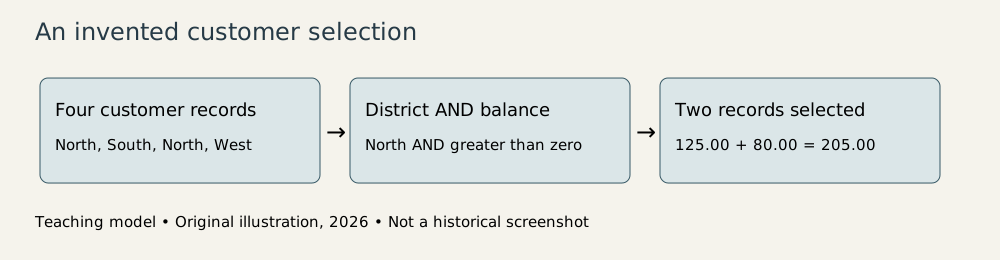
Original explanatory diagram, created for this article in 2026; invented records, not a historical dBASE screen. See research notes for asset provenance.
From a question to a repeatable operation
Here’s an illustrative dBASE-style command sequence for a table already created with those fields:
USE CUSTOMERS
LIST NAME, BALANCE FOR DISTRICT = "North" .AND. BALANCE > 0
SUM BALANCE FOR DISTRICT = "North" .AND. BALANCE > 0
The expected selected customers are Alder Books and Cedar Studio. Their balances sum to 205.00. This is a teaching example of the command model, not a transcript captured from a 1984 machine. Formatting and incidental display output depend on the environment.
The logical condition combines two tests. The district must be North, and the balance must be greater than zero. Beacon fails the district test and the balance test. Delta fails the district test and has a credit. Alder and Cedar satisfy both. Saying “and” is doing real work; replacing it with “or” would select a different population.
There are two useful kinds of repetition here. First, one command applies a condition across the records, saving the operator from selecting each customer individually. Second, saving a sequence of commands makes the same task repeatable next week. The dataset changes while the rule remains stable.
That leads naturally to programming. A stored command file can arrange operations in sequence. Variables hold intermediate values; conditional statements choose a branch; loops repeat steps. The database language is particularly convenient because the program doesn’t have to begin by inventing its own record storage and display routines. It can start much closer to the business problem.
Imagine expanding our example into a collection report. The application opens the customer table, requests a district, validates the answer, selects positive balances, computes the total, and prints a report with a date. The useful program is an organized version of operations that an operator can already try interactively.
This gradual path is a substantial advantage. An application can develop from an established routine instead of appearing fully formed from a requirements document. It also has a danger: a useful ten-line command file can acquire fifty special cases, three undocumented assumptions, and one irreplaceable employee. The program has grown. Its governance may have remained the size of a sticky note.
Finding one record without reading everything
A different task is looking up customer C003. A sequential search checks records until it finds a match. With four records, this is hardly a crisis. With a large customer list, repeated searches waste work.
An index adds a structure organized around a chosen key, such as the customer identifier. Conceptually, it maps a key to the relevant record position. The database can use that structure to locate records without examining every customer’s name and balance in turn. This paragraph describes the purpose of indexing, not a reconstruction of a particular dBASE III index algorithm.
The distinction between physical record order and index order is especially useful. Sorting a displayed list by name doesn’t require the business to redefine customer identity. The identifier still connects the customer to other information. Names can change; identifiers should remain stable.
An index also imposes maintenance work. When a key changes, its index entry must stay consistent. An application that mishandles supporting files can discover that the records exist but the usual route to them has become unreliable. Extra structures make retrieval faster by creating more things that must agree.
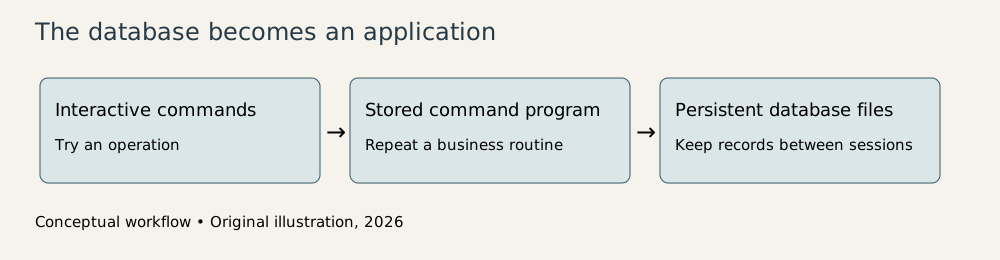
Original explanatory diagram, 2026. It shows the application model rather than the implementation of a particular release.
The business application hiding in the database
Our customer table should eventually become more than one table. If a customer has ten invoices, copying the customer’s address into all ten records creates ten places to correct after a move. A separate customer table and invoice table can connect through the stable customer identifier.
This is a general database design principle rather than a claim that early dBASE provided every safeguard of a modern relational server. Application code still has to manage its assumptions. What should happen if an invoice names a customer that doesn’t exist? Can a customer record be removed while invoices refer to it? A workable storage format doesn’t supply all the answers.
The strength of the desktop approach was proximity. The person who understood the actual work could inspect the data and alter the routine. The weakness was also proximity: a locally successful program could become essential before anyone planned for documentation, backups, changes, or multiple users. A database is very accommodating about becoming important without a meeting.
That helps explain why dBASE deserves space beside the decade’s more photogenic programs. It made practical programming available in the language of records and reports. The outcome wasn’t always elegant software architecture. Sometimes it was a reliable membership list or an inventory report that finally matched the stockroom.
Those are consequential achievements. Much of an organization’s computing life consists of modest questions asked repeatedly against changing facts. dBASE III made those questions programmable on a personal computer. The enduring lesson is to respect the little application early, while its rules can still be explained by the person who wrote them.
Footnotes
-
Library of Congress: dBASE Table File Format, product-family history and referenced documentation. The article uses 1984 and does not settle conflicting exact-month claims. ↩
-
Breazeale and Talley, Search and Retrieval of Office Files Using dBASE III, NASA TM-86550, August 1986, especially “Why dBASE III” and search-program explanations; inspected from the downloaded PDF. ↩
-
Susan Lammers, interview with Wayne Ratliff, preserved transcript attributed to early 1986. Firsthand recollections of Vulcan, JPLDIS, the marketing agreement, and dBASE’s language model. This establishes lineage, not a claim that Ratliff alone wrote every part of dBASE III. ↩
-
Indonesia education planning training modules, ERIC ED357425, database inquiry and user-manual sections. This later primary usage document specifies III 1.1 or PLUS; it supports the command workflow and use case, not a first-release feature inventory. ↩
-
Library of Congress: dBASE Table File Format. Its description covers the family and format variants; not all later extensions apply to the 1984 product. ↩