C:\2010S\REACT.TXT
2013
React: Describe the Next Screen
React's 2013 public releases moved interface maintenance from scattered DOM edits toward repeatable component descriptions.
A shopping basket offers several opportunities to disagree with itself. The quantity says three. The subtotal still reflects two. The checkout button is disabled because an event handler updated the number but forgot the condition attached to the button.
None of these errors requires difficult arithmetic. They require a program to remember every place where the arithmetic matters.
React approached that problem by asking developers to describe an interface from its current inputs, then letting the library reconcile that description with the browser’s existing document. Facebook open-sourced it on May 29, 2013. This article follows the first public version and July’s 0.4 release, rather than treating today’s React as a package that arrived complete that spring.1
Its lasting attraction was a change in the programmer’s job. Instead of maintaining a checklist of edits for every possible transition, the programmer could write down what the next screen ought to contain.
A small basket with a surprisingly large maintenance bill
Consider an invented ticket basket. Each ticket costs five dollars. The customer can choose a quantity, the page displays the quantity and total, and a checkout button becomes available when the quantity is positive. Taxes, discounts, inventory and payment processing are deliberately absent. They would obscure the interface problem without improving the example.
At quantity two, the visible facts are:
Quantity: 2
Total: $10
Checkout: enabled
At quantity three, two visible values change and the button’s condition remains satisfied. At quantity zero, both values change again and checkout becomes disabled.
A direct document-editing implementation can work perfectly well. Its increment handler changes the quantity text, recalculates the total text and adjusts the button. Its decrement handler does the corresponding work. A reset handler remembers all three updates. An inventory correction arriving from elsewhere must remember them too.
That is already four routes through the same display rules. Add a compact basket summary in the page header and the routes acquire another destination. Each handler remains simple enough to inspect. The difficulty is whether every handler has kept up with the latest arrangement of the page.
For this example, define a view as a result of two inputs: a unit price and a quantity. The total is their product. The enabled condition is whether the quantity exceeds zero. Store the quantity; derive the two dependent facts when describing the view.
Changing two to three produces quantity three, total fifteen and enabled true. Changing three to zero produces quantity zero, total zero and enabled false. The original Python check accompanying this article calculates those descriptions. It does not execute React or manipulate a browser.
There is a useful distinction here between storing a total and displaying a total. A displayed total is necessary. A second independently stored total may be unnecessary. If quantity and price already determine it, storing it creates another fact that can become stale.
React did not invent this observation about data. It gave it a practical place in the construction of interactive web interfaces.
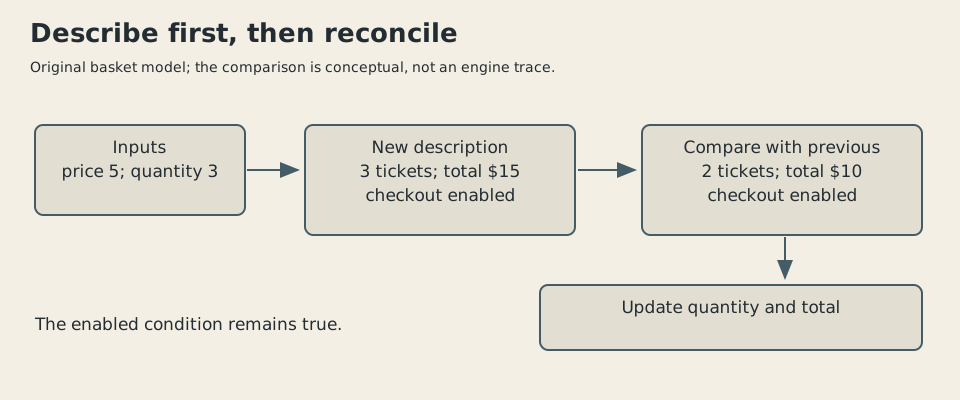
Modern explanatory diagram, drawn in 2026. The ticket basket and values are invented; this is not a historical React debugger screen.
The description is not the document
The browser’s Document Object Model, or DOM, is the collection of nodes that scripts can inspect and change. Changing those nodes is how a great deal of interactive web software makes itself visible.
React inserted a representation between application decisions and those changes. Pete Hunt’s June 2013 explanation describes render returning a lightweight account of the desired interface, rather than a DOM node or an HTML string. React compares successive results and applies changes to the document. The period article calls this reconciliation.2
In the basket, imagine a simple description containing three named results: quantity, total and enabled. Comparing the description for quantity two with the description for quantity three reveals that the first two results differ. The enabled result does not.
Our accompanying check reports exactly those two changed fields. This is a deliberately small model of comparing results, not a reproduction of React’s tree algorithm. Real components have structure, attributes, events and relationships that a three-field dictionary does not possess.
Nevertheless, the model exposes the division of work. The application’s rule produces the complete desired answer. The update machinery determines how the existing presentation must change to agree with it.
Recomputing a description does not necessarily mean throwing away the entire document and rebuilding it. The intermediate representation provides somewhere to compare the old and new answers. Nor does it mean a programmer can ignore the cost of computing a large description. A clear model and a fast implementation are related ambitions, not interchangeable measurements.
Hunt’s post includes a small performance claim for a particular demonstration. That is not a benchmark for this basket, this machine or every application that might adopt React. The mechanism is interesting without borrowing somebody else’s stopwatch.
A component owns a manageable piece
The version 0.3.0 source describes composite components built with React.createClass. Their required render method uses properties and state to describe their structure. The same source defines getInitialState and explicitly requires rendering to have no side effects.3
Those names belong to the period. A modern example built around Hooks would teach a different API and quietly make the first public release look younger than it was.
For our basket, a parent can supply the ticket price while the basket keeps track of its current quantity. The basket’s rendering rule describes its quantity label, derived total and button condition. A child price display can receive the calculated amount without needing to know whether the customer clicked plus, minus or reset.
This creates a boundary worth drawing on paper. The basket knows how its quantity changes. The price display knows how to present an amount. Neither needs a private list of all the other labels elsewhere on the page.
A component boundary is still a design choice. Putting every pixel into a separate component would not automatically make a program legible. Putting an entire application into one component would preserve the vocabulary while losing much of the benefit. The useful unit is something with a comprehensible responsibility and a comprehensible set of inputs.
The instruction against side effects in rendering also matters. Suppose rendering the basket charged the customer’s card. Recomputing the description would then perform an operation that should happen only under an explicit purchasing decision. Even a less dramatic side effect, such as appending a log record, would tie observable behavior to how often the library happened to request a description.
Keeping the description repeatable makes it possible to ask for it again without accidentally asking for a second purchase. The actual payment operation remains separate work, with separate correctness requirements.
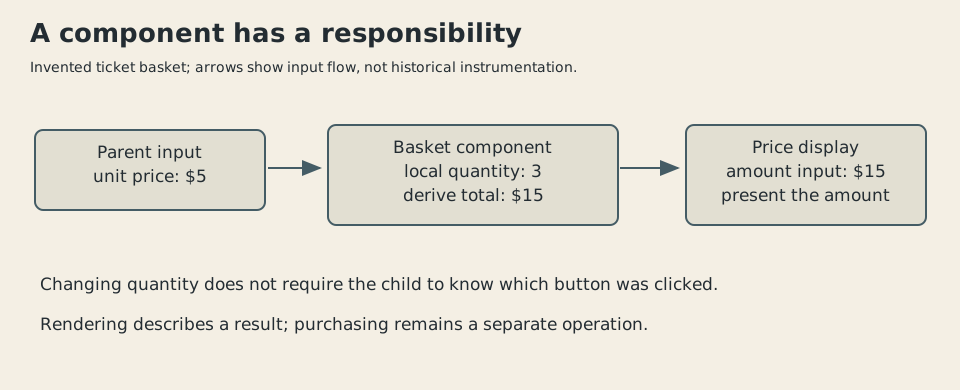
Modern explanatory diagram, drawn in 2026. It illustrates responsibility in the original basket example, not an exact implementation trace.
Markup moved into the programming conversation
React’s period examples also put something conspicuous inside JavaScript: JSX, an optional syntax resembling markup. The 0.3.0 README shows a component created with React.createClass, followed by React.renderComponent mounting its result into a page container. It explains that a transformation converts JSX into JavaScript.4
This was a different organizational choice from treating a template as an isolated document with its own limited expression language. The interface’s structure could sit near the logic that decided what structure to produce.
For the basket, the condition governing checkout and the button it governs have an obvious relationship. Keeping that relationship visible can be more useful than keeping every markup character in a separate file. It also gives ordinary programming tools a role in composing the interface.
The distinction is not between an untidy program and a tidy one. A component can contain bad names, tangled conditions and an unhelpful division of responsibilities just as a template can. The syntax does not do the editing for its author.
Optional JSX is another historical detail worth retaining. React’s component model and reconciliation were the underlying arrangement; angle brackets were a way to express it. A developer could use the library without adopting that syntax. Conversely, looking like HTML did not mean JSX was a string that the browser would understand without transformation.
The preserved README contains an installation example referring to 0.6.0 despite the file’s 0.3.0 tag. That discrepancy is recorded in the research note. Its component illustration helps establish period style, but its CDN snippet is not offered here as proof of the launch package or as a runnable installation recipe.
July already changed the contract
Version 0.4 arrived on July 17, 2013. Its announcement lists public key support, batched component updates, changes to server rendering and a switch from using id attributes to data-reactid for tracking document nodes.5
These are useful boundaries. A list-reordering tutorial depending on key should not be presented as a demonstration of every feature available at the May launch. A description of update timing should not silently flatten the two releases into one behavior.
The node-tracking change also shows that this small library had to coexist with an existing web. A page could contain other JavaScript and CSS with their own expectations. Owning an interface region was easier to describe than negotiating every interaction with surrounding code.
Nor was React a complete application architecture. Hunt described Instagram using it alongside Backbone.Router. Routing, server communication, storage and application-wide policy still needed decisions. Our basket’s clean rendering rule does not decide how inventory is reserved, how a user authenticates or whether a quoted price remains valid at checkout.
That limited scope was part of the proposition. A team could reconsider the view without necessarily replacing every other part of its application.
React’s first public year consequently matters less as the delivery of a final framework than as the public arrival of a durable habit. Make the interface a description of the current situation. Keep the description repeatable. Let a component explain a piece of the screen without remembering every event that led there.
The basket still needs correct arithmetic. It has merely become harder for three separate labels to maintain three separate opinions about the answer.
Sources
Footnotes
-
React, Versions: initial commit and early releases, official retrospective record, consulted 2026-10-10; May 29, 2013 public release. ↩
-
Pete Hunt, “Why did we build React?”, June 5, 2013. Contemporary design account; its performance claim is not reproduced as a finding here. ↩
-
React, version 0.3.0,
ReactCompositeComponent.js, interface comments and state-transition excerpts inspected. ↩ -
React, version 0.3.0 README, component example and JSX explanation. The anomalous 0.6.0 CDN path is not used as launch-version evidence. ↩
-
Paul O’Shannessy, “React v0.4.0”, July 17, 2013. ↩