C:\2000S\MACOSX10.TXT
2001
Mac OS X: A Desktop With Internal Borders
The March 2001 release put Aqua above a protected, preemptive operating system while keeping a route back to older Macintosh applications.
An application can look perfectly well behaved while making a terrible neighbor. It draws its window, accepts a document, and then occupies the processor indefinitely. Other applications wait for an opportunity that the busy one has neglected to provide. The desktop’s apparent democracy depends on voluntary attendance.
Mac OS X changed that arrangement for native applications. The operating system scheduled their work and protected their memory. Apple paired the new foundation with Aqua, a visibly new interface. The surface attracted attention; the internal borders were the more consequential change.
Apple released a public beta on September 13, 2000. Its March 21, 2001 announcement specified retail availability on March 24. The beta, the announcement, and the retail date should retain their separate places in the story.12
This was a transition across application generations as well as an operating-system release. A new foundation is useful only if people can continue doing enough of their old work while software catches up. The box included Mac OS 9.1 for Classic applications. The future came with a substantial compatibility allowance.2
Give the scheduler the authority
Apple’s archived kernel guide contrasts Mac OS 9’s cooperative application scheduling with OS X’s preemptive environment. In the latter, the kernel controls access to processor time instead of relying on every application to yield at suitable moments.3
A scheduler decides which runnable thread gets to execute. Runnable matters: a thread waiting for a disk operation has no immediate instruction work the processor needs to perform on its behalf. The operating system can let other work proceed while the request waits.
Preemption permits the system to interrupt an executing thread and run something else. It doesn’t mean every application receives identical time or that no program can ever feel slow. Priorities, waiting, and the amount of runnable work still affect the outcome.
The practical difference is authority. An application can remain busy without owning the schedule indefinitely. The desktop doesn’t have to wait for the application to discover its social obligations.
There is a further distinction between an application’s interface freezing and the entire environment ceasing to respond. If its own interface thread is occupied, a program can still become unhelpful. A preemptive system gives other applications a chance to continue. It cannot make an application handle an event it has no time to examine.
That is why protected, scheduled execution should be understood as containment. A system becomes more resilient when a local problem can remain local. It hasn’t abolished problems. It has acquired somewhere sensible to put them.
Three tasks on one imaginary processor
Here is an original scheduling model, with deliberately invented times. It illustrates preemption, not Darwin’s actual scheduling algorithm or a benchmark of a Macintosh.
Three tasks become ready together. A drawing operation needs 30 milliseconds of processor work, a mail operation needs 10, and an interface update needs 5. Assume one processor and a five-millisecond time slice. Ignore switching overhead and priorities.
| Time interval, ms | Task | Work remaining afterward, ms |
|---|---|---|
| 0–5 | Drawing | 25 |
| 5–10 | 5 | |
| 10–15 | Interface | 0 |
| 15–20 | Drawing | 20 |
| 20–25 | 0 | |
| 25–45 | Drawing | 0 |
After the other tasks finish, drawing can use the remaining intervals. The last row compresses four five-millisecond slices into one entry because no competitor remains in this model.
All 45 milliseconds of work still have to happen. Preemption hasn’t invented spare processor capacity. It has allowed the short interface job to finish at 15 milliseconds instead of waiting behind the full drawing and mail operations.
For comparison, a simple nonpreemptive sequence in the listed order finishes drawing at 30, mail at 40, and the interface at 45. This comparison models tasks that do not yield early. A cooperative program that yields frequently could produce a different result; the important point is that preemption gives the system a means of enforcing turns.
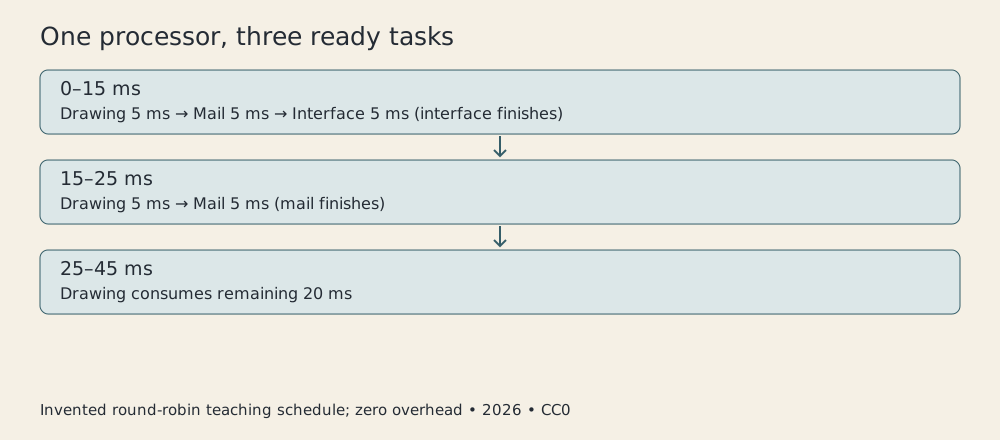
Original CC0 diagram, 2026. Invented single-processor schedule; neither measured performance nor a reconstruction of the Darwin scheduler.
The example also exposes a tradeoff. More frequent switching can improve opportunities for response, while switching itself costs work. Real systems must account for that cost and for different classes of task. Choosing a small number for a diagram is much easier than choosing a policy for a machine running actual people’s software.
An address isn’t a place until it’s translated
Memory protection establishes another boundary. Apple’s kernel guide describes separate process address spaces and controlled access between them. Darwin brings together Mach, BSD, and Apple technologies; it is the underlying operating-system foundation rather than the complete Aqua desktop.3
An address space is the set of memory addresses a process can use. Two processes can use the same numerical address without referring to the same physical storage. The system’s mappings determine what each address means in each context.
Imagine two applications, A and B. Each asks to read address 1000. In our teaching model, A’s address maps to a physical location holding its document text; B’s maps to a different location holding its network buffer. The identical number doesn’t imply shared ownership.
Now suppose A attempts to write to a location outside its permitted mapping. Hardware and operating-system mechanisms can detect the violation. Handling that fault is preferable to silently replacing B’s data with a brushstroke’s coordinates.
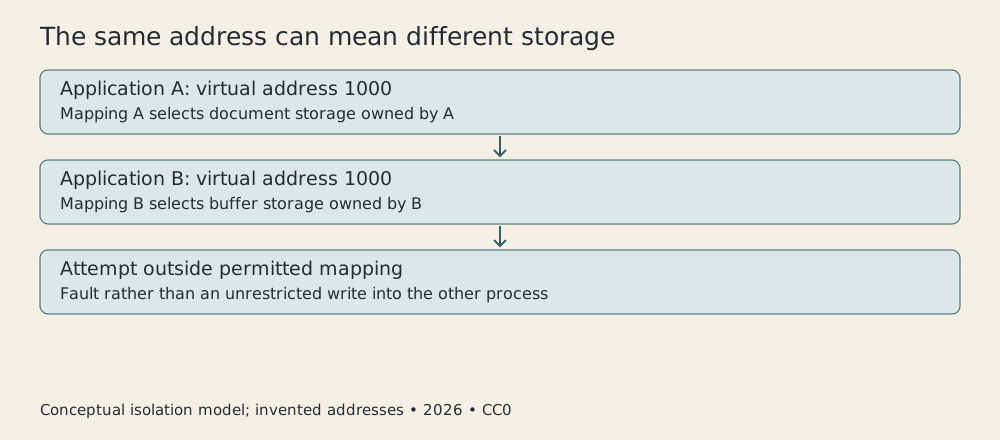
Original CC0 diagram, 2026. Simplified address mappings explain isolation; the numbers are invented and don’t represent real Mac OS X page tables.
This does not require forbidding all communication. Applications need to exchange information, and a system can provide explicit ways to do that. The boundary makes sharing a deliberate operation rather than an accidental consequence of neighboring allocations.
It also has limits. Two processes can damage the same file if they have access and coordinate badly. A privileged component can have a wider effect than an ordinary application. Memory protection describes a particular enforcement mechanism, not a blanket guarantee that everything on a computer is safe.
A Mac desktop above a different foundation
Aqua supplied the visible arrangement, including the Dock. The launch announcement also identified Quartz for two-dimensional graphics, OpenGL for three-dimensional work, and QuickTime for media. These are launch-period components, not later additions inferred from a modern Mac.2
The graphics stack and the kernel solve different parts of the experience. A button needs drawing and event handling. The process drawing it needs scheduling and memory. An attractive interface cannot compensate for absent protection, but protection alone doesn’t supply an understandable interface.
Apple’s March announcement included BSD command-line tools and network services alongside the graphical system. A user could remain in the desktop while developers and administrators had a different route into the same machine.2
That coexistence is the interesting design decision. The system did not require every ordinary operation to become a shell command. It also did not require technical users to abandon a mature command-line environment merely because the windows had acquired translucent decoration.
The new architecture was a collective engineering product, drawing on existing systems and Apple’s own work. Jobs was its public advocate, not the sole author of a kernel, application framework, and desktop. A stage presentation is a very small sample of the people required to make an operating system boot.
Compatibility is an engineering schedule
Classic provided a route for older applications, while Carbon and Cocoa represented application environments in the wider architecture described by Apple’s guide.3 These names should not be reduced to interchangeable labels for “Mac programs.” They described different paths through the transition.
For an application vendor, changing operating-system generations can mean revisiting interfaces, assumptions, drawing, and installation. For a user, it can mean discovering that an essential tool or peripheral isn’t ready. The release date of the system is only one date in that migration.
Keeping an older environment available reduces immediate disruption. It also means the new system’s benefits cannot simply be assigned to every piece of legacy code. An old application running within a compatibility arrangement is not automatically equivalent to a newly designed native application.
This is a general migration lesson, rather than a claim about every Classic failure mode. Compatibility preserves valuable behavior while placing some limits on how quickly an ecosystem can change. Remove it too early and useful work stops; retain it indefinitely and old assumptions become a permanent design obligation.
The first retail release deserves that transitional framing. It established the direction while leaving real product work ahead. The September 2001 announcement for version 10.1 emphasized performance and additional capabilities, including DVD playback. Those improvements belong to 10.1, not to a retrospective feature list for March.4
Reliability is a change in the shape of failure
The worked examples explain why the architecture mattered without manufacturing performance results. Our schedule shows an interface task finishing earlier under a stated policy. Our address mapping shows how two processes can keep the same numerical address private. Neither proves a particular application ran faster in 2001.
What they show is a redistribution of control. The operating system can enforce turns, define access, and contain a misbehaving native process. That makes the desktop less dependent on every application behaving perfectly all the time, a dependency with a rather demanding recruitment policy.
Mac OS X’s early importance lay in joining those boundaries to a usable Macintosh environment and a migration path. The glossy appearance was memorable, but the deeper promise was mundane and valuable: one program’s trouble needn’t immediately become everybody’s trouble.
It still takes good applications, working drivers, and tested storage to deliver a dependable computer. The kernel cannot edit a document for you. It can help keep another application’s mistake from editing the document on your behalf.
Sources
Footnotes
-
Apple, Mac OS X Public Beta release, September 13, 2000. ↩
-
Apple, Mac OS X Hits Stores This Weekend, March 21, 2001. March 24 availability, Darwin, graphics components, BSD tools, Classic and included Mac OS 9.1. ↩ ↩2 ↩3 ↩4
-
Apple, Kernel Architecture Overview, archived developer guide. Consulted for architectural explanations; this later archived document is not treated as an exact 10.0 implementation listing. ↩ ↩2 ↩3
-
Apple, First Major Upgrade to Mac OS X Hits Stores This Weekend, September 25, 2001. Distinguishes 10.1 improvements from the March release. ↩