C:\1990S\WINDOWS9.TXT
1995
Windows 95: The New Desktop Still Had Old Obligations
Windows 95 made everyday work easier to find while balancing preemptive Win32 execution with the shared code and cooperative behavior older applications expected.
A person wants to open a program, find a document and return to something already running. These are related actions in ordinary work, even if an operating system has previously sent them to different places.
Windows 95 made that collection more approachable. The Start menu gave work a recognizable beginning, and the taskbar gave running work a visible place to return to. Beneath the interface, however, the system had another collection to manage: new 32-bit programs and older applications with established expectations.
The new desktop couldn’t make those expectations disappear. A useful upgrade had to carry a substantial part of the previous world along with it.
That is why Windows 95’s story is as interesting below the taskbar as on it. The interface offered a clearer arrangement of actions. The architecture negotiated who could perform them, and when.
A launch, and a visible change
Windows 95 launched on August 24, 1995. Microsoft’s retrospective identifies the Start menu and taskbar as defining additions. Its launch history also lists the Recycle Bin, shortcuts, longer filenames and Plug and Play.12
Those capabilities describe different kinds of convenience. A longer filename can carry more meaning for a person. A shortcut can provide a route to an item without requiring another complete copy. A visible running-task control can reduce the effort of finding the right window.
Consider an invented desktop with a letter, a spreadsheet and a drawing program open. Opening the drawing program and returning to its existing window are different intentions. An interface that gives running tasks a persistent location helps make the second intention visible.
That matters even without changing the work inside the program. A drawing can remain exactly the same while the route back to it improves. Usability includes the cost of recovering your place, not merely the cost of starting something.
The article’s technical evidence comes from Adrian King’s Inside Windows 95, published in 1994 while the system was still being developed. It describes the planned architecture rather than serving as a complete inventory of the final retail build. That version boundary stays visible here.3
Different kinds of turn-taking
King describes Win32 applications with private address spaces and preemptive scheduling, while Win16 applications share an address space and retain cooperative scheduling. The shell consolidates responsibilities previously split among Program, File and Task Manager.3
Scheduling is the decision about which thread receives processor time. A thread is an executing sequence of instructions within a process. With a single processor, several runnable threads take turns; the appearance of concurrent work doesn’t mean every instruction happens at once.
In cooperative scheduling, a participant is expected to yield control at suitable points. In preemptive scheduling, the system can interrupt a running participant and give another one a turn. The difference determines how much progress depends on the current program’s cooperation.
Imagine two new applications doing independent calculations. In a deliberately simplified timeline, thread A runs for one interval, then thread B runs for one interval, then A again. The scheduler chooses those changes; the application doesn’t need to reach a voluntary courtesy point before every switch.
The size of our interval is arbitrary. This isn’t a statement about a real Windows 95 quantum, timer resolution or observed response time. It isolates the reason preemption is useful: the system can allocate another turn even when the current calculation hasn’t finished.
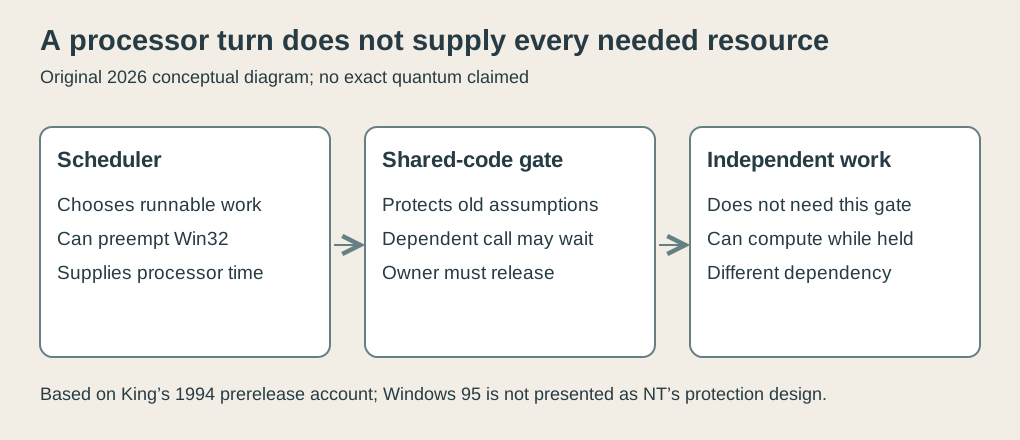
Original explanatory diagram, 2026. A conceptual distinction between processor scheduling and access to shared code; not a Windows 95 screen or exact scheduler implementation.
A scheduling turn doesn’t supply every resource a thread needs, however. A thread can receive an opportunity to run and immediately discover that it must wait for something else.
That second kind of waiting is central to the compatibility problem.
Shared code needed a gate
Older code can have a non-reentrant routine: one that cannot safely be entered by another caller before its existing use finishes. Shared internal state may be the reason.
An invented example makes the hazard easy to see. A routine temporarily stores the current caller’s destination in a shared variable. Caller A sets it to “printer,” then pauses. Caller B enters and changes it to “screen.” If A resumes and trusts the shared variable, its operation may use B’s destination.
Both callers can be individually reasonable. The overlap breaks the routine’s assumption that nobody else changes that state midway through its work.
Rewriting the routine to keep separate state, or carefully protecting smaller sections, can address the problem. Preserving existing code and expectations can instead require serialized access: one caller at a time through the relevant gate.
King’s Win16Mutex discussion describes this compatibility gate. Win32 threads needing the Win16 subsystem can block while a Win16 thread holds it; Win32 threads that don’t enter that subsystem don’t block on that mutex. The gate remains associated with active Win16 execution until cooperative yield.3
This qualifies a common oversimplification. It isn’t accurate to infer that every independent 32-bit calculation must stop merely because an older thread holds the gate. Dependence on the shared facility is the crucial detail.
Follow three participants
Let’s construct a teaching timeline with three participants:
- Legacy: an older Win16 thread that holds the gate.
- Dependent: a Win32 thread whose next operation needs the protected older subsystem.
- Independent: a Win32 thread doing a calculation that doesn’t use that subsystem.
These names describe the model’s dependencies, not real application binaries. We choose the turns explicitly instead of implementing Windows scheduling.
At interval 0, Legacy begins and owns the gate. At interval 1, Dependent attempts its shared operation. It finds the gate occupied and waits.
At interval 2, Independent performs a unit of computation. Its work doesn’t need the gate, so the ownership doesn’t prohibit that progress.
Legacy resumes at interval 3 and continues its old operation. Independent performs another unit at interval 4. At interval 5, Legacy yields and releases the gate.
Dependent can now acquire the gate and perform its operation at interval 6, releasing it afterward.
| Interval | Selected participant | Model action | Gate afterward |
|---|---|---|---|
| 0 | Legacy | Acquire and begin | Legacy owns it |
| 1 | Dependent | Attempt access; wait | Legacy owns it |
| 2 | Independent | Compute one unit | Legacy owns it |
| 3 | Legacy | Continue | Legacy owns it |
| 4 | Independent | Compute another unit | Legacy owns it |
| 5 | Legacy | Yield and release | Free |
| 6 | Dependent | Acquire, work, release | Free |
The important result is that Dependent waits while Independent advances. A single shared gate affects work that needs that gate.
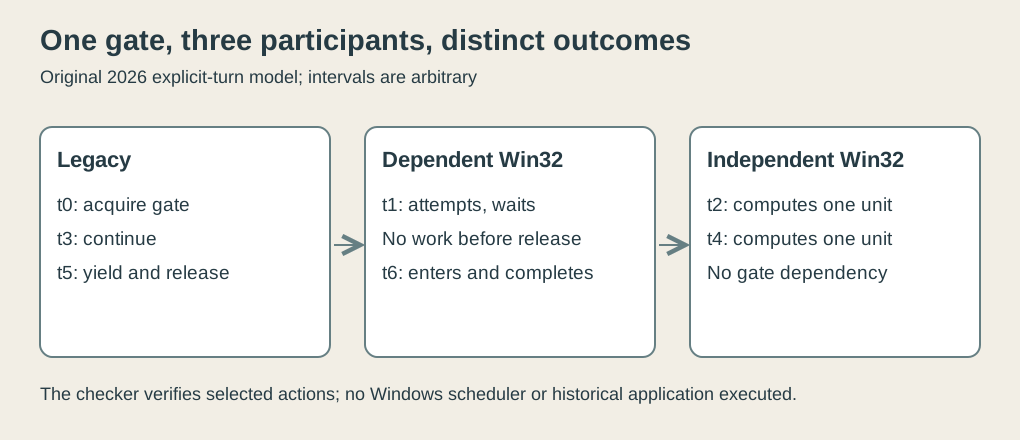
Original teaching timeline, 2026. Invented turns and work units based on the documented dependency distinction; no measured quantum, API trace or Windows execution claimed.
Our saved checker tracks the gate owner and work counters. It confirms that Dependent performs no shared work before release and that Independent completes two units while Legacy still owns the gate.
It isn’t a full scheduler simulation. The selected turn sequence is an input, and the arbitrary work units aren’t elapsed milliseconds. A narrow model lets us verify the explanation without pretending to reproduce the complete system.
What if the older program doesn’t yield?
Remove Legacy’s release from the sequence. Dependent’s next attempt still finds the gate occupied. Independent can still perform another unit, assuming it continues to avoid the protected facility.
The resulting visible behavior depends on what the applications need. A new application might make progress in a private calculation and then stall when it reaches a shared operation. A different thread might remain independent longer.
Consequently, “the processor is available” and “this operation can proceed” aren’t equivalent statements. Scheduling supplies a turn; resource ownership supplies permission to enter the critical code. Both conditions may be needed.
This is a useful way to read complaints about hangs. Several windows can appear unresponsive because their relevant operations share a dependency. That observation doesn’t establish that every thread has stopped executing.
Our second checker scenario leaves the gate owned, records repeated Dependent failures and records Independent progress. It illustrates the scope of blocking. It doesn’t prove that a real hung legacy program is harmless, predict recovery behavior or promise that a particular application can avoid the shared subsystem indefinitely.
Compatibility carries structural costs because older software’s assumptions can become new software’s constraints. Maintaining the same visible behavior may require preserving an execution arrangement that a clean design would otherwise change.
A practical compromise has several measures
It would be easy to judge the design using one goal at a time. Maximize isolation. Minimize memory. Preserve every old program. Rewrite all shared code. Ship promptly.
The difficult part is that these goals interact. A change that removes a shared dependency may require rewriting and testing code on which many applications rely. A change that preserves an old timing assumption may reduce how independently new work proceeds.
King’s description makes the tradeoff visible, but the article doesn’t adopt his most confident performance assurances as measurements. The source was explaining a system still in development. The worked timeline likewise supplies an architectural interpretation, not proof of how fast a retail machine behaved.3
Windows 95 and Windows NT should consequently remain distinct systems in this series. Windows 95’s new Win32 facilities didn’t make its compatibility architecture equivalent to NT’s privilege and protection design. Calling both “32-bit Windows” hides too much of the machinery.
The retail milestone also deserves protection from later additions. A familiar screenshot from a subsequent release isn’t evidence that its browser integration or other later features were in the original August product. This article keeps the launch and its documented architecture as its boundary.
Finding work, and allowing work
The Start menu and taskbar made actions easier to locate. Preemptive scheduling made some work less dependent on voluntary turn-taking. The compatibility gate preserved assumptions of older code at a cost to work that needed it.
Those changes belong together because an operating system must manage both people’s intentions and programs’ dependencies. A person wants to switch tasks. The machine has to determine which parts of that task can actually proceed.
The strongest detail in the timeline is the independent thread. It prevents a sweeping explanation from concealing a specific relationship. Shared code can impose a wait without making every operation share that wait.
Windows 95 gave work a new starting place. Some of its older obligations still had to take their turn.
Footnotes
-
Microsoft, Looking back — The 25th Anniversary of Windows 95, August 24, 2020. Launch date and Start/taskbar milestone; linked interviews not quoted as if heard. ↩
-
Microsoft, Launch of Windows 95, corporate history entry. Selected launch interface/features only; company sales figures and promotional rankings not needed for the argument. ↩
-
Adrian King, Inside Windows 95, Microsoft Press, 1994, printed pp. 64–65 and 152–154. Prerelease architectural account, especially Win16Mutex’s dependency-specific blocking. Original chosen timeline isn’t a historical runtime trace. ↩ ↩2 ↩3 ↩4