C:\1990S\GIMP054.TXT
1996
GIMP: A Picture Is Also a Buffer
GIMP's early Unix releases made image editing extensible, with graphical tools and plug-ins that turned pixel data into a shared working material.
A photograph contains a dark speck. You’d like to soften it without softening the entire picture, moving its edges or turning the lettering behind it into soup.
This sounds like one small task. It actually asks an editor to coordinate several kinds of work: display the picture, identify a region, calculate replacement pixels, preserve the untouched surroundings and give you a way back if the result is dreadful.
A filter alone doesn’t provide that workflow. A collection of command-line utilities can perform impressive transformations while leaving the human to organize the intermediate files. A graphical editor puts the operations around the image, where their consequences can be seen.
The early GIMP added another useful division of labor. The editor could maintain the interaction while separate plug-ins supplied more operations. The interesting engineering lies in how a picture crosses that boundary: as data whose meaning both sides must understand.
A beta before the familiar name
Kimball and Mattis released the General Image Manipulation Program beta on November 21, 1995; 0.54 followed February 15, 1996. Its Unix/X11 Motif interface offered selections, painting, transformations, filters, color operations, extensions and multiple undo/redo.1
The 0.54 announcement places layers and an interface overhaul in future work, following the authors’ encounter with Photoshop 3.1
This article therefore uses 1996 as the milestone for 0.54, with the 1995 beta kept visible. It doesn’t ask a flat early editor to perform a modern layered composition. The chosen mechanism needs only pixels, a filter and a defined region of work.
What the picture contains
For an original teaching example, imagine a grayscale picture. Each pixel holds a brightness from 0 to 255. Zero is black; 255 is white. This deliberately removes the extra channels of a color image so we can inspect the arithmetic without negotiating with three numbers at once.
Our tiny picture has five rows and five columns. Every pixel is 90 except the center, which is 0:
90  90  90  90  90
90  90  90  90  90
90  90   0  90  90
90  90  90  90  90
90  90  90  90  90
Suppose we define an illustrative filter that replaces an interior pixel with the average of its surrounding three-by-three neighborhood, including itself. This is a box average. It is a teaching choice, not a claim about a named GIMP 0.54 filter’s precise kernel or rounding behavior.
At the center, eight neighboring values contribute 90 each. The sum is $8 \times 90 + 0 = 720$. Divide by nine and the new center becomes 80.
The speck has become lighter. We haven’t inferred what the camera originally saw; we’ve chosen a rule that spreads nearby brightness into the dark point. The distinction matters whenever an image is being treated as evidence rather than decoration.
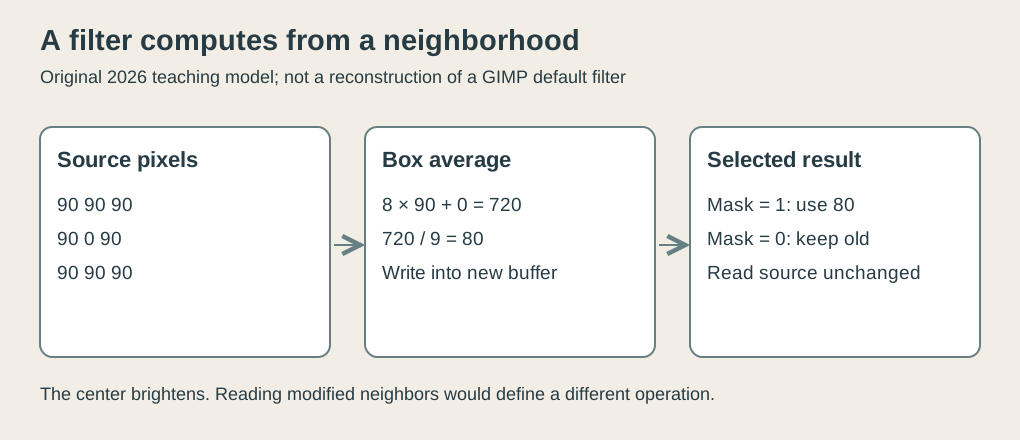 Original explanatory SVG, created in 2026. The invented grayscale filter and mask illustrate image processing; they don’t reproduce a historical screen or a particular GIMP filter.
One buffer to read, another to write
There is a second detail hiding inside “replace each pixel.” Which picture does the next calculation read?
A clean definition reads every neighborhood from the original picture and writes each result into a separate destination buffer. A buffer is simply an area of memory holding the pixel values. The source remains steady throughout the operation.
For our grid, the nine interior positions each have the dark center somewhere in their neighborhood. Every one of those neighborhoods therefore averages to 80. If we process the interior and leave the border unchanged, the result is:
90  90  90  90  90
90  80  80  80  90
90  80  80  80  90
90  80  80  80  90
90  90  90  90  90
The center brightened, but eight surrounding pixels became slightly darker. Smoothing redistributes variation. It doesn’t know which pixel we dislike.
Now imagine writing each replacement directly over its source, moving from the top left toward the bottom right. The next neighborhood may include a value that was already changed. Its average will be based partly on the original picture and partly on the work completed so far.
That defines a different operation. Reverse the traversal and you may get another answer. There are algorithms that intentionally update in place, but a uniform neighborhood filter shouldn’t acquire a preferred direction accidentally because a loop happened to march left to right.
The checker accompanying this article computes the separate-buffer version, verifies all nine interior results and confirms that reversing traversal leaves them identical. It also runs the deliberately different in-place version and detects unequal results between traversal directions. These are modern arithmetic checks, not an execution of the historical application.
The selection is a policy
Our opening problem asked to soften one speck. The full interior result changes more than that. We need a separate description of where the calculated result is allowed to appear.
Use a binary mask: one value for each position, with 1 meaning “take the filtered pixel” and 0 meaning “keep the source pixel.” Give only the center a 1. The result is now the original grid with its center changed from 0 to 80. The neighbors stay at 90.
This is an original mathematical explanation of restricting an effect, not an assertion about GIMP’s exact internal mask representation. Early GIMP’s announced selection tools establish the historical capability; our small model makes the separation between calculation and chosen region visible.1
A filter can calculate a candidate value without being authorized to replace every pixel. The mask supplies that authorization. Treating these as separate concerns lets an editor combine many selection shapes with many operations instead of implementing a special version of each filter for every possible region.
There is a consequence at the boundary. A selected pixel can still read unselected neighbors if that is how the operation is defined. Restricting the output doesn’t necessarily restrict the input neighborhood. Near an edge, those choices can yield different pictures.
Our example explicitly reads the original neighborhood, then applies the mask to the output. It leaves the outside border unchanged. Another implementation might extend edge pixels or wrap coordinates; neither policy has been smuggled into this calculation. The quiet decisions at the boundary are often responsible for the very visible decisions in the image.
Why send pixels to another program?
Mattis’s July 1995 description of the plug-in design distinguishes pipes for communication from shared memory for large data structures. It also notes that this message system doesn’t automatically expose arbitrary application internals.2
A pipe carries a stream between processes. It can convey a request and a reply: perform this operation, use these dimensions, report whether it succeeded. Shared memory lets separate processes access a common memory region, avoiding the need to treat every large object as another stream of transmitted bytes.
That separation suits images. In our five-by-five teaching picture, only 25 grayscale samples are involved. A hypothetical 1,000-by-1,000 RGB picture, storing one byte per channel, has 3,000,000 bytes of pixel data before any other structures are counted. The example is a size calculation, not a measured early-GIMP memory requirement.
The control request can remain small while the data it refers to is large. A plug-in reads the agreed image representation, performs its operation and reports a result. The host still has to interpret that result within its workflow. Merely making memory accessible doesn’t tell another program its dimensions, channel arrangement or ownership rules.
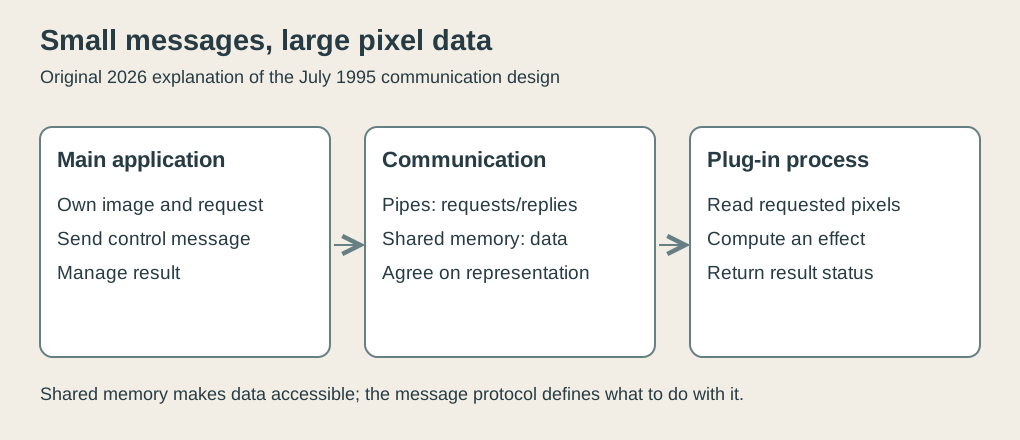 Original explanatory SVG, created in 2026, based on the July 1995 description of pipes and shared memory. It illustrates responsibilities rather than an exact packet format.
An extensible editor consequently needs a contract. What is the plug-in allowed to read? Where should it write? What does a failure mean? When may the memory be reused? A useful extension boundary gives outside code enough information to work while keeping unrelated internal details from becoming an accidental public interface.
Separate processes provide an organizational boundary, but shared writable memory isn’t a magic barrier against mistakes. Agreeing that a region contains pixels doesn’t prevent buggy code from writing the wrong bytes. Extensibility reduces the need to put every operation into the main application; it adds communication and compatibility work in return.
Editing requires recovery
Undo belongs alongside the filter, not after the engineering is finished. If an operation has overwritten the only stored version of the source, a later instruction to “undo” cannot recover it by wishing harder.
An editor needs some form of retained state or reversible operation. Keeping a prior buffer is one straightforward teaching strategy. Recording changed regions is another. This article doesn’t attribute either exact storage scheme to 0.54; its announcement supports multiple undo/redo, while the examples explain why recovery consumes information.1
The same distinction applies to saving. An image visible on screen and a file preserved on disk are separate states. The 0.54 notes mention a modification flag used to prompt before closing altered images.1 Such a flag doesn’t improve a photograph, but it can prevent the entire editing session from disappearing. Graphics software has to respect the user’s last twenty minutes as well as the next twenty pixels.
A useful early boundary
I find the five-by-five example useful because a successful average still leaves choices unresolved. We must decide which values remain available to read, which outputs may change and what information survives if we reconsider. The arithmetic alone cannot choose those policies.
Our dark speck supplies the practical lesson. The arithmetic needs a stable source. The selection defines where the result goes. The plug-in contract makes the operation available across a program boundary. Undo preserves enough information to reconsider it.
An image editor earns its usefulness by arranging those decisions around a picture somebody actually wants to finish. The pixels are numbers; the workflow is what makes changing them an edit.
Footnotes
-
Peter Mattis, preserved November 21, 1995 and February 15, 1996 announcements, “How It All Started”. Original announcements inspected. ↩ ↩2 ↩3 ↩4 ↩5
-
Peter Mattis, July 16, 1995 message, preserved on the same project history page. Original message inspected. ↩