C:\1980S\WORDFORW.TXT
1989
Word for Windows: A Document Becomes a System
The 1989 Windows version of Word joined graphical editing, reusable formatting, and substantial document machinery on ordinary PCs.
Change the size of one heading in a long report and the page still looks manageable. Change every heading and the document starts negotiating. Paragraphs move. Page breaks shift. A table that fitted neatly yesterday acquires strong opinions about its surroundings.
A word processor has to maintain several descriptions of the same document: its text, its formatting, its structure, and its current arrangement on pages. The user sees a sentence become bold. The software has a rather longer list of responsibilities.
Microsoft released Word for Windows in late 1989. Its place in this series comes from bringing substantial document preparation into the Windows graphical environment, with a working model that connected visible formatting to deeper organization. The achievement becomes easier to appreciate once the document stops looking like a string of letters.1
A familiar name on a different platform
Word for Windows 1.0 followed Microsoft’s DOS and Macintosh versions. It was also distinct from Windows’ included Write accessory. The product name can make these histories look like one uninterrupted application; platforms, interfaces, and release numbers require more care.
Microsoft’s original Word work had involved Charles Simonyi and Richard Brodie, drawing on their experience at Xerox PARC. The Windows product was a later team effort, rather than a fresh invention by one person. Its inheritance included the ambition to show formatting while a document was being edited.2
The first Windows version also entered an existing market. In his January 1990 hands-on review, John Lombardi compared version 1.0 with Ami Professional and NBI Legend. Graphical word processing on the PC already had competitors. The interesting claim is the strength and integration of this particular implementation.3
That review identifies style sheets, multiple document views, outlining, tables, and a BASIC-like macro language. It also describes the use of Windows printer facilities and Dynamic Data Exchange, or DDE, for exchanging data with cooperating applications. These belong to the period product; today’s ribbon, cloud collaboration, and modern document format belong to subsequent history.3
Formatting can have an address
Consider an invented report with four section headings. The author could select each heading individually, choose a font size, add spacing, and repeat the operation. That works until somebody asks for a different design.
A style supplies a reusable definition. Instead of remembering that a particular paragraph was made larger and bold, the document can associate it with a named formatting choice. Change that definition and the paragraphs using it can receive the new treatment together.
This moves a decision to a useful location. The author can reason about the document’s heading design in one place. The paragraphs retain their relationship to that design even when their words change.
Our teaching example uses a style called Section Heading. It begins with 12-point type and a chosen amount of space after the paragraph. The author changes it to 16-point type. The four headings are still four different pieces of text; they now share the revised formatting decision.
The name also communicates intent. A paragraph labeled as a heading carries information that a paragraph merely made large may not express as clearly. Word 1.0’s reviewed outlining features could associate styles with outline levels, connecting formatting to organization.3
I like this because it gives consistency a mechanism. Advising an author to “make all the headings match” relies on vigilance. Giving the headings a shared definition makes that vigilance easier to sustain.
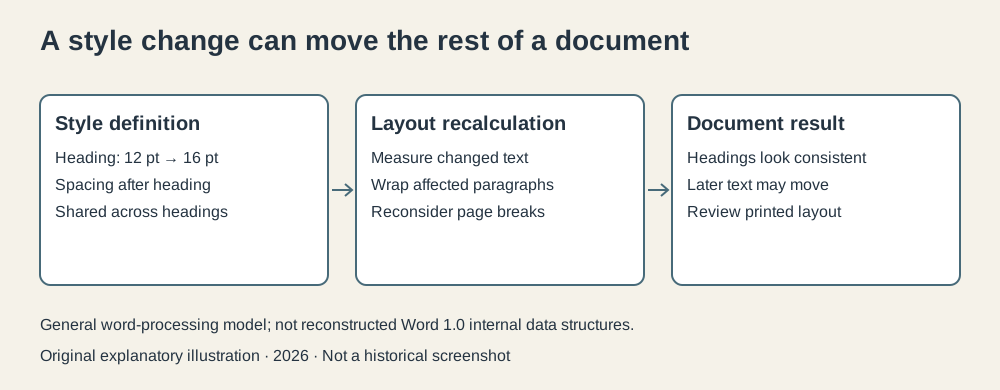
Original explanatory illustration, 2026. A general word-processing model with invented formatting choices; it does not reconstruct Word 1.0’s internal data structures.
There is still room for confusion. Direct formatting applied to individual passages can create local differences. A reusable definition helps only when the document actually uses it coherently. A report can contain a remarkably elaborate style system and still have one heading formatted by an impatient person on Friday.
The page has to be calculated again
Font size is a measurement, not a complete description of layout. The program needs character widths, paragraph widths, spacing, and rules for line and page breaks. A larger heading may take another line. Another line changes what follows.
For a simple original model, suppose each of our four headings occupies one line. The layout assigns an 18-point vertical advance before the change and a 24-point advance afterward. Those are invented layout values, not a rule equating font size with line height.
Each heading now consumes six extra points vertically. Across four headings, that adds 24 points, or one-third of an inch at 72 points per inch. If the old arrangement had only 12 points of spare room on a page, a break may have to change. The total increase alone doesn’t determine where: the positions of the headings and the paragraph rules matter.
This is why a document’s page count can change after an edit that adds no words. Pagination depends on the geometry of the text as well as its content. The software has to turn those ingredients into a new arrangement.
A fast editing view can also make different compromises from a full page view. The version 1.0 reviewer distinguished normal editing from full page viewing and reported slower behavior in the latter on the tested PCs.3 A graphical document application must decide how much work each view requires.
The general engineering problem is to update enough to keep the display honest without recalculating every possible consequence after every keystroke. Stored layout results can help, provided the program knows which edits make those results obsolete. A stale result is fast and wrong, an efficient combination with limited appeal.
Inserting a word needn’t move every character
Layout is one problem. Storing editable text is another. If a large document is kept as one contiguous sequence, inserting near the beginning may require moving much of the later text to create space.
One alternative is a piece table: keep text in storage and maintain a sequence of references describing which ranges form the current document. The document’s logical order can differ from the physical order of its characters.
The later Word for Windows 1.1a source archive contains piece-table machinery. Its preserved code is dated January 10, 1991, so it is evidence about that later implementation. The following model explains the idea; it isn’t a claim that we have reconstructed the precise 1989 implementation.4
Start with this invented original text:
The red foxThe original store contains eleven characters, including its two spaces. Insert quick after The . Store those six new characters in a separate added-text area, then describe the visible document with three pieces:
| Piece | Store | Starting offset | Character count | Visible text |
|---|---|---|---|---|
| 1 | Original | 0 | 4 | The |
| 2 | Added | 0 | 6 | quick |
| 3 | Original | 4 | 7 | red fox |
Offsets start at zero. Reading these ranges in order produces The quick red fox, seventeen characters long. The spaces are part of the ranges, rather than punctuation supplied by wishful thinking.
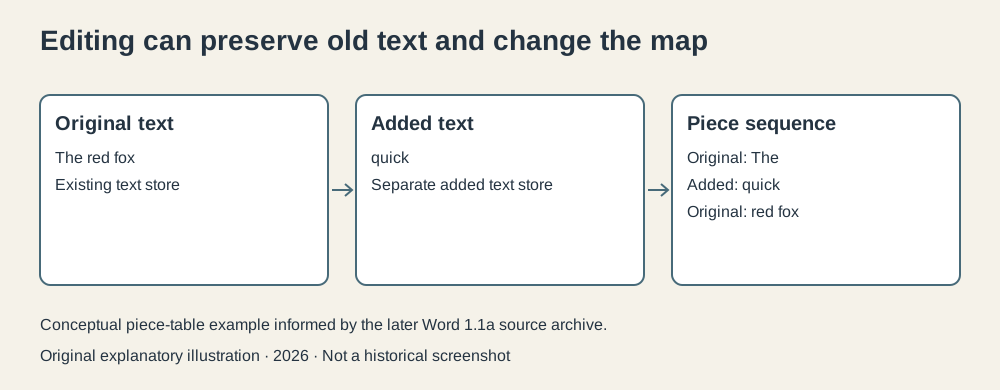
Original conceptual illustration, 2026, informed by the later Word 1.1a archive. Labels show text fragments; the table above supplies their exact spaces and ranges. Not a historical screenshot.
Now delete red . The third piece can instead refer to offset 8 in the original store, with a length of 3. The logical document becomes The quick fox. The original store can still contain the deleted characters, although the current piece sequence no longer selects them.
This does not mean deleted text must remain forever or that undo comes free. A complete editor needs policies for retained data, saved files, recovery, and edit history. Our model shows only why changing a map can avoid repeatedly moving a large tail of text.
The tradeoff is additional bookkeeping. The editor must locate a logical position within the pieces, split or combine ranges when needed, and keep the sequence valid. The later archive’s search-test document explicitly considers matches spanning piece boundaries: a word that looks continuous on screen may cross an internal boundary.4
For the reader of a document, that boundary should be invisible. For its programmer, it is another place where correctness has work to do.
A document joins the desktop
Word’s use of Windows made some surrounding services part of a shared environment. The contemporary review describes printer support through Windows and data exchange with other participating programs. DDE was a period mechanism, not today’s embedded-object or cloud-sharing system.3
The practical idea is understandable. A report may include numbers whose source is a worksheet. Keeping a relationship with another application can reduce repeated transcription. It also introduces questions about when data changes and what the document should display after that change.
Those are consequences of integration, rather than proof that integration always helps. A copied value is independent but can become stale. A linked value can stay connected but needs a dependable source and update policy. A polished report doesn’t tell its reader which arrangement was chosen.
The graphical interface also required real resources. Lombardi’s review found substantial differences between editing modes and hardware configurations. Its favorable judgment coexisted with complaints about sluggish full-page viewing.3 The document could look more like its printed result while demanding more work from the machine.
That balance prevents the familiar historical shortcut in which a graphical application succeeds merely because it is graphical. A useful implementation needs sufficient performance, capable printing, understandable commands, and compatibility with the documents people already have. The mouse cannot handle the migration plan by itself.
End the decade with an editable arrangement
Word for Windows is a fitting final subject for this series because it connects several of the decade’s developments. The graphical environment supplies shared services. Formatting turns choices into reusable definitions. Document structure gives those choices meaning. Editing and layout machinery keep the result usable within a constrained computer.
Its subsequent success doesn’t make every part of that outcome inevitable in 1989. The first version deserves examination as an ambitious application entering a competitive market, with limits visible in contemporary use.
What interests me most is the agreement between the surface and the machinery. The author asks for a heading, a correction, or a different page arrangement. The software maintains enough structure to make the request coherent across the document.
A report still needs something worth saying. Word for Windows made the work of arranging and revising it into a substantial desktop system. That leaves the author with the remaining difficulty: deciding what the report should say before the software has finished making it look authoritative.
Footnotes
-
Roy Levin, Microsoft Research, Microsoft makes source code for MS-DOS and Word for Windows available to public, March 25, 2014, confirms the 1989 release. The Computer History Museum’s source-release account specifies late 1989. No unsupported exact day is assigned here. ↩
-
Computer History Museum, Word source-release account, Simonyi, Brodie, Xerox PARC, and early Word. These roles concern the product’s earlier lineage, not sole authorship of the Windows version. ↩
-
John Lombardi, “Welcome Microsoft Word in a New Version for Windows”, InfoWorld, January 15, 1990, pp. 78–80. Contemporary hands-on primary evidence about version 1.0; the three-page scan was visually inspected. Its screenshot is research evidence, not reproduced as a reusable asset. ↩ ↩2 ↩3 ↩4 ↩5 ↩6
-
CHM’s Word for Windows 1.1a archive, preserved January 10, 1991. Inspected
MuseumDistribution_Readme.txt,Opus/wordtech/doc.hpiece descriptor,Opus/CREATE2.Cpiece-table initialization, andOpusEtAl/cashmere/doc/srchtest.docboundary cases. The teaching example is original, with no copied implementation code. Archive reuse restrictions apply; the source package is not bundled with this series. ↩ ↩2