C:\1980S\POWERPOI.TXT
1987
PowerPoint: Presentations Become Desktop Documents
The original Macintosh PowerPoint put editable slides, speaker notes, and printed handouts into a single presentation workflow.
The meeting starts tomorrow. The argument has changed today. The transparencies have already been prepared.
That is a production problem before it is a problem of public speaking. Once a presentation exists as typed sheets, artwork, or photographic slides, a modest revision can require several people and another trip through the machinery that made it. The speaker may understand the subject perfectly and still be waiting for somebody to move a box three inches to the left.
PowerPoint’s original opportunity was to give the person making the argument control over the document that supported it. Its first release was intended for the printed presentation world of overhead projectors. The familiar laptop projecting an animated deck would come later.
Forethought, before Microsoft
Robert Gaskins developed the product concept at Forethought, a Silicon Valley software company. His August 14, 1984 proposal described presentation graphics for overhead projection and envisaged slides, talking papers, and handouts derived from one master file. It also proposed capabilities that weren’t all present in the first shipping version. A proposal is an account of intention, not a receipt.1
Gaskins identifies Dennis Austin, who joined in October 1984, and Tom Rudkin, who joined in May 1986, as the other two earliest central contributors. Austin’s design and implementation work mattered enormously; treating PowerPoint as a business idea that simply became code leaves most of the difficult part out. The program was initially called Presenter before taking the PowerPoint name.2
Although Windows had been an early intended platform, Forethought shipped the first version for Macintosh. Gaskins dates the program files on the shipping disks to April 20, 1987. This is an unusually concrete milestone: software recorded on disks, rather than an elastic claim about when an idea was born.2
Microsoft acquired Forethought later in 1987. PowerPoint therefore entered Microsoft’s product family through acquisition, with a working Macintosh product already in existence. Windows PowerPoint wasn’t version 1.0’s original home, and PowerPoint wasn’t originally created as a component of Microsoft Office.3
The output still had to leave the computer
The Macintosh supplied a graphical environment in which text and drawing objects could be arranged directly. The LaserWriter and the surrounding desktop publishing ecosystem supplied a route to quality printed output. Those capabilities made a presentation application practical in a way a low resolution text display and a rough printout could not.
Forethought’s July 1986 product review shows this reasoning explicitly. It distinguishes overheads, 35 mm slides, and video, and assigns different capabilities and costs to them. It also emphasizes the presentation as the unit of work: an editable sequence, with accompanying materials, rather than isolated graphic templates.4
PowerPoint 1.0’s particular job was black and white overhead production on the Macintosh. Color slide production belonged to the next stage, PowerPoint 2.0 in 1988. Retelling the first release with today’s animation, multimedia, or online collaboration would miss the actual engineering question. How could one person maintain a presentation and produce the physical materials needed to deliver it?5
The computer didn’t abolish the projector, the printer, or the handout. It brought their preparation into a document that could be revised.
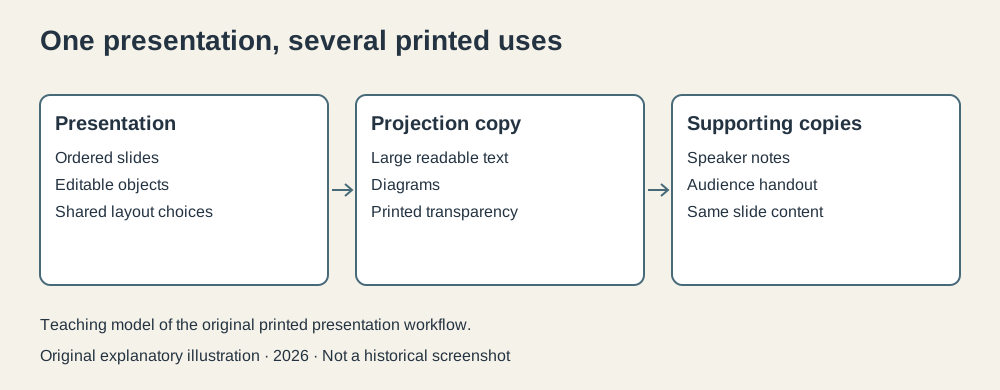
Original explanatory diagram, 2026. This illustrates the printed presentation workflow; it is not a screenshot of PowerPoint 1.0.
Why editable objects mattered
A slide can be represented as a bitmap: a grid recording the color of every pixel. That works nicely when painting, but it is a poor primary model for a business diagram you expect to revise. If a box and its label have become only pixels, moving the box may require selecting and repairing an area of the picture. Changing the label means repainting part of it.
An object based drawing preserves a different kind of information. A rectangle has a location and dimensions. Text has characters and formatting. A line has endpoints. The application can select a shape, move it, resize it, or redraw it at another scale because it retains instructions describing the shape.
This is a general explanation of the drawing model, not a reconstruction of every internal PowerPoint 1.0 structure. It clarifies why the product could give an author useful control over slide layout. Contemporary Forethought materials emphasize direct editing, drawing, reuse, and multiple forms of output.4
Imagine a slide showing a process with three departments. Purchasing sends an order to Shipping, which passes information to Billing. Each department occupies a labeled box, and arrows show the relationships. Then the organization changes. Shipping becomes Distribution, and its box needs more space.
With separate editable objects, you alter the label, enlarge the box, move its neighbors, and adjust the arrows. The change concerns the logical components of the diagram. You don’t need to redraw the entire slide. The difference becomes particularly useful at the fifth revision, when the person requesting it confidently calls it “the final small change.”
A screen and a printer disagree politely
Preserving geometry also helps with output. A display and a printer have different resolutions, but a document needs to keep its physical proportions.
For a deliberately simplified example, place a rectangle one inch from the left edge of a page and make it two inches wide by one inch high. At 72 coordinate units per inch, the rectangle is 144 units wide and 72 high. At 300 units per inch, it is 600 units wide and 300 high. Its size in inches hasn’t changed.
The basic conversion is:
These numbers are a teaching model, not a specification of PowerPoint’s private coordinates or every device’s exact resolution. The point is that retaining a description of geometry allows each output device to render it appropriately. A tiny preview doesn’t have to supply all the pixels of a larger printed original.
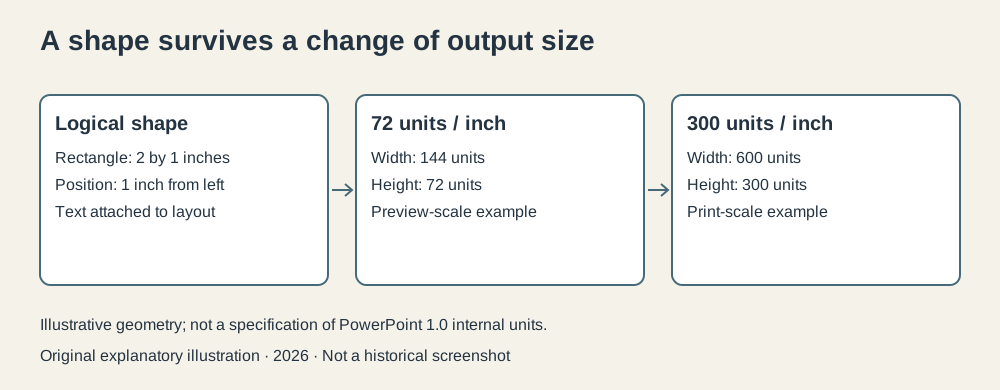
Original geometry illustration, 2026. Illustrative resolutions and dimensions; not a recovered PowerPoint implementation diagram.
Text adds further complications. A font available on the screen may be rendered differently by the printer. Character widths determine where a line breaks. A shape that fits beside a short label can become crowded when the label wraps. WYSIWYG, “what you see is what you get,” is a useful goal, but it requires cooperation between the application, fonts, and output device. The acronym doesn’t do that work itself.
That is why a graphical presentation program was part of a system of technologies. The application’s editable layout, the Macintosh environment, and the printer’s rendering abilities all contributed to the result.
Three audiences for one file
The projected slide, the speaker’s page, and the audience’s handout have different jobs. The slide needs large, selective information readable from a distance. The speaker may need reminders that would be distracting on the screen. A handout can place several slides on a page to make the argument easier to carry away.
Keeping these outputs associated with a presentation reduces a mundane but expensive failure: disagreement between copies. If the projected slide gives the revised total and the handout gives the previous total, the audience acquires an excellent reason to stop listening and start checking arithmetic.
The original product’s provision for slides, notes, and handouts followed the workflow identified in the early proposal and developed in the shipped Macintosh application.15 The benefit was consistency through a common source of slide content, while still allowing different page arrangements for different purposes.
Consider a deck of ten slides. In a teaching example, printing five slides per handout sheet produces two sheets. Printing one slide alongside its notes produces ten speaker pages. Printing one transparency per slide produces ten projection originals. Those counts are simple; the organizational gain lies in keeping the same ten slides behind all three jobs.
This doesn’t remove editorial choices. A speaker can still put too much material on a slide, write inadequate notes, or hand out a document that makes sense only when narrated. Software can organize the artifacts. Somebody still has to organize the thought.
The freedom to revise has consequences
Giving speakers direct control reduces the interval between deciding on a change and seeing it on the page. It also makes presentations reusable. A slide from an earlier report can enter a new sequence without sending the entire job back through a production department.
That is a practical accomplishment, and it has a less glamorous side. When revision becomes easy, requests for revision become easier too. A presentation can accumulate more slides because adding another no longer feels expensive. The tool lowers a production cost; the organization decides whether to spend the saving on clearer communication or a larger pile of material.
I don’t think that makes the original idea suspect. It makes its success worth examining at the level of work. PowerPoint solved the delay and duplication involved in preparing presentation documents. It couldn’t promise that the resulting meeting would deserve them.
Nor should later ubiquity be projected backward as immediate inevitability. Forethought’s early documents contain forecasts, competitive positioning, and proposed partnerships. These are evidence of a company trying to build a market, not proof that every forecast came true.4
The presentation becomes the thing you save
PowerPoint’s first release is easiest to appreciate when the slide deck is treated as an editable document with several destinations. The visible page was important, but so was the file behind it: ordered slides, reusable parts, and supporting output managed together.
That pattern reaches beyond presentations. A useful application often preserves the user’s working model and then produces several kinds of finished artifact from it. The original PowerPoint did this for a task that had involved physical media and several production steps.
Its central promise was that a speaker could change the argument and change the supporting materials in the same place. Whether the argument improved remained beyond the jurisdiction of the File menu.
Footnotes
-
Robert Gaskins, original presentation product proposal, August 14, 1984. Proposed capabilities are distinguished from shipping features. ↩ ↩2
-
Robert Gaskins, PowerPoint history and contributor chronology, especially the 25th anniversary account. ↩ ↩2
-
Robert Gaskins, Results of Microsoft’s Graphics Business Unit after Our First Year, August 8, 1988, records the new unit beginning July 31, 1987 and the retained PowerPoint team. ↩
-
Forethought/Robert Gaskins, Presenter: New Product Summary and Review, July 15, 1986. A planning document, including forecasts. ↩ ↩2 ↩3
-
Robert Gaskins, PowerPoint at 20: Back to Basics, Communications of the ACM, December 2007, and 2012 creator interview, including the original notes/handouts workflow. The 1988 internal report documents the color product’s development. ↩ ↩2