C:\ANCIENT\NLS.TXT
1968
NLS: A Document Is Larger Than Its Current View
NLS showed structured documents, links and shared work; an original tree model explains how navigation and view controls can change the screen without changing the underlying material.
A project document starts with a useful outline. Then the equipment list gets longer, staffing acquires its own explanation, and the schedule needs a few exceptions. Before long, looking for the overall plan means scrolling through the reasons it is no longer simple.
The information is useful. The current view is making it difficult to use.
NLS explored a richer arrangement: structured material could be viewed at different levels, linked and worked on with other people. The document could remain detailed while the screen showed the part appropriate to the current task.
That distinction between stored material and visible material is small enough to miss and important enough to build an interface around.
A public demonstration, not a shipping date
The Doug Engelbart Institute dates the live NLS demonstration to December 9, 1968, at the Fall Joint Computer Conference in San Francisco. Douglas Engelbart and the SRI Augmentation Research Center team presented hierarchical views, links and shared-screen collaboration with audio/video.1
The archive’s transcribed onscreen outline describes complex information structures, control techniques and joint file usage. Its credits identify Bill English’s show coordination and several software/presentation contributors.2
This was a demonstration of developed research, not a commercial product release on that date. Nor should the presentation’s networked collaboration be described as already using the later ARPANET: the archive places that network among future activities.1
The examples here are invented. They separate document structure, view and navigation without asserting a reconstructed NLS command language or permanent-address implementation.
Five items in one tree
Create a small project document with this structure:
Project
  Budget
    Equipment
    Staffing
  Schedule
There are five stored items. Project is the root. Budget and Schedule are its children; Equipment and Staffing belong beneath Budget.
Our original model gives each item a chosen identifier as well as text and a child list. Project is root, Budget budget, Equipment eq, Staffing staff, and Schedule schedule.
Those names are invented model identifiers. They don’t claim to reproduce NLS addressing syntax.
The relationships carry information beyond the five text labels. Equipment isn’t simply the third line of a string; it is a child of Budget. The model can use that relationship when constructing a view.
Depth is a display choice
Choose a depth-one view, counting the root at depth zero. The screen shows Project, Budget and Schedule. Equipment and Staffing are deeper than the chosen limit and remain hidden.
The stored tree still has five items. Its Equipment text hasn’t been erased, and Budget still has two children.
Change the view to depth two and all five items become visible. No content had to be retyped or restored from a backup. We changed the selection policy used to derive the display.
Our checker compares the stored records before and after both views and verifies that the document is unchanged. It checks the visible identifiers separately: three in the shallow view, five in the deeper view.
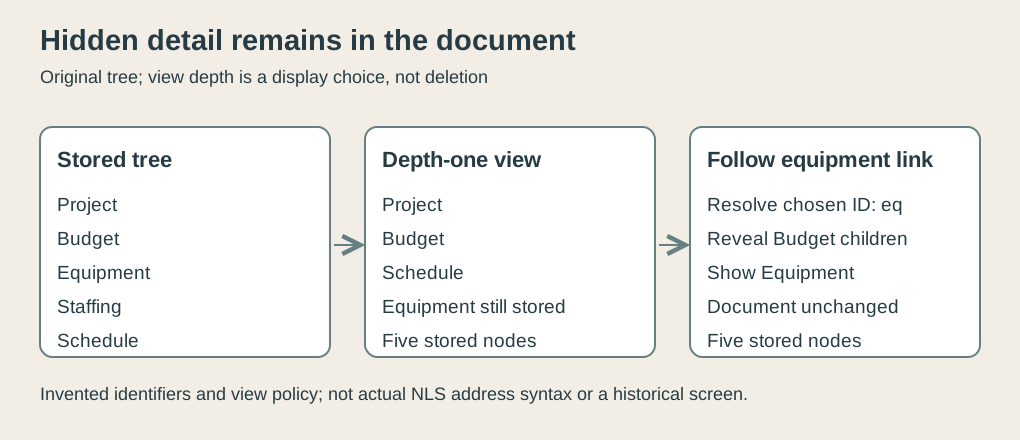 Original explanatory SVG, created in 2026. Chosen tree, identifiers and view policy; not an NLS screen or recovered address syntax.
The archive describes hierarchical view control and internal linking.1 The precise depth rule and data representation here are independent teaching choices.
A visible row isn’t an item’s identity
In the shallow view, Schedule is the third visible item. In the deeper view, it is fifth, because two Budget children now appear before it.
If a link means “the third displayed row,” changing the view changes its destination. A useful reference needs a destination defined in terms appropriate to the document, not an accidental row in the current rendering.
Our model resolves a link to the invented Equipment identifier eq. That item exists even when the shallow view doesn’t show it.
The distinction supplies three different notions: the item’s stored identity, its position in the tree and its row in a particular display. They can be related without being interchangeable.
In our checker, the Equipment record remains the same object while view depth changes. The row containing it appears only when the view policy includes that part of the tree.
This isn’t a historical claim that NLS preserved our identifiers across arbitrary edits. It is a deliberately simple navigation contract whose behavior we can test.
Following a link needs a view policy
Resolving the destination is only the first step. If the target is hidden, the interface also has to choose how to make it visible.
For our original model, find the path from Project to Equipment: Project, Budget, Equipment. The target is at depth two. Increase the depth limit from one to two, then select the target in the resulting view.
The document still has the same five records. Navigation changed attention and view depth, not the Equipment content.
Another valid interface could instead show only the target’s subtree, or preserve the current overview and open a second view. Our model chooses expansion so that its behavior is explicit.
The checker verifies both the resolved target and its presence after expansion. Simply finding a hidden record in memory would be insufficient evidence that the user can now see it.
A missing identifier gets a clear failure in the model. It isn’t silently redirected to the first visible row. Guessing confidently is a remarkably efficient way to navigate to the wrong place.
Rearranging changes position
Add a new child called Travel under Budget before Equipment. The full view now has six nodes, and Equipment moves down by one visible row.
Our chosen eq reference still resolves to Equipment. This demonstrates the benefit of the model’s identifier contract under this specific insertion.
Delete Equipment instead and the same reference fails. Hiding, moving and deleting are three different operations, even if a user can experience all three as “the line isn’t where it was.”
The check keeps those cases separate. Shallow viewing retains the destination; insertion changes its row; deliberate removal makes the identifier unresolved.
The model doesn’t offer a policy for preserving links after identifier reuse or copying material between unrelated documents. Those are additional design decisions. A small checked example should state its contract rather than imply that it solved every possible reference problem.
Two views of shared content
Now create two view specifications for the same document. An overview reader uses depth one; a detail reader uses depth two.
Change the stored Budget text to Approved budget. Derive both views again. Both display the new title, because they read the same content record.
The overview still hides Equipment and Staffing. The detail view still shows them. Shared content doesn’t require identical display choices.
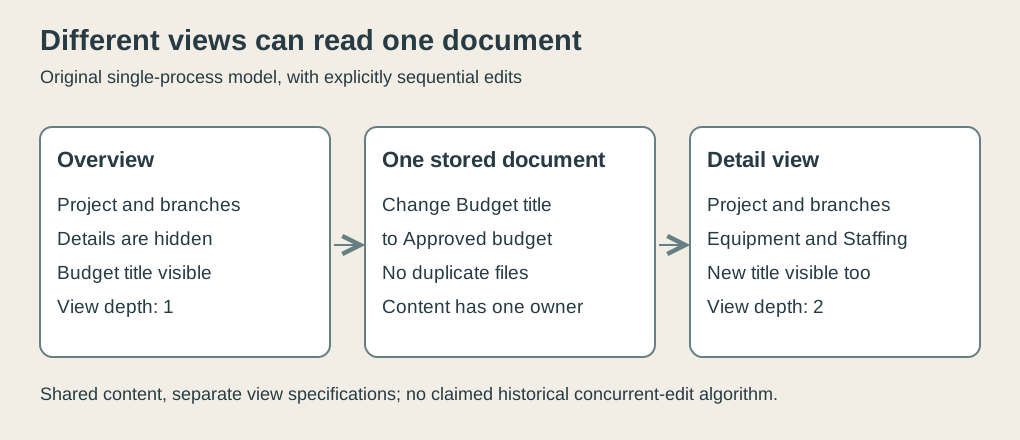 Original explanatory SVG, created in 2026. Sequential shared-content model and different depth specifications, not a reconstructed historical collaboration protocol.
Change only the overview reader’s depth and the detail reader’s setting remains two. Keeping view specifications outside the shared text makes that possible.
A mistaken implementation could store depth as one global document property, making one person’s attempt to inspect details collapse somebody else’s view. The checker verifies independent view settings alongside shared text.
Shared work doesn’t explain its own conflicts
The demonstration archive records joint file usage and two-person shared-screen work.1 The onscreen outline also includes collaboration among the system’s intended activities.2
That evidence doesn’t establish a modern conflict-resolution algorithm. Our model performs edits sequentially inside one process. It has no network delay, disconnected replica, simultaneous insertion or operational transformation.
Two sequential title changes illustrate the limitation. First write Approved budget, then Revised budget. Our chosen record ends with Revised budget because the second write replaces the first.
Reversing the order changes the result. A shared record alone doesn’t decide which edit ought to win. A complete collaborative system needs a stated policy and a way for participants to understand its consequences.
This original example isn’t evidence for NLS’s exact editing policy. It marks the point at which shared-document explanation stops and concurrency design would have to begin.
Structure helps attention
Our tree is tiny, but even here the reader can ask different questions. What are the main branches? What belongs under Budget? Where is Equipment? What changed in the shared title?
The answers use the same material through different views and references. Maintaining structure lets the program help with those questions without forcing a new duplicate document for each one.
The companion check uses modern Python. It verifies tree traversal, view limits, target resolution, insertion/deletion distinctions and shared versus local state. It doesn’t run NLS or the 1968 hardware, and it supplies no historical latency measurement.
One additional model check asks whether navigation alters content. Following the Equipment link should expand the chosen view and select its target, while every stored label and parent-child relationship remains unchanged. That is a useful contract for a reader: looking more closely should not itself edit the document. Our checker compares the document before and after the operation rather than merely accepting the resulting screen.
Keep the document, change the attention
I find the most useful idea in this example is the ability to hide something without treating it as absent from the work.
A document can retain detail while a view presents an overview. A link can direct attention to a stored target. Two people can read shared content with different display needs.
NLS brought those possibilities into a public demonstration of structured work. The practical promise is straightforward: the screen can change to fit the task while the document remains larger than the screen.
Footnotes
-
Doug Engelbart Institute, 1968 demonstration archive. Body and clip descriptions read for December 9, 1968, hierarchical views, links, shared work and future ARPA network. Descriptions inspected; no claim to have watched the footage. ↩ ↩2 ↩3 ↩4
-
Doug Engelbart Institute, detailed onscreen outline, archive transcription with editorial additions. Its film preface says December 8; event date follows the institute’s December 9 chronology. Used for stated goals, collaboration and team credits. ↩ ↩2