C:\2010S\WINDOWS8.TXT
2012
Windows 8: Two Contracts on One Computer
Windows 8 tried to add a touch-oriented application system while preserving the desktop's much less restricted expectations.
A file copy has a reasonable ambition: finish copying the files. If you switch to another application, the copy shouldn’t interpret your departure as permission to stop working.
A news reader has a different case. Once you’ve stopped reading, its visible interface may have no reason to keep consuming processor time. A platform designed around portable devices can pause that work and still make returning to the article feel continuous.
Windows 8 had to accommodate both expectations. Microsoft announced general availability for October 26, 2012, accompanied by the Windows Store and a new touch-oriented interface.1 The release’s significance lies partly in how much new behavior it attempted to place beside an existing desktop contract.
The Start screen was the most obvious change. The more interesting engineering question was what an application could assume about execution, interaction with other applications, and compatibility with software already installed.
A familiar product name didn’t make those assumptions identical.
The desktop remained a working commitment
Microsoft’s April 2012 edition announcement distinguished Windows 8 and Windows 8 Pro on x86 systems from Windows RT on ARM. Its feature table marked desktop software installation for the former and omitted it for RT, even though all three included a desktop.2
That is a detail worth keeping explicit. A visible desktop wasn’t proof that a Windows RT machine could run an arbitrary existing PC executable. Nor should later Windows-on-ARM compatibility mechanisms be assigned to this release.
The announcement also distinguished WinRT, the Windows Runtime used for the new application direction, from Windows RT, the ARM product name. The similar labels are a small act of generosity toward future historical misunderstandings.2
On ordinary x86 Windows 8, preserving desktop applications meant preserving substantial behavior. Existing programs could perform long-running work and maintain their own conventions. Giving the operating system a new shell didn’t rewrite their assumptions.
That preservation is a strength for users with valuable software and a constraint for platform designers seeking tighter control. If compatibility is a promise, there are optimizations you cannot apply indiscriminately.
Suspension belongs to an application model
Microsoft’s February 2012 engineering account describes the new app model through foreground execution, suspension, and defined background activities. It explicitly says the suspension policy concerns the new Metro-style applications, while desktop work such as file copying continues as before.3
This describes ordinary application switching, not every power state. On Connected Standby-capable hardware, Windows 8’s Desktop Activity Moderator also suspended desktop applications when the device entered that low-power state.3
A suspended app can retain state without executing its threads. Returning may resume that state, or relaunch after the system has removed the app under memory pressure. Application authors therefore need to preserve the user’s task.3
The important distinction is between continuity as experienced by the user and continuity of execution. A weather tile can communicate information without proving that the entire weather application’s interface has been continuously running.
For an original example, imagine a Store-style museum guide and a desktop archival utility. The guide opens an exhibit page. The utility copies photographs to an external disk. When the user returns to the guide, it should still identify the exhibit. While the guide is visible, the archival utility should continue the operation it began.
These are invented applications, not claims about software Microsoft shipped. They show why “pause every program that isn’t visible” would be a poor description of Windows 8.
The app model determines which behavior is coherent. An application designed for suspension can save a compact description of its task. An existing desktop process may be midway through work whose purpose is precisely to continue without attention.
Cooperation becomes a platform service
The Windows 8 product guide describes common system actions including Search, Share, Devices, and Settings, accessible through the right-side charms. Share could pass information from one application to another without requiring the user to begin by manually assembling an email.4
Behind that user-facing feature sat an application contract. A source offers data. A target knows how to accept particular data. The platform can mediate the connection rather than requiring each source to know every target’s private interface.
Jeff Blankenburg’s November 2012 developer walkthrough demonstrates a share source using DataTransferManager, responding to a data request, and supplying a DataPackage with text and metadata. It also walks through the target side.5
Those are period APIs. The worked example below is a simpler conceptual model, not a replacement SDK listing or proof that a modern UWP example runs unchanged on Windows 8.
Count the relationships before writing them
Suppose four invented applications can produce shareable material, and five can receive it. A design based on individual integrations can require up to twenty source-to-target relationships:
If all participate in one suitable shared contract, there are nine application-to-contract relationships: four producers and five consumers.
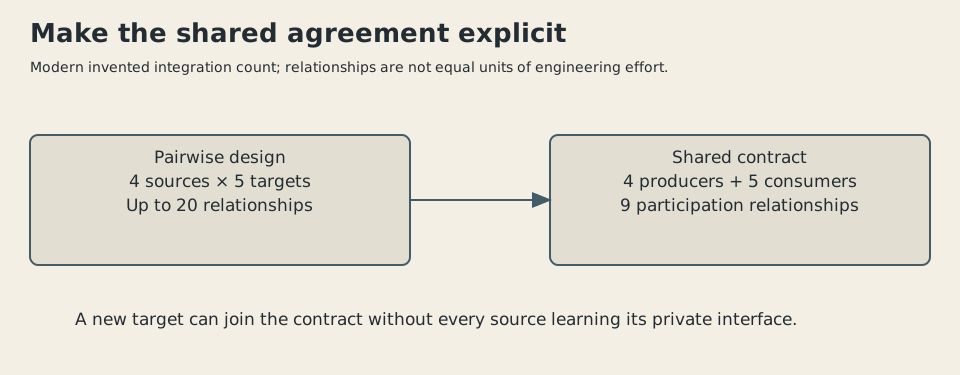
Original explanatory illustration, 2026. Invented counts compare integration relationships. They aren’t measured API calls, engineering hours, or Windows 8 performance.
The arithmetic identifies a reason to centralize the agreement. It doesn’t guarantee that twenty implementations literally become nine equally easy ones. A source may support several formats. A target may need authentication or a service-specific editor. The broker itself must be implemented and maintained.
Adding another target still illustrates the attraction. In the pairwise arrangement, four sources may need new knowledge. With a stable shared contract, the new target can describe its ability to accept existing formats without requiring every producer to recognize its name.
The platform has moved a relationship to a common location. The application author can concentrate on what the data means and what the target should do with it.
A compatible format isn’t a completed task
Give our museum guide a conceptual package containing a short caption as text and a photograph as an image. A note-taking target accepts text. A photo target accepts images. A mail target accepts both. A fictional music target accepts only audio.
Our teaching broker selects targets with at least one supported format in common:
| Target | Accepted conceptual formats | Match with text + image |
|---|---|---|
| Notebook | Text | Yes |
| Photo album | Image | Yes |
| Text, image | Yes | |
| Music tool | Audio | No |
This model uses generic format names and invented applications. It isn’t the complete Windows 8 selection algorithm, its manifest schema, or a guarantee that every target can perform the user’s intended task.
The note application might receive a caption without the picture. The photo application might receive the picture without the explanatory words. The mail application might ask the user to choose a recipient before anything is sent.
That last distinction matters. Passing information to a target isn’t equivalent to completing an external operation. An application can prepare a message for review rather than immediately dispatch it. The transfer contract doesn’t know every consequence of the recipient application’s actions.
A useful package may therefore include more than one representation of the same thing. A web address and a human-readable description can serve different targets. But sending several representations can also produce inconsistent results if they don’t refer to the same item.
The source must describe its data honestly. The target must interpret it within its own task. The platform’s mediation removes some coupling; it doesn’t remove meaning.
The new agreement has a boundary
The example’s integration count assumes willing participants. A desktop program with no matching share implementation doesn’t gain one simply because Windows now has a Share charm.
This is the recurring complication of a transitional operating system. It can provide a coherent model for new applications while carrying a large population of programs built for another one. Users move between them according to their work, not according to which programming model a developer prefers.
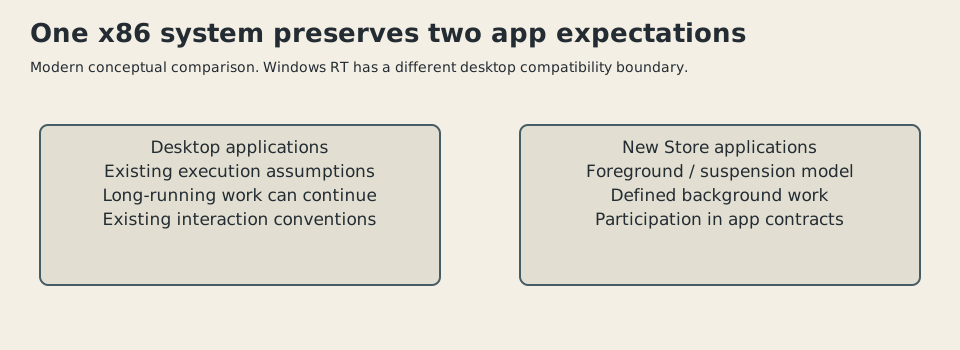
Original diagram, 2026. A simplified comparison of desktop and new Store-app expectations on x86 Windows 8. Windows RT’s different compatibility boundary is stated in the text.
Imagine collecting information in the museum guide, then editing a report in an older desktop application. A well-defined share route may cover one part of the journey while ordinary file saving, opening, or copying covers another. The overall workflow inherits both models.
The practical result can be capable and awkward at the same time. Preserving old software makes the computer useful immediately. Introducing common contracts creates an opportunity for more coordinated new software. The user may have to learn where one arrangement ends and the other begins.
That is an engineering tradeoff, not evidence that the operating system has failed merely because two arrangements exist. The harder question is whether their boundaries are predictable enough to support ordinary work.
Consistency is more than a visual style
A consistent interface gives users expectations about where to find an action. A consistent execution model gives developers expectations about what happens after that action. A consistent data contract gives cooperating programs expectations about what they receive.
Windows 8 attempted to define all three for its new application direction. It also retained desktop behavior that couldn’t simply be folded into the same rules. The release is therefore useful historical evidence that redesigning an established platform includes negotiation with its installed software.
The 2012 launch should remain distinct from Windows 8.1 refinements and later Windows application systems. UWP is later terminology and machinery; it isn’t the name of the original launch contract described here.
I find the sharing model more instructive than an argument conducted entirely over the Start screen. A common contract could reduce direct dependencies among programs and make useful actions available through the platform. Its success still depended on participating applications and clear user-facing consequences.
The old desktop, meanwhile, retained work that people expected to continue. That is why the file copy is a good place to begin. A new interface can reorganize how you ask for something. Compatibility decides how many old promises the computer is still obliged to keep after you ask.
Sources
Footnotes
-
Microsoft, “It’s Here…Windows 8!”, October 25, 2012. Specifies general availability beginning October 26 and Windows Store opening. ↩
-
Brandon LeBlanc, “Announcing the Windows 8 Editions”, April 16, 2012. x86 editions, ARM Windows RT, WinRT distinction, and desktop-installation comparison. ↩ ↩2
-
Sharif Farag and Ben Srour, with Steven Sinofsky’s introduction, “Improving power efficiency for applications,” republished by Microsoft, February 8, 2012, original February 7. Read suspension and desktop-file-copy distinction; source’s absolute battery/performance rhetoric isn’t adopted. ↩ ↩2 ↩3
-
Microsoft, Windows 8 Product Guide, 2012, sharing/charms sections. PDF text inspected; no screenshot reuse rights inferred. ↩
-
Jeff Blankenburg, “31 Days of Windows 8: Day 7, Share Contract”, November 7, 2012. Contemporary developer’s source/target walkthrough, actually read. No code copied into the article’s independently checked broker model. ↩