C:\2010S\CHROMEOS.TXT
2011
Chrome OS: The Operating System as a Replaceable Part
The first retail Chromebooks made browser computing a maintenance model, with verified startup and replaceable system images.
An update is a peculiar kind of repair. The computer performing it must replace parts of the software it depends on, then trust those replacements enough to start again. A successful download is encouraging. It isn’t the same as a successful boot.
The first retail Chromebooks made that maintenance problem part of their proposition. Google’s May 11, 2011 announcement specified availability beginning June 15, with machines from Samsung and Acer. The browser was the central working environment, and automatic updates were presented as a way to spare users the usual housekeeping.1
Chrome OS didn’t invent the web browser, remote applications, or the desire to stop maintaining a laptop. Its distinctive arrangement put those ideas together with an operating system designed to be replaced in a controlled way. The result asked a useful question: how much of a computer’s accumulated local software state is actually the user’s work?
A browser profile matters to its owner. A damaged system executable usually doesn’t deserve preservation merely because it has been there a while.
An appliance still contains an operating system
Google’s retail announcement described web applications as the platform’s core and included centrally managed business and education offerings. The promised simplicity concerned the user’s experience of the machine, not the absence of software beneath the browser.1
A browser still needs storage, networking, input, a display system, and a kernel. Web applications still depend on local execution, remote services, or both. Moving the familiar desktop out of view doesn’t eliminate those responsibilities.
It does make a narrower system image plausible. If the vendor knows which basic components must be present, it can distribute a defined replacement rather than attempting to reconcile every locally modified executable. That changes maintenance from repairing an individual machine’s history toward installing a known state.
The user’s data needs a different policy. Bookmarks, preferences, cached content, and locally stored work can’t all be discarded whenever the operating system changes. The early Chromium OS filesystem design therefore separates writable state from read-only system software.2
That boundary is the central mechanism of this article. It isn’t a claim that all browser data lives remotely or that local storage becomes irrelevant. A machine can be organized around web applications and still contain data its owner would rather not lose.
Two copies with different jobs
The filesystem design describes two root-system partitions. One supplies the running system; the other receives an update. If the new system fails to boot successfully, the older partition supplies a fallback.2
For an original model, call the partitions A and B. A contains version 7 and is currently in use. B contains version 6, left from an earlier cycle. The updater prepares version 8 in B while A remains the running version.
| Moment | Partition A | Partition B | User-state area |
|---|---|---|---|
| Before update | Version 7, running | Version 6 | Writable user data |
| During preparation | Version 7, running | Being changed to version 8 | Still separate |
| Trial boot | Version 7, fallback | Version 8, candidate | Still separate |
| After accepted boot | Available for a later update | Version 8, running | Still separate |
The version numbers are invented. The table explains roles rather than a particular Chromebook’s partition numbering or boot flags.
The second copy buys a useful form of restraint: don’t modify the system you’re currently depending on when you can prepare another one. If preparation is interrupted, the running copy needn’t be half old and half new.
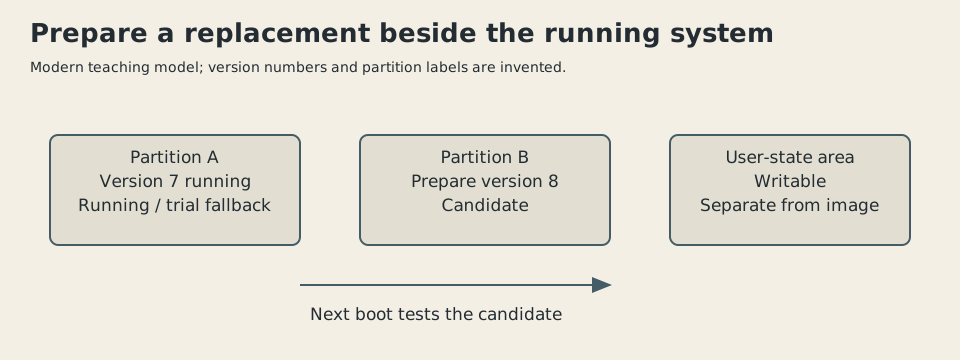
Original explanatory diagram, 2026. Invented versions and simplified partition roles informed by Chromium OS design documents; not a disk-layout screenshot.
The design also requires a definition of successful boot. Reaching some early screen isn’t enough if the machine can no longer update itself. The early document uses the updater’s ability to launch as its criterion.2
This makes the fallback a policy rather than a spare collection of bytes. The machine has to know when to try the candidate, when to accept it, and when to stop trying. A second copy with no decision procedure is merely a well-stocked place to remain confused.
A patch is an ordered transformation
Downloading an entire system image for every change can be wasteful. A delta update carries instructions and data sufficient to transform an existing image into the new one. It depends on having the expected old image.
The Chromium OS autoupdate details describe copying blocks, applying binary differences, and replacing blocks. The target is a bit-for-bit result suitable for verification. The document also recognizes that one operation can overwrite data another operation still needs.3
Here is an original miniature example. Treat each letter as an entire block, not a byte:
Old: [A, B, C, D]
New: [B, A, C, E]
We need to swap the first two blocks and replace the fourth. A careless procedure copies block 1 into position 0, producing [B, B, C, D]. It then copies position 0 into position 1. The original A has gone, so the result remains [B, B, C, D].
Both copy instructions sound locally reasonable. Their combination destroys an input before it is used.
A safe teaching procedure saves A temporarily:
scratch = old[0]
old[0] = old[1]
old[1] = scratch
old[3] = E
The result is [B, A, C, E]. A short Python check verifies both the failed naive operation and the corrected one. This is an invented four-block model, not the Chromium updater’s source code.
The real design uses dependency relationships among update operations and scratch copies to break cycles before ordering the work.3 The model explains why that bookkeeping is needed. Compression alone doesn’t make a patch safe; the order of reads and writes matters.
It also explains why a delta must match its starting point. Instructions generated for one old image can’t be casually applied to another and expected to produce the same result. A precise update format is maintaining a relationship between two defined states.
Verify the thing that will verify the next thing
Replacement raises a second question: who supplied the replacement? A hash is a compact fingerprint of data. If the bytes change, a suitably chosen cryptographic hash makes an undetected change impractical under its security assumptions. But a hash supplied by the same untrusted party as the bytes isn’t an independent reason to trust them.
Suppose someone hands you a substituted system image and its correct fingerprint. Comparing the two will succeed. You’ve established consistency within the package, not its origin.
Verified boot therefore needs an anchored trust relationship. The Chromium design begins with protected firmware, then verifies subsequent boot components. Its root-filesystem discussion describes checking accessed blocks through a hierarchy of hashes, rather than reading the whole filesystem before startup.4
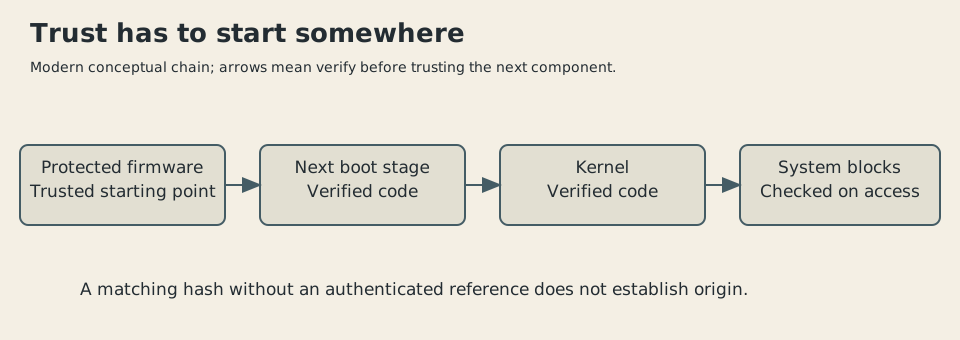
Original conceptual illustration, 2026. A simplified chain of verification. Hash-tree details, key rotation, and recovery paths are omitted.
Our block model can demonstrate tamper detection without pretending to implement that trust chain. Hash the four-block target, then change E to F and hash it again. The check records that the digests differ. It doesn’t prove the target was authorized; that would require a trusted signature or another authenticated reference.
This distinction is useful outside operating systems. Download checksums help detect corruption. Authenticity requires knowing why the expected checksum itself should be believed.
The design documents discuss an early architecture, with proposals and limitations visible in the text. They aren’t a claim that every detail shown there shipped unchanged on each June 2011 device. The diagrams here explain the architecture rather than reconstructing a specific firmware build.
The system image isn’t the whole threat model
Verified boot can detect changes to protected software while leaving other problems untouched. A legitimate browser can encounter malicious content. A user can disclose a password to an impostor. An attacker who steals data during a compromised session doesn’t return it merely because the next boot repairs the system.
The Chromium verified-boot document explicitly distinguishes writable state from the protected image and discusses attacks through malicious stateful data.4 That is a useful qualification to a launch narrative about a safer computer.
Separating state creates a manageable system boundary, but also identifies material that cannot be protected simply by making it read-only. User data must change. Applications must interpret it safely. Remote services must have their own security and recovery arrangements.
Likewise, rollback of the operating system isn’t automatically rollback of everything a newer application has written. If persistent data changes format, an older system may have difficulty reading it. That is a general consequence of the two-copy model, not a documented failure claimed for an original Chromebook.
Simplicity relocates responsibility
The narrower environment asks users to accept a particular division of labor. The vendor maintains the operating-system image. Web applications supply much of the working software. The device handles replacement and startup policy.
That can reduce routine maintenance while making connectivity, service availability, and application suitability more consequential. The retail announcement’s prediction that web applications would eventually do everything traditional applications could do was a prediction. It shouldn’t be recast as a measured fact about 2011.1
Later Android-app support, Linux development environments, and subsequent desktop features belong to later Chrome OS history. The first retail milestone is interesting without borrowing them.
What I find durable is the change in how system software is treated. Instead of cherishing every local modification, the machine aims to return to a defined image while keeping the owner’s mutable work elsewhere. Updating and verification reinforce the same boundary.
A computer can become easier to maintain when its operating system is allowed to be ordinary: a replaceable part with a known origin and a tested route back. The user’s work deserves the more personal treatment.
Sources
Footnotes
-
Linus Upson and Sundar Pichai, Google, “A new kind of computer: Chromebook”, May 11, 2011. Retail June 15 schedule, browser-first environment, automatic updates, and managed offerings. ↩ ↩2 ↩3
-
Chromium Projects, “File System/Autoupdate”. Preserved early-design document; read-only running root, alternate update partition, writable state, fallback and success criterion. Accessible page has no secure revision date; exact shipping flags and retry counts aren’t asserted here. ↩ ↩2 ↩3
-
Chromium Projects, “Autoupdate Details”. Read operation types, ordering dependencies, cycle breaking, and exact-image goal. Four-block example is original and checked separately. ↩ ↩2
-
Chromium Projects, “Verified Boot”. Protected initial firmware, layered verification, on-demand block checking, and mutable-state limitations. Early proposal language retained as a source boundary; no specific cryptographic algorithm is attributed to a retail build. ↩ ↩2