C:\2000S\WINDOWSX.TXT
2001
Windows XP: The Home PC Gets a Different Foundation
Windows XP brought the Windows 2000 lineage to home PCs, while its access controls and later security changes exposed the distance between capability and configuration.
A family computer is shared infrastructure with very informal governance. One person installs software, another writes a report, and a third regards every folder as a promising place to put photographs. Eventually somebody wants privacy, while somebody else wants the printer to work without a meeting.
Windows XP arrived with a new look and an older, substantial architectural inheritance. Its significant change was bringing the Windows 2000 foundation to home PC users, as Microsoft’s August 2001 manufacturing announcement explicitly described. The NT family was no longer confined to the business side of Microsoft’s desktop story.1
The date needs two entries. On August 24, Microsoft released the software to computer manufacturers. On October 25, it announced worldwide availability on new PCs and at retail. A factory receiving finished code and a customer buying a boxed upgrade are related events, separated by real work.12
XP deserves examination as a convergence. The home and business products still had different features, but the underlying development direction was shared. That offered a way out of maintaining separate expectations for what a household computer and an office computer ought to survive.
A common base doesn’t make identical products
The October 2000 Whistler beta announcement presented the project as a common code base for home and business users. XP Home and Professional were the resulting major consumer desktop editions in the 2001 launch story.32
The naming can obscure the engineering. A shared base gives developers a more consistent target for applications and devices. It doesn’t mean every edition exposes the same management facilities or that every machine behaves identically after installation.
Microsoft positioned Home around household media, networking, and communication. Professional added business-oriented capabilities, including remote access and management features. The launch releases are evidence of this product distinction, not independent proof that every advertised task was effortless.2
For a programmer, convergence can reduce the number of architectural families to support. For a user, the benefit appears indirectly: an application or driver can rely on a more consistent platform. There is still testing to do. Two systems can share a lineage while differing in hardware, settings, and installed software.
This is why “the same Windows” is an imprecise compatibility statement. It may describe a familiar desktop, a common API, an edition, or a particular service-pack level. An installer gets to discover which meaning you intended at a rather inconvenient time.
Identity travels with a request
One useful mechanism in the Windows security model is the access check. A request to open a protected object is evaluated against the requesting thread’s identity and the object’s permissions. A file does not grant access merely because the application has drawn a reassuring icon.
Microsoft’s technical documentation describes an access token containing identifiers for a user and applicable groups. The system compares those identities with entries in a discretionary access control list, commonly abbreviated DACL.4
An entry names a trustee, such as a user or group, and allows or denies particular rights. Different rights can describe reading and writing. The list is ordered, so the checking procedure must respect the sequence rather than treating the entries as unrelated decorations.
This explanation uses later Microsoft documentation for the underlying Windows model. It isn’t a reconstruction of XP’s permission dialog, and it doesn’t claim Home and Professional offered identical editing interfaces. The distinction between an enforcement mechanism and its visible configuration tools is important.
A user can belong to several groups. A request therefore carries more than a single name, and permissions may apply through more than one identity. The software must evaluate the applicable entries coherently. Otherwise a group intended to simplify administration becomes a surprisingly efficient way to distribute mistakes.
A report with three readers
Let’s build an original teaching example. An invented file, Budget.txt, has three permission entries in this order:
| Entry | Trustee | Action | Rights |
|---|---|---|---|
| 1 | Visitors | Deny | Write |
| 2 | Editors | Allow | Read, write |
| 3 | Readers | Allow | Read |
Alice belongs to Editors and Readers. Bob belongs to Visitors and Readers. Carol belongs only to Readers. Assume these group identities are enabled and applicable. We omit inheritance, ownership, special privileges, impersonation, and other details of the full Windows model.
Alice requests read and write together. The Visitors denial doesn’t apply to her. The Editors entry allows both requested rights, so the simplified check succeeds. The last entry needn’t supply anything further.
Bob requests read only. The first entry names one of his groups, but its denied right is write. It doesn’t deny this read request. The Editors entry doesn’t apply. The Readers entry supplies read, so the request succeeds.
Now Bob requests read and write together. The first entry denies one of the requested rights. The check fails. Having another group that allows reading doesn’t turn a request for both rights into a successful request for one.
Carol requests writing. No applicable entry allows it, so the request fails when the list is exhausted. Absence of an explicit denial doesn’t amount to permission. The requested right must be granted.
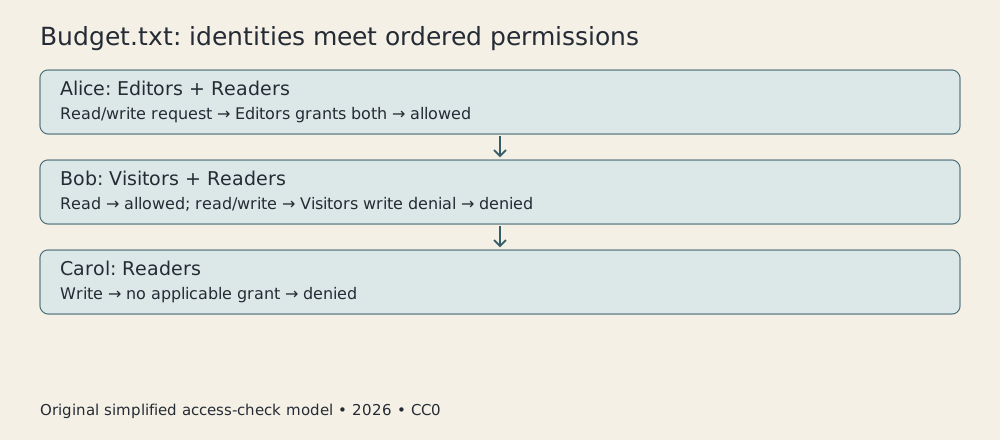
Original CC0 teaching diagram, 2026. Invented identities and permissions; no historical Windows dialog is reproduced.
The outcomes were checked with a small Python model, not with a Windows XP installation. This verifies the example’s stated logic. The real Windows mechanism has details the teaching model intentionally excludes.
Order also matters. Microsoft’s documentation explains that evaluation can stop once all requested rights have been granted. A later denial therefore cannot simply be assumed to override every earlier grant in an arbitrarily ordered list. Preferred ordering conventions exist for a reason.4
That is a more useful lesson than memorizing “deny always wins.” It tells us which procedure actually determines the result. Security rules have an execution order, and slogans are not an execution engine.
The desktop and the policy are different views
A folder’s appearance communicates organization. Its permissions communicate who may act on it. Those two descriptions can diverge. A beautifully named folder can be writable by an unintended group; a visible folder can contain a file that the current account cannot open.
This isn’t an interface defect by itself. A system must represent many properties that don’t fit inside a small icon. It does mean that administrators and users need a way to inspect effective behavior instead of relying on visual tidiness.
Consider a household account used by several people. If everyone runs under the same identity, the access checker sees that identity. It cannot infer which family member is physically at the keyboard from the current document’s subject matter.
Separate identities make finer distinctions possible, but they introduce account management and expectations about switching. The mechanism can enforce a policy only after somebody has supplied a meaningful policy and used the identities consistently.
The same issue appears in an office. A group called Editors is helpful only if membership is maintained. Leaving former editors in it doesn’t produce a permissions bug. It produces a faithfully executed stale decision.
These are general consequences of identity-based access control, not a survey of how every XP household was configured. They explain why a more capable foundation and a well-configured machine are separate achievements.
Network exposure needs another boundary
Local file permissions don’t determine every network risk. A program listening for incoming connections introduces an interface through which requests can arrive. The question becomes which traffic reaches which service, and what the service does with it.
A firewall can limit that exposure. In a simplified model, the machine has an application listening on a network port. An incoming request reaches a filtering decision before it reaches the listener. Allowing it exposes the application to that request; dropping it prevents that path from being used.
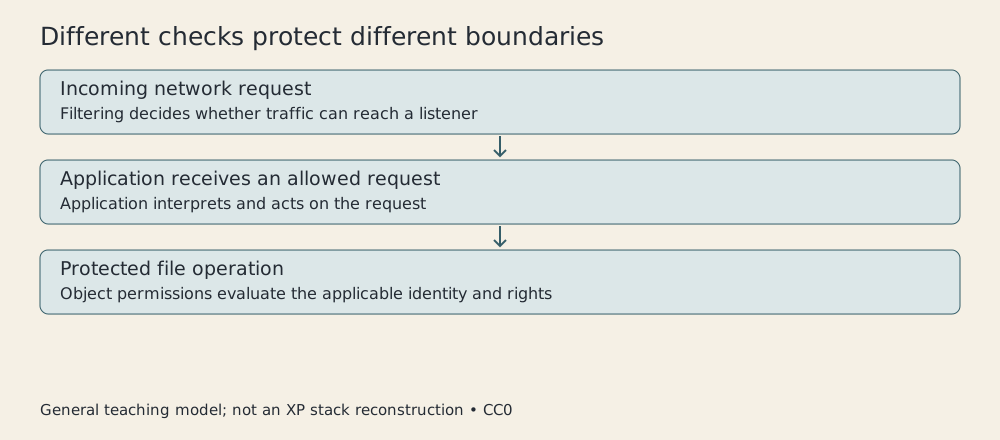
Original CC0 mechanism diagram, 2026. General teaching model; not XP’s exact network stack or service configuration.
The filter doesn’t inspect the moral character of the application. It also doesn’t replace the file permission check. An allowed network request can still fail a later access check, and a locally permitted file operation says nothing about whether a remote peer should connect.
This separation gives security a layered shape. Each mechanism controls a particular boundary. Describing the system as “secure” without identifying those boundaries is rather like describing a building as “locked” because one cupboard has a key.
Windows XP’s 2004 Service Pack 2 is a distinct milestone within the product’s history. Microsoft’s August 6 manufacturing announcement highlighted security changes, including stronger default settings and a Security Center for monitoring protective settings.5
Those changes should not be imported into the October 2001 release. A reader remembering a patched XP desktop may remember features and defaults introduced after launch. The name on the Start menu is an insufficient version number.
A foundation becomes ordinary
XP’s historical importance doesn’t depend on claiming it invented protected operating systems, access tokens, or graphical desktops. It brought an established architectural direction into Microsoft’s mainstream home offering and tied that direction to a familiar consumer product.
The launch spectacle featured Gates and Allchin, but the system was the work of development teams and a hardware and software ecosystem. The manufacturing announcement’s compatibility programs are a reminder that an operating-system release requires cooperation beyond the company writing the kernel.1
I find the gap between capability and configuration the useful part of this story. A platform can support meaningful identity checks while users share an account. It can support filtering while defaults and application expectations remain contested. Later changes can improve the arrangement without retroactively improving the first disc.
Windows XP helped make the NT lineage a household platform. Its permissions demonstrate what that foundation could enforce, while its service-pack history shows how much depended on the way the foundation was presented and maintained. A capable operating system still needs somebody to decide who gets to edit Budget.txt.
Sources
Footnotes
-
Microsoft, Windows XP to Take the PC to New Heights, August 24, 2001. Manufacturing milestone, Windows 2000 foundation, edition positioning and ecosystem preparation. ↩ ↩2 ↩3
-
Microsoft, Windows XP Is Here, October 25, 2001. Worldwide availability and Home/Professional distinction. ↩ ↩2 ↩3
-
Microsoft, Whistler beta announcement, October 31, 2000. Common home/business code-base intent. ↩
-
Microsoft, How AccessCheck Works, later technical documentation. Ordered checks, access tokens and rights; simplified original example excludes special cases. ↩ ↩2
-
Microsoft, Windows XP Service Pack 2 released to manufacturers, August 6, 2004. Later security defaults distinguished from 2001. ↩