C:\2000S\FIREFOX1.TXT
2004
Firefox 1.0: The Browser Belongs to Its User
Firefox 1.0 made browser choice practical through migration, tabs and extensions, while keeping a user's profile separate from the application.
Changing a browser sounds like changing the program that displays a page. Then the bookmarks turn up. So do saved passwords, preferences, and all the small accommodations that make a familiar application feel usable. A replacement has to address that accumulated investment before its rendering engine gets much of a hearing.
Firefox 1.0 arrived on November 9, 2004, for Windows, Mac OS X and Linux. Mozilla’s announcement presented migration from other browsers alongside tabs, search, popup controls, Live Bookmarks and extensions. Mitchell Baker, the foundation’s president, credited the community volunteers and developers behind the release.1
That combination matters more than a contest over who invented an individual feature. The milestone offered a usable alternative whose interface and surrounding community treated the browser as something its user could choose and adapt.
The technical bargain was interesting. Personal state could survive replacement of the application, and optional extensions could change its behavior. Both required boundaries. A bookmark should outlast a reinstall. An incompatible extension shouldn’t be permitted to turn an upgrade into a guessing game.
One window can hold several unfinished tasks
A tab is a modest piece of interface with a useful consequence: several pages can remain available without each demanding its own top-level window. The browser can hold the partially finished work of reading, comparing and returning.
Imagine researching a railway timetable. One page lists departures, another describes a fare, and a third explains a connection. Keeping all three available reduces the need to remember which search led where. The tab strip provides visible handles for that temporary working set.
This doesn’t make the information correct. It makes comparison more convenient. A browser feature can improve a workflow without improving any of the pages involved, which is a distinction worth maintaining whenever interface convenience starts sounding like knowledge.
Firefox 1.0’s notes describe controls for where links from other applications open. They also record that a proposed single-window preference was disabled late enough to leave an inaccurate help reference.2 That small warning is useful historical evidence. Even release documentation can contain a feature that didn’t actually ship in the advertised form.
The external-link choice connects separate applications to the browser’s working set. An address clicked in mail can join the existing task or begin another window. The browser isn’t only a destination for typing URLs; other programs continually hand work to it.
The profile is a separate object
The release notes distinguish the installed application from its profile. Uninstalling Firefox leaves bookmarks, saved passwords and other settings behind. The notes identify profile locations separately from the application directory.2
Think of the application as the machinery and the profile as the user’s accumulated state. Updating the machinery should not require throwing away every address the user has collected. Conversely, copying an application executable alone isn’t a complete backup of a person’s browsing setup.
Here’s an invented directory model, deliberately simpler than the actual files and formats:
application/
    browser-program
profile/
    bookmarks
    preferences
    extension-settings
Our check starts with program version 1.0 and a profile containing three bookmarks. Replacing the program with version 1.1 leaves the same three bookmarks in the profile. Deleting the application object also leaves the profile object intact.
That result follows from what the model chooses to delete. It isn’t a test of Firefox’s installer. The value is in making the distinction explicit: a maintenance operation targets one collection of files, and preservation depends on not accidentally including the other.
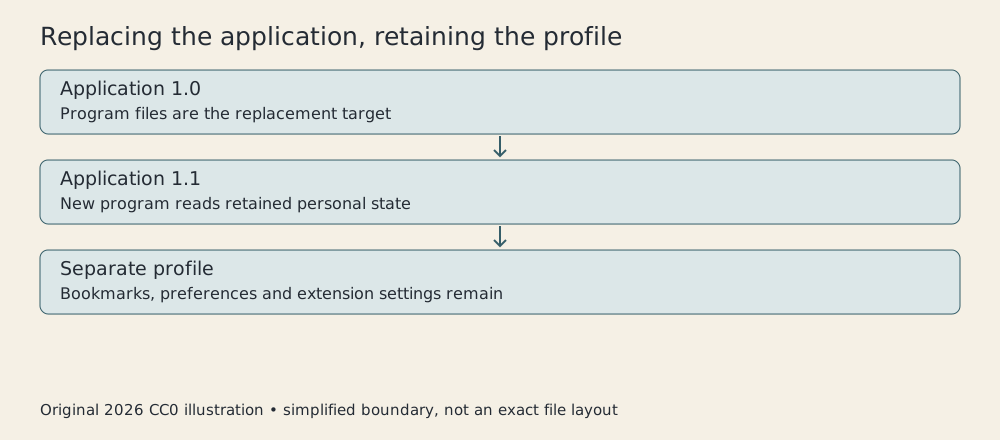
Original CC0 diagram, 2026. Simplified separation of application and profile; not a screenshot or exact Firefox 1.0 file layout.
Separation doesn’t mean independence in every respect. A newer program may interpret stored settings differently or migrate their format. A profile can also contain the very configuration that causes a recurring problem. Keeping state faithfully sometimes keeps the problem faithfully too.
This creates two quite different troubleshooting experiments. Reinstalling the application asks whether its program files are damaged. Trying a fresh profile asks whether the user’s retained state is involved. Repeating the first experiment doesn’t automatically perform the second.
The 1.0 notes recommend testing with a new profile or Safe Mode when investigating problems. Safe Mode disables extensions and uses the default theme.2 It gives the user a controlled change in the environment, rather than requiring an immediate judgment about which customization is guilty.
Extensions make compatibility part of the interface
An extension adds behavior to the browser. That sounds like an uncomplicated benefit until the application changes and the added behavior still expects an older environment.
Firefox’s upgrade instructions explicitly discuss extensions and themes being disabled until compatible versions are available. The instructions also distinguish older releases from the more recent upgrade path.2 “Upgrade Firefox” was therefore a task involving more than a single version number.
Consider three invented extensions. We give each an inclusive range of application versions that it claims to support:
| Extension | Minimum | Maximum |
|---|---|---|
| Page Notes | 0.9 | 1.0 |
| Window Counter | 0.8 | 0.9 |
| Link Basket | 1.0 | 1.2 |
With application version 1.0, Page Notes and Link Basket pass the range check. Window Counter does not. At 1.1, only Link Basket passes.
The arithmetic is intentionally a model. It doesn’t reproduce Mozilla’s full historical version-matching rules, extension manifests or loader. It expresses the basic obligation: optional code needs a declared relationship to the application that will run it.
We represent versions as integer pairs, so (1, 10) sorts after (1, 2). Treating version strings as decimal numbers would make 1.10 equal to 1.1, which is not a reliable account of software release ordering. A small teaching example can accidentally introduce a large misconception if its notation isn’t checked.
Passing a declared range is still not proof of correctness. It means the extension’s stated expectations include this version. Actual behavior can depend on bugs, other extensions and settings that the range doesn’t describe.
Disabling a component is consequently a useful protective default, though an inconvenient one. The user temporarily loses a feature rather than receiving an unexplained failure somewhere in the browser. A compatible replacement can restore it later. Good upgrade behavior includes a comprehensible account of what has been deferred.
A bookmark can point to a changing list
Ordinary bookmarks preserve addresses. Live Bookmarks gave the user a way to inspect changing headlines through the browser’s bookmark interface.1 The distinction is between remembering one destination and following a list whose entries can change.
To expose the mechanism, take this invented, minimal feed:
<rss><channel>
  <item><title>Evening service added</title>
    <link>https://example.invalid/evening</link></item>
  <item><title>Platform repairs</title>
    <link>https://example.invalid/platform</link></item>
</channel></rss>
A small parser reads each item and produces a title/address pair. The result has two entries. Change the feed to contain a new first item and an old second item, and the displayed collection changes at its next refresh in this model.
The example uses Python’s modern XML parser to demonstrate a general feed transformation. It is neither recovered Firefox code nor a recreation of its exact refresh policy. The .invalid addresses are deliberately nonworking teaching destinations; no publisher’s feed is queried.
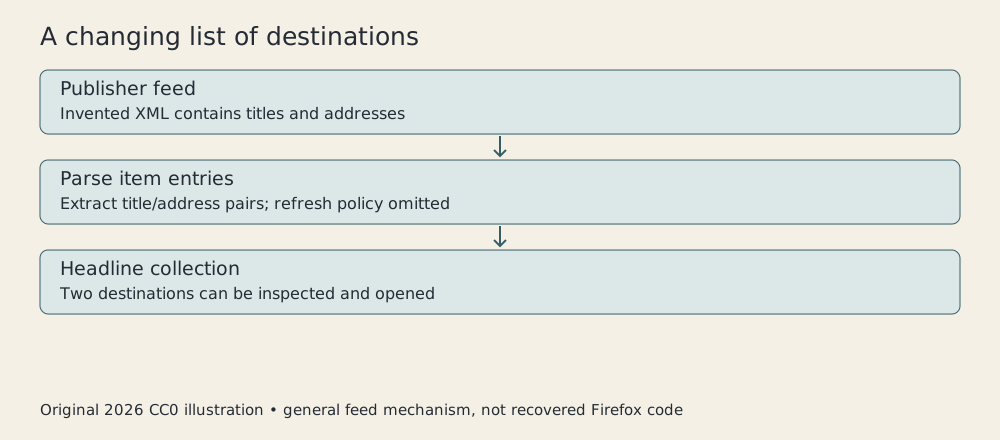
Original CC0 illustration, 2026. General feed-to-headline mechanism, not the exact Firefox parser or interface.
This helps distinguish retrieval from notification. A changing collection can make new material easier to notice, but noticing depends on when it is refreshed and when the user looks. The model promises no immediate delivery and no record of everything the publisher ever posted.
It also separates a headline from the article it describes. The feed supplies a label and destination. Opening the destination is another operation, which may involve a different page, a changed address or a failed request. A useful shortcut doesn’t abolish the network.
Migration is part of competition
A browser can be freely available and still impose a substantial switching cost. Users have invested in arrangements that help them find information. Asking them to rebuild those arrangements makes the alternative less attractive before any technical comparison begins.
Firefox’s launch announcement therefore included importing data from other browsers.1 The practical message was that trying a replacement needn’t start with an empty bookmark collection.
Import has limits. A copied preference may not mean the same thing in another application. An extension is not merely a bookmark with more bytes. Successful transfer of some state doesn’t establish that every workflow will be identical.
Still, preservation changes the decision. A person can evaluate how the new application works while retaining familiar destinations. Migration work is product work, even when it produces little that looks impressive in a screenshot.
The same applies to the community behind the application. Documentation, testing, translation and extension maintenance help determine whether a replacement remains useful after its first launch. Mozilla’s public credit to hundreds of contributors was more revealing than treating the browser as the product of a single visible spokesperson.
Keep the 2004 browser in 2004
Today’s Firefox has accumulated many changes. This article doesn’t assign contemporary process isolation, cloud synchronization, private-browsing behavior or the present extension architecture to version 1.0. The release’s archived notes are the boundary for its specific operating instructions.
Nor should an advertising claim about safety be converted into a measured comparison of every threat. Displaying information about a secure connection, controlling popups and maintaining software are different activities. No original browsing benchmark or security experiment was run for this article.
What can be shown is the structure of the bargain. Tabs kept several tasks available. A profile carried personal state across application maintenance. Extensions opened the browser to additional behavior while creating compatibility obligations. Feeds supplied changing destinations through a familiar interface.
Firefox 1.0 made those choices available together in a browser people could adopt. Its most consequential invitation was fairly ordinary: bring your bookmarks, try the program, and make it suit your work. The difficult engineering began where that invitation met an upgrade.
Sources
Footnotes
-
Mozilla Foundation, Firefox 1.0 launch announcement, November 9, 2004. Date, platforms, features, migration and contributor credit. ↩ ↩2 ↩3
-
Mozilla, Firefox 1.0 release notes, November 9, 2004. Profile persistence, upgrade compatibility, troubleshooting and known issues. ↩ ↩2 ↩3 ↩4