C:\1990S\VISUALBA.TXT
1991
Visual Basic: The Form Was a Place to Start
Visual Basic brought a visual form designer and BASIC together, making Windows application behavior something programmers could build a piece at a time.
A blank application window is an unusually useful promise. Put a few controls in it and the outline of a program becomes visible: a field for the thing someone knows, a button for the thing they want done, a place for the answer.
The outline does not supply the program’s rules. An attractively aligned button remains entirely capable of doing the wrong thing. But it gives a programmer a concrete place to begin, and a user something concrete to discuss.
Visual Basic brought that approach to Windows programming in 1991. Its combination of a visual front end and BASIC made a form a practical starting point for application development. The programmer could arrange the visible pieces, attach behavior, and discover which assumptions the first convincing little demonstration had concealed.
A shell construction set found another job
Microsoft’s own chronology records the Visual Basic announcement on May 20, 1991, at Windows World in Atlanta. That establishes the announcement, rather than requiring us to infer an exact shipping day from a later anniversary.1
The visual part had a different intended destination. In Alan Cooper’s account, the project grew from a Windows shell construction set: a way to assemble an interface appropriate to the person using it. Microsoft acquired his technology in 1988. The eventual development tool combined that visual work with Microsoft’s BASIC.2
Cooper’s 2017 oral history describes a palette of controls, modules that could load dynamically, and the ability to connect visible elements with behavior. Ruby, the project’s internal name, was written in C and was unrelated to the later Ruby programming language. He also describes the extensible control mechanism that became the VBX interface. His contribution was substantial; the complete Microsoft product involved further development inside Microsoft.3
A second firsthand account usefully distinguishes the prototype name Tripod from Ruby, adopted after the Microsoft agreement. Cooper says he specified the product and hired a small team to build it. The delivered shell construction system went through Microsoft’s quality assurance before finding its eventual role as a programmer’s tool.4
That change in audience matters. A person arranging a shell chooses convenient ways to launch existing work. A programmer building an application must also define what its controls mean and how their actions change data. Visual Basic offered a manageable connection between those two activities.
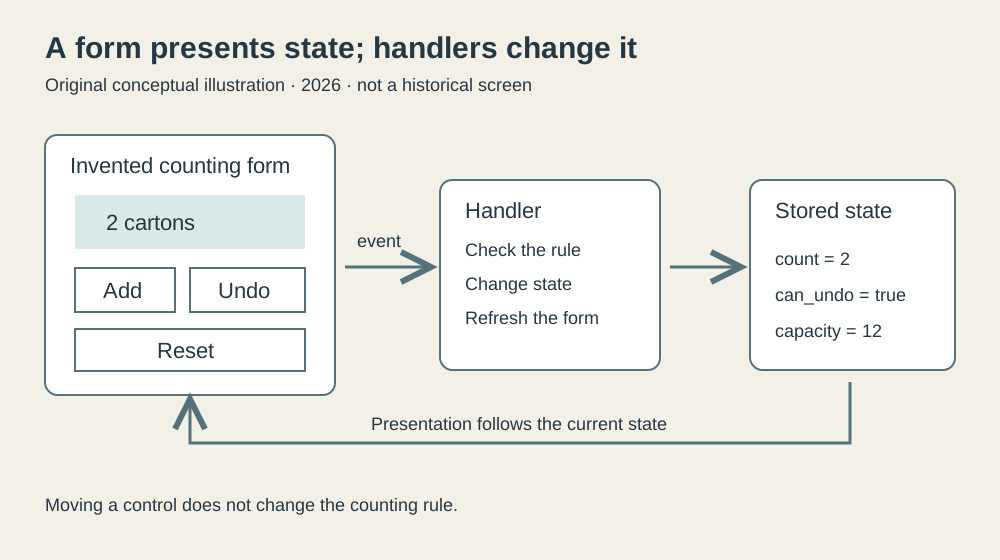
Original explanatory diagram, 2026. An invented counting form separates visible controls, event behavior, and stored state. This is a conceptual illustration, not a Visual Basic 1.0 screenshot.
The program waits for someone else
For a small sequential calculation, the order of work is straightforward. Read two numbers, add them, print the result, finish. The programmer chooses the sequence.
A form introduces an awkwardly independent participant. Its user may change a field, press a button, change their mind, or leave everything untouched. The application needs to respond to the action that actually happens.
The general event model is simple enough to explain without pretending that modern Visual Basic syntax belongs to 1991. An event reports an occurrence; an associated handler runs the relevant procedure. Microsoft’s current documentation describes this model, but its .NET declarations and handler syntax are later machinery.5
The example below is therefore teaching pseudocode. It demonstrates the relationship between controls, events, and application state; it does not claim to be a listing accepted by the original compiler. That boundary lets us examine the useful idea without quietly installing a later language into the first release.
Imagine a small form used to count inspected cartons. It has a display showing the current count, an Add button, an Undo last add button, and a Reset button. The count begins at zero. For this exercise, a batch holds at most twelve cartons.
We also give the program a rule: Undo reverses only the most recent successful Add, once. Reset clears the whole batch and clears that undo opportunity. This is a deliberately modest application, with an equally deliberate definition of what its labels mean.
The stored state is:
count = 0
can_undo = false
capacity = 12
Here count is a number. The display contains a representation of that number. Treating them as separate things prevents a surprising amount of trouble.
A label reading “3 cartons” is useful to a person. It is an inconvenient place from which to reconstruct the program’s arithmetic. The number belongs in state; the label belongs in the presentation of that state.
Three handlers, one set of rules
An Add event can be handled like this:
when Add is activated:
    if count < capacity:
        count = count + 1
        can_undo = true
    refresh the form
At capacity, Add changes nothing. It also preserves any existing undo opportunity. That detail is a policy decision: a refused thirteenth carton should not erase the ability to undo the successful twelfth.
The Undo behavior is:
when Undo is activated:
    if can_undo:
        count = count - 1
        can_undo = false
    refresh the form
Reset is shorter:
when Reset is activated:
    count = 0
    can_undo = false
    refresh the form
The same refresh procedure follows every action:
display the count
make Add available when count < capacity
make Undo available when can_undo
This last procedure translates state into presentation. Having a single place for that translation means the Add, Undo, and Reset handlers do not each invent a slightly different account of which controls should be available.
It also makes a distinction that the pleasant appearance of a form can obscure. Disabling a control communicates a rule to the user. Checking the rule inside the handler enforces it in the model. We retain both checks here so the application’s correctness does not depend on the diagram’s buttons being its only possible inputs.
Start at (0, false). Add produces (1, true), then another Add produces (2, true). Undo produces (1, false). A second Undo leaves the state alone. Reset returns to (0, false).
The notation is compact because it shows the two facts that affect the next action. The count alone would not be enough: (1, true) and (1, false) look identical in the count display, but permit different behavior.
| Action | Count afterward | Undo available? |
|---|---|---|
| Start | 0 | No |
| Add | 1 | Yes |
| Add | 2 | Yes |
| Undo | 1 | No |
| Undo again | 1 | No |
| Reset | 0 | No |
The lesson is considerably more general than carton counting. A visible interface shows part of an application’s state. Its future behavior can depend on facts that are not themselves displayed as numbers.
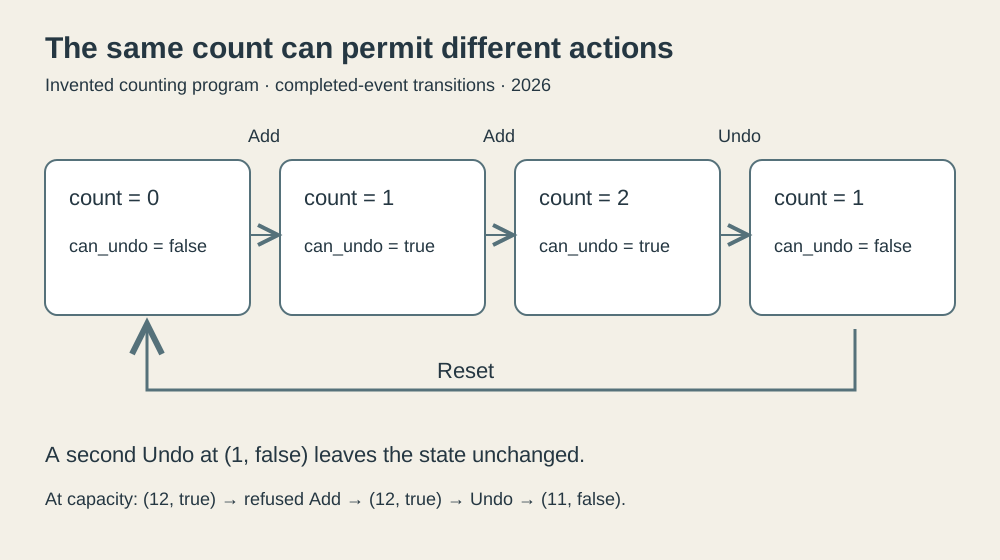
Original explanatory diagram, 2026. The invented event sequence shows count and undo permission together. Arrows represent completed handlers; it does not depict a historical Windows message queue.
The smallest program still has an invariant
Our toy application has a rule that should survive every completed event: the count stays between zero and twelve. It has another: an available Undo implies that the count is at least one.
The handlers make those properties inspectable. Add increments only below capacity. Undo decrements only when permission is present, then consumes that permission. Reset establishes the starting state again. A quick drawing of three buttons cannot establish these properties; the behavior attached to the drawing can.
We can check more than the happy path. Try every possible sequence of the three actions up to eight events long. There are 6,561 sequences of exactly eight events. Including shorter sequences gives 9,841 cases. The accompanying small check models those cases and verifies the bounds and undo condition after each action. It also checks the twelve-carton boundary separately.
This is a modern check of our invented rules, rather than a test of Visual Basic 1.0. Its purpose is to make the explanation accountable. A reader should be able to inspect the transition rules and get the same result.
The boundary case is especially useful. Twelve successful Adds reach (12, true). One more Add leaves that state unchanged. Undo then produces (11, false), and Add becomes available again. This is exactly the sort of interaction a demonstration can miss if its author presses each button once and declares the application finished.
The visual approach makes such experiments convenient to describe. Someone can point to a control and ask what it does when the batch is full. The question remains a programming question, but it is now attached to a visible object.
A useful separation, with ordinary responsibilities
This example has three distinct parts: the form’s arrangement, the rules applied to state, and the presentation of the result. Moving the count display should not change the capacity. Changing the capacity should not require redrawing the buttons. Rewording the label should not change the number stored by the program.
That separation is an engineering choice, not a guarantee conferred by a product name. A programmer can distribute arithmetic across several controls and end up with an application whose behavior is hard to explain. The presence of a designer does not oblige anyone to design well.
There is also a natural limit to what our example establishes. It keeps state only for this imagined session. Saving batches, recovering after failure, distinguishing operators, or sharing a count across machines would introduce additional work. None follows automatically from the ability to place an Add button.
Cooper’s extensible-control account suggests another useful boundary: a component can provide a capability without supplying the application’s policy. An improved numeric display might handle drawing and input elegantly. It would still need to be told what twelve means to this business and when an undo is valid.
The resulting division of work explains the attraction of a form designer without requiring a story in which programming disappears. Common interface machinery can be supplied once and reused. Application authors can spend more attention on the behavior particular to their task.
Keep the first release in its own decade
The 1991 subject here is Visual Basic for Windows. Later products sharing the name should not silently contribute their syntax, compilation model, or libraries to this account. In particular, today’s Visual Basic .NET documentation is evidence for a continuing general concept, not a manual for the launch version.
The original release matters because of the practical connection it made visible: arrange controls, associate behavior, run the application, revise what happens. Its descendants became much larger systems, but size is not necessary to explain the initial appeal.
A form gives software an address that people can point to. That is useful even when the program behind it is small, and especially when the person requesting it knows the work better than they know the programming language.
Visual Basic helped make that conversation part of building a Windows application. The buttons were easy to see. The rules still had to be worked out. Having both in the same development task was a productive place to begin.
Footnotes
-
Microsoft, The History of Microsoft: 1991, dated May 20 announcement entry. ↩
-
Computer History Museum, Alan Cooper profile, acquisition and contribution summary. ↩
-
Computer History Museum, Oral History of Alan Cooper, 2017, printed pages 24–27: construction set, C implementation, Microsoft combination and extensible controls. Recollection is attributed; broad claims of historical priority are not adopted. ↩
-
Richard Morris, Alan Cooper: Geek of the Week, April 15, 2015, Cooper’s answers concerning Tripod, Ruby and the delivered product. ↩
-
Microsoft, Events in Visual Basic, current .NET documentation, opening conceptual explanation only. Its code is not used as Visual Basic 1.0 syntax. ↩