C:\1980S\XWINDOWS.TXT
1984
X Window System: The Screen Is a Service
MIT's networked graphics architecture let programs run elsewhere while keeping their windows in front of the user.
A powerful computer is a fine place to run a demanding program. It isn’t necessarily a convenient place to put your keyboard. Once computing resources live across a network, the ordinary desktop assumption—that the program and its display occupy the same machine—starts to look unnecessarily restrictive.
The X Window System treated the display as a service that applications could reach. A program running on another computer could create windows on the user’s screen and receive the user’s input. The network sat between calculation and interaction, with a protocol defining their conversation.
The names can be disorienting at first. The machine on your desk runs the display server. The application on a large remote machine is a client. They are named for the service being provided: access to the screen, keyboard, and pointing device. Once that clicks, the architecture becomes pleasantly consistent. The desk has the scarce thing everyone wants: your attention.
A mixed collection of machines
X began at MIT in 1984, with Robert Scheifler and Jim Gettys central to its development. Project Athena’s setting included machines from different vendors. A common graphics interface was useful precisely because the hardware collection wasn’t uniform. The project drew on the earlier W window system, but developed its own approach.1
Early X evolved rapidly. X10 appeared in 1985. X11’s design began in 1986, and the sample implementation became available in 1987. The later version involved a larger group, including important implementation work at Digital Equipment Corporation. Gettys, Philip Karlton, and Scott McGregor’s technical account explains both the design goals and the lessons learned from X10.2
The distinction between versions is essential. X11 wasn’t simply the 1984 software with eleven written on its box. Its protocol redesign addressed hardware diversity, interaction costs, and extensibility. An explanation of its graphics contexts or resource allocation shouldn’t quietly assign those mechanisms to the earliest X.
This article therefore uses the original problem to introduce the architecture, then explains selected X11 mechanisms. It leaves modern extensions outside the 1980s frame. The durable identity of a protocol can conceal a substantial accumulation of later capabilities.
Following a window across the network
Consider an invented teaching setup. An engineering program runs on machine Compute. A user sits at machine Desk, which has a display server. The application establishes a connection to that server. It requests a window, provides the information needed to draw within it, and asks to receive suitable events.3
The server manages display resources and handles interaction with the local devices. When the user presses a mouse button over the application, the server can send an event describing that input back to the client. The client interprets what it means—perhaps selecting a point in a graph—and sends appropriate drawing requests in response.
This is not the same as sending a photograph of a remote desktop for every change. Core X provides requests for windows, graphics operations, and input events. An application can ask the server to draw using the protocol’s primitives. Different applications can share the display without sharing the same remote computer.
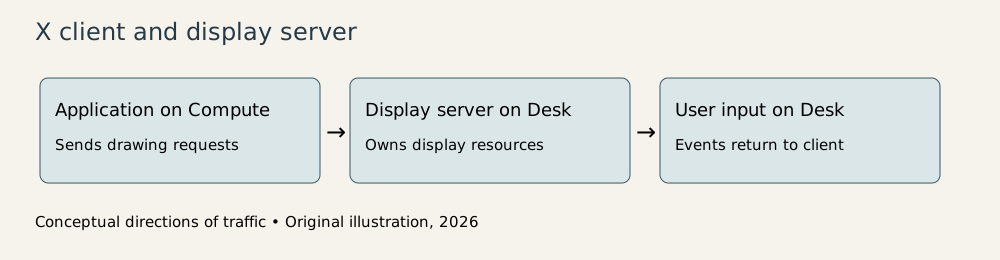
Original explanatory diagram, 2026; machine names are invented. The arrows show conceptual traffic rather than a packet trace.
The setup has three separate responsibilities. The application understands its data and task. The display server understands display resources and device interaction. A window manager supplies decisions about how top-level windows are arranged and manipulated. That last program is also a client of the server.
This separation leaves room for different interfaces over the same base system. A toolkit can provide buttons, menus, and other conventional controls, while a window manager supplies its chosen decorations and placement behavior. X itself doesn’t dictate a single complete desktop experience.
That flexibility is appealing to developers with differing requirements. It also means “supports X” doesn’t promise that every application has identical menus or interaction conventions. The common foundation reaches a different level from the user’s idea of a consistent desktop. Compatibility is sometimes an agreement about plumbing.
A drawing request has some state behind it
In X11, a graphics context groups attributes used by drawing operations. Rather than attaching every visual attribute to every request, a client can refer to a context containing relevant settings. The context is a server resource identified by a number.2
For a simple teaching example, suppose a client draws twenty line segments in the same color and style. Conceptually, it establishes the appropriate graphics context, then sends drawing operations that refer to it. It can change the context or use another one when drawing requires different attributes.
This saves repeated description, but also introduces state. A request’s meaning depends partly on the referenced context. Looking at a single line-drawing operation in isolation may not tell you what the finished line will look like. The server has information the request assumes is already present.
Windows, pixmaps, and graphics contexts are different kinds of resources. A window participates in the visible hierarchy and input arrangement. A pixmap is off-screen image storage. The distinction lets applications prepare or retain image information without making every stored image a window the user can click.
These are useful boundaries, but they leave work for the client. If visible content is lost when another window obscures it and then moves away, the application may need to redraw in response to exposure events. A displayed image and the application data that produced it are not automatically the same retained object.
A graphing application should therefore keep the numerical data and enough drawing logic to reconstruct its view. Treating the screen as the only copy of important information makes routine window movement a surprisingly destructive filing system.
The network charges for hesitation
The most instructive X11 design problem is the cost of a round trip. Sending a request and waiting for a reply means crossing the network in both directions before continuing. Even if each message is small, waiting can dominate the time required for a sequence of operations.
Use deliberately hypothetical timings. Suppose a connection has a round-trip latency of 20 milliseconds. If an application performs fifty operations that each require a separate reply before the next can begin, the waiting alone totals one second:
The example doesn’t measure a historical installation. It illustrates why batching or avoiding synchronous requests can matter more than shaving a few bytes off a message.
X11’s designers addressed several sources of waiting. Initial connection information included commonly needed screen data. Clients could allocate resource identifiers from an assigned range rather than requesting a new identifier from the server each time. Those choices allowed more operations to proceed without a question-and-reply exchange.2
The user sees the consequence as responsiveness. The developer sees it as avoiding unnecessary dependencies between operations. A program that constantly asks the other machine whether it may take the next tiny step has an impressive commitment to politeness and a poor chance of feeling quick.
Asynchronous operation doesn’t eliminate ordering or errors. It lets requests proceed without requiring an immediate reply for every one. The client must still arrange operations correctly and handle errors and events when they arrive. In exchange for less waiting, it takes on more responsibility for the conversation.
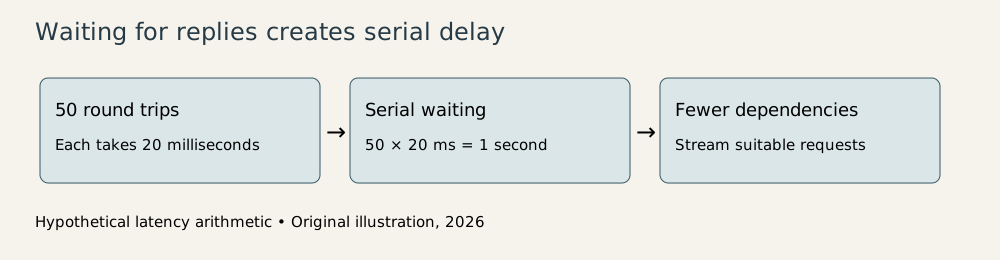
Original explanatory diagram, 2026. The 20 ms figure is an invented round-trip latency for arithmetic illustration.
What the common protocol leaves out
The X11 design paper is refreshingly explicit about exclusions. The original core protocol didn’t provide a complete three-dimensional graphics model, subpixel graphics or antialiasing, video, or audio. An extension mechanism offered a path for later additions without requiring the initial release to settle every future graphics argument.4
That is an engineering judgment about scope. A general system can fail by promising enough capabilities to postpone its usable version indefinitely. X11 defined a base that the team could implement, then left other concerns to extensions or higher-level software.
Security is another boundary that should remain visible. Sending display access over a network requires access control and a suitable environment. Network transparency is a location property; it doesn’t mean a connection has automatically gained encryption or isolation. Gettys’ later discussion of security helps explain the historical assumptions, but it shouldn’t be read as evidence that the earliest releases provided later protective mechanisms.5
The architecture also doesn’t abolish hardware differences. Clients need information about screens and supported visual representations. A portable protocol provides a way to discover and work with those differences. It cannot make every display identical merely by agreeing on packet formats.
I find X’s location choice especially revealing. Once the interface is a service, an application can live wherever its work makes sense. That opens useful possibilities while exposing costs that a local program can ignore: latency, distributed state, and the need to recover an interface from explicit application data.
X made those costs part of an articulated design rather than an accidental side effect. The result was a shared foundation for heterogeneous machines and many competing ideas of a desktop. Its history offers a durable lesson in systems design: choose the boundary carefully, because everything on either side will spend years learning how to talk across it.
Footnotes
-
Jim Gettys, Mythology about security…, creator’s retrospective establishing MIT origins and network transparency; MIT’s record of Scheifler and Gettys’ technical report. ↩
-
Gettys, Karlton, and McGregor, The X Window System, Version 11, introduction, design goals, and lessons from previous versions. This retrospective paper describes the 1986–1987 design; it is not evidence that all mechanisms existed in 1984. ↩ ↩2 ↩3
-
X Window System Protocol, requests, events, resources, and window structure. Later specification consulted for core semantics, with modern extensions excluded. ↩
-
X11 design paper, “Goals of Version 11 Design.” ↩
-
Gettys’ security retrospective. Historical assumptions and later security mechanisms must be distinguished. ↩