C:\1980S\MINIX.TXT
1987
MINIX: An Operating System You Could Study
MINIX made a working Unix-like operating system small enough to explain, with source code that students could read and modify.
A textbook can explain what an operating system should do. A running computer can demonstrate that something is doing it. The difficult part for a student is connecting the explanation to the machinery.
Processes take turns. Files appear to have names rather than physical disk locations. A program waits for input while another continues working. These behaviors are easy to describe from outside and rather less easy to implement. Studying them through a huge production system can feel like learning plumbing by being handed a municipal water network.
Andrew S. Tanenbaum’s MINIX offered a deliberately smaller object of study. It was a real Unix-like system, written to accompany Operating Systems: Design and Implementation in 1987. The code and the explanation belonged together. Students could trace the behavior, alter the implementation, and discover whether their understanding survived compilation.1
Small was an educational decision
Tanenbaum developed MINIX at Vrije Universiteit in Amsterdam. His later account explains the teaching problem behind it: restrictions on distributing and teaching from Unix source made an independently written, understandable system valuable. The design needed to fit both a course and modest personal computers.2
The original system targeted IBM PC hardware. Tanenbaum’s January 1987 technical description sets out an especially austere goal: operation on a machine with 256 KB of RAM and one floppy drive. That configuration couldn’t contain all the conveniences available on a larger installation, including the normal compiler arrangement.3
The source mattered as much as the executable. The first edition of the textbook printed the kernel, memory-manager, and file-system implementation, roughly twelve thousand lines. MINIX also included Unix-style utilities, so the system was more than a scheduler demonstrated in isolation.1

Andrew S. Tanenbaum, March 15, 2006. Later portrait by GerardM, source, CC BY 2.5. No alterations.

Keeping an operating system readable requires restraint. Features increase not only line counts but interactions: a new memory facility may change loading, execution, fault handling, and file access. A teaching system has reason to decline features that would obscure the mechanisms students are meant to examine.
That is a different optimization target from winning every performance comparison. The shortest route to a student’s understanding may be worth more than the shortest route through a benchmark.
Divide the work into conversations
MINIX organized major responsibilities as cooperating processes. A small kernel handled scheduling and communication. The memory manager and file system ran as separate server processes. Device drivers were organized as tasks, communicating through messages.3
There is an essential historical qualification. In MINIX 1, the driver tasks were linked into the kernel’s executable and address space. The later MINIX 3 emphasis on isolated user-space drivers and recovery shouldn’t be attached to the 1987 release. The modular message structure was present; the later protection and reliability arrangement was different.2
This architecture made boundaries visible. The file system couldn’t simply reach into the memory manager’s private data as though both were routines in one undifferentiated program. A request crossed an explicit interface. That gave a student somewhere to stand while following the operation.
The system’s low-level communication primitives included sending a message, receiving a message, and a combined send-and-receive operation. When the requested exchange couldn’t proceed, the caller could be blocked until the other participant was ready. Blocking means the process waits; it doesn’t need to consume the processor repeatedly asking whether anything has happened.3
Follow one file read
Consider a program making a familiar request:
count = read(fd, buffer, 100);This is a teaching fragment, not a complete historical test program. fd identifies an open file, buffer supplies a destination for the data, and 100 is the maximum number of bytes requested. count receives how much was actually read, or an error result.
The useful abstraction is that the application asks for bytes without personally controlling the disk. Under the original MINIX architecture, a library routine packages the request into a message to the file-system server and waits for its response. The server interprets the file descriptor and determines where the data belongs.3
Suppose the requested data is already in the server’s buffer cache, a collection of recently used disk data held in memory. Then it can satisfy the request from that cached material. If the data isn’t present, the file system asks a disk driver task to obtain the required block. The disk operation and its completion eventually allow the server to reply to the caller.
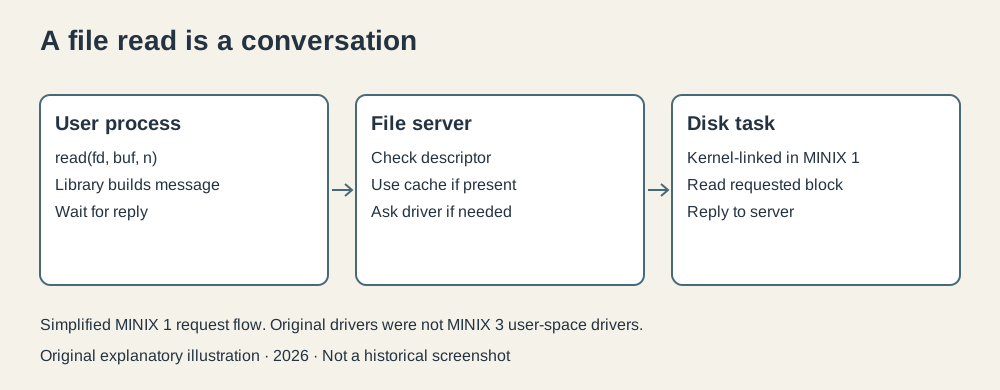
Original explanatory illustration, 2026. Simplified MINIX 1 request flow. The disk task is kernel-linked in this version; it is not a MINIX 3 user-space driver.
For an invented example, the file contains 60 unread bytes when the application requests 100. A successful read at the end of that file can return 60. Asking for 100 is a limit, not a promise that 100 bytes must exist. A following read can return zero to indicate the end.
Notice the division of responsibility. The application knows what it wants to do with the bytes. The file server knows about file positions and storage organization. The driver knows how to request work from the device. The kernel knows how to move messages and choose a process to run.
Each participant can be studied as a piece of the explanation. The result still appears to the application as an ordinary library call, which is exactly the point of the abstraction.
Waiting is productive when someone else can run
If a process is waiting for a disk operation, keeping it on the processor doesn’t make the disk faster. Scheduling lets another runnable process use the available time.
An operating system therefore tracks states. A process can be runnable, waiting for some condition, or finished. A device interrupt can report an event that allows waiting work to continue. The scheduler chooses among processes that can make progress, subject to its policy.
MINIX’s original technical account describes priority queues for driver tasks, servers, and user processes, along with rotation of compute-bound user processes. The exact policy was intentionally simple enough to inspect.3 The general lesson is that concurrency requires bookkeeping, not merely several programs loaded into memory.
Imagine a teaching scenario with an editor and a compilation. The editor is waiting for the next key. The compiler has calculations to perform. Giving the compiler processor time while the editor waits makes the computer useful without requiring the reader to type more quickly on its behalf.
This is a conceptual example, not a claim about timings measured in a reconstructed installation. It highlights why background work and responsive interaction depend on interrupts, blocking, and scheduling cooperating correctly.
Memory without a magic extension
MINIX 1’s memory model was simple. The original description states that it didn’t page or swap. A process needed space in actual memory; the system couldn’t quietly make a large collection of active programs fit by moving their contents to disk.3
That limitation is instructive. Paging divides memory into fixed-size units and allows an operating system to manage mappings and, when supported, move pages between memory and backing storage. Swapping can move a larger process image out to storage. Both introduce additional mechanisms and policies. Leaving them out narrows the problem students have to understand.
The original memory manager tracked free regions and used a first-fit allocation scheme: find the first available region large enough for the request. That is understandable and doesn’t make fragmentation disappear.
Take an original teaching model with three free regions of 40, 80, and 30 KB, separated by allocated memory. The total free space is 150 KB. A request for one contiguous 90 KB region still cannot fit. A request for 60 KB can fit in the 80 KB region, leaving 20 KB there.
The arithmetic is ordinary. The implication matters: “enough memory in total” and “a suitable region for this allocation” are different conditions. A small implementation exposes this distinction without surrounding it with several layers of virtual-memory machinery.
Source available wasn’t the same as today’s license
The 1987 source distribution made study and modification possible, but MINIX’s original publisher-controlled licensing should not be described as if the current BSD terms had always applied. Tanenbaum’s retrospective discusses the publisher distribution arrangement, and the present project distinguishes its later freely redistributable system from the early educational product.24
This is relevant to the history of participation. A system can be inspectable and useful for teaching while still placing limits on distribution. Access to code, permission to change it, and permission to redistribute it are related questions with different answers.
The distinction also prevents an easy comparison with GNU from becoming misleading. Both projects made source significant, but their aims and distribution arrangements differed. MINIX prioritized an understandable teaching system; GNU set out to build a freely shareable system and its supporting tools.
The later Linux connection needs care
Linus Torvalds studied and used MINIX before developing Linux in 1991, beyond this series’ decade. MINIX provided an educational reference and development environment. It was not the source code of Linux under another name. Tanenbaum and the MINIX project’s own FAQ explicitly reject the claim that Torvalds stole MINIX code.4
The distinction is worth preserving because the more interesting influence is educational. Seeing a complete working system can make another implementation conceivable. Understanding a design doesn’t oblige its reader to choose the same design. Torvalds and Tanenbaum would disagree about architecture; that is a fairly normal outcome when people learn enough to have opinions.
MINIX 3 later pursued a substantially different reliability agenda. Its automatic recovery facilities don’t belong in a description of the first textbook system. The familiar name spans a history, not one unchanged program.
A working explanation
MINIX’s value in the 1980s was that operating-system behavior could be connected to a manageable implementation. It put the scheduler, the messages, the memory decisions, and the file operations within reach of a determined reader.
I find the restraint particularly admirable. A system designed to explain itself has to know when more capability would make its main job harder. That can look modest beside a commercial feature list, but teaching someone to reason about the machinery is a substantial result.
The student could change the code and find out. The computer would grade the assignment with its usual tact.
Footnotes
-
Vrije Universiteit Amsterdam, MINIX and Tanenbaum’s ACM Software System Award, including the 1987 textbook and system’s approximate size; MINIX project historical overview. ↩ ↩2
-
Andrew S. Tanenbaum, Lessons Learned from 30 Years of MINIX, Communications of the ACM, March 2016. A creator’s retrospective, used with the contemporary technical description. ↩ ↩2 ↩3
-
Andrew S. Tanenbaum, MINIX: A Cheap Unix Clone with Source Code / technical description, posted January 15, 1987 ahead of a Uniforum presentation. Architecture, message calls, scheduler, and memory-manager sections. The numerical scenarios here are original teaching models. ↩ ↩2 ↩3 ↩4 ↩5 ↩6
-
MINIX project, FAQ, historical relationship with Linux and later license; current MINIX 3 properties are distinguished from the first release. ↩ ↩2